
Home
The Home page shows your associated asset groups and applications, as well as recent applications and scans in your organization that are within the asset groups to which you are assigned. From the Home page, you can select one of your latest applications or scans, or view all applications and all scans on the Applications page and the Scans and sessions page, respectively. The What's New section lists recent updates to ASoC.
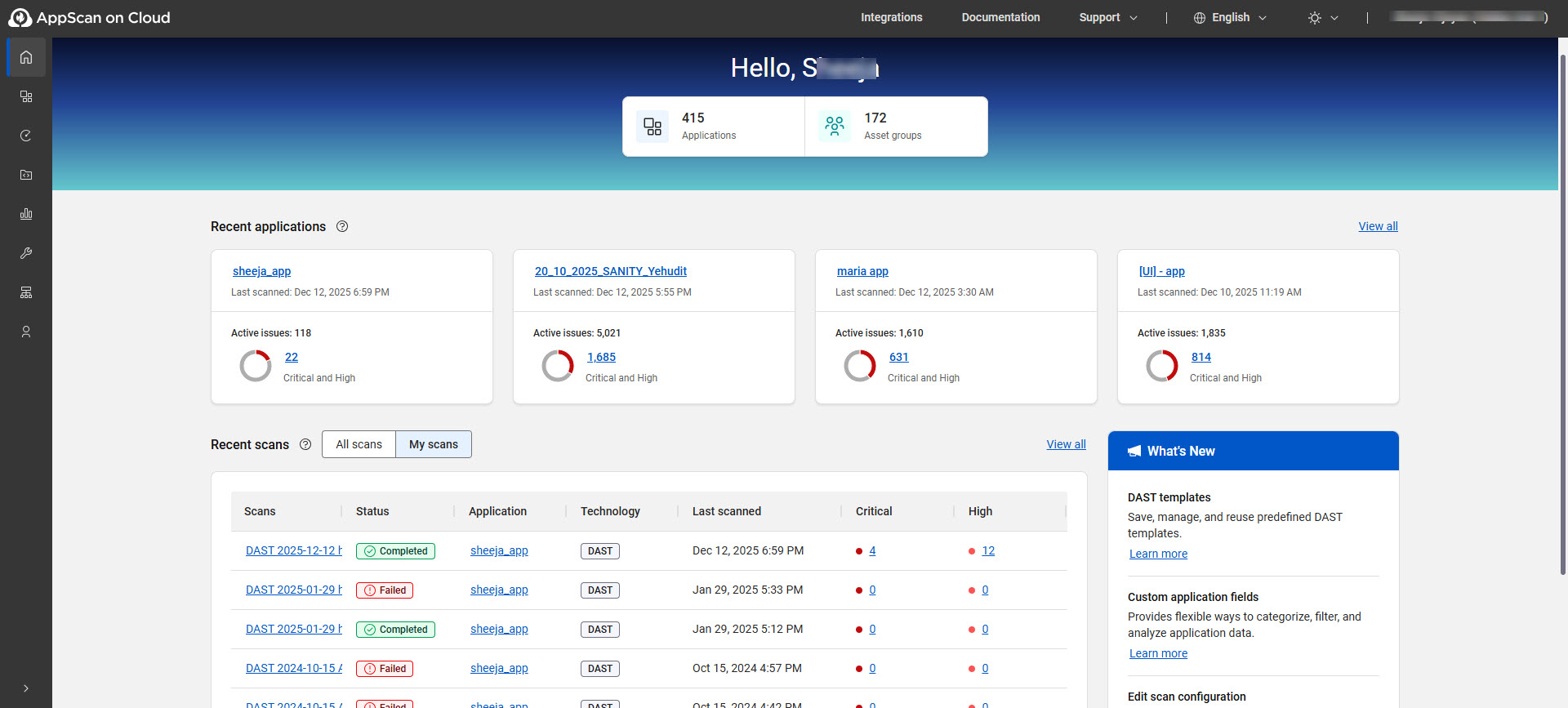
Home page options
| Option | Description |
|---|---|
| [n] Applications | Number of applications in your organization that are within your associated asset groups. |
| [n] Asset groups | Number of asset groups to which you’re assigned in your organization. |
| Recent applications | Displays up to four applications in your asset groups that were
recently updated. Click View all to go to the Applications page. Click the application name to go to the single application view. Click active issues to view the issues filtered by Critical and High. |
| Recent scans | Displays scans that you or members of your asset groups recently
ran.
Click the scan name to go to the single scan view. Click the application name to go to the single application view. Click Critical or High to view the issues filtered by that severity. Click View all to go to the Scans and sessions page. |
| What's New | Displays recent features and enhancements added to ASoC. |