The Table (visual) component is responsible
for recognizing tables. The Table (visual) component
is different from the Table (field) component
in that it does not require that the underlying host screen fields
line up vertically. It looks for columns in the selected region which
contain the column delimiter for each row in the selection. Rule of
thumb: If a region has the appearance of a table, the Table (visual) component should be able to recognize
it.
A recognized table can be rendered by the following widgets:
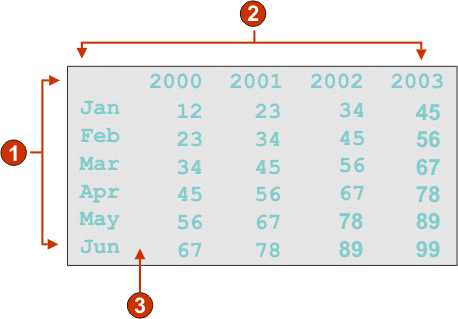
The following figure shows how a Table (visual) component
might appear on your host screen:
Figure 1. Table
(visual) component example
Rows (minimum row count = 1)
Columns (minimum column count = 1)
Column delimiter (a space)
The following settings can be configured for this component:
Column delimiter
Required. The string of characters which must exist in every
row of the selected region for the host screen column to be marked
as a table column. If consecutive columns are each marked as a delimiting
column, only the last column is actually rendered as the delimiting
column of the generated table.
Include empty rows
If selected, empty rows (rows without any visible text or input
fields) will be included in the rendered table or graph.
Rows to exclude
The comma-separated or ranged set of rows to exclude from the
recognized table. This setting is useful for hiding specific rows
of data on a table or graph. The rows represented by this value are
based on the recognized table, not on the actual host screen. Example
values: 1,2,3...., 1,2-4, 3-5.
Columns to exclude
The comma-separated or ranged set of logical columns to exclude
from the recognized table. The columns represented by this value are
based on the recognized table, not on the actual host screen. Example
values: 1,2,3...., 1,2-4, 3-5.
Minimum row count
The minimum number of rows the specified region must contain
for the region to be recognized as a table.
Note: The number of recognized rows is evaluated before the specified
rows are excluded (see Rows to exclude).
Minimum column count
The minimum number of logical columns (not host screen columns)
the specified region must contain for the region to be recognized
as a table.
Note: The number of recognized
columns is evaluated before the specified columns are excluded (see Columns to exclude).
Extract column header text from row above
table
Select this box if you want the text from the line above the
table to be used as the column headers of the table. The column headers
must be in protected fields.
Have feedback?
Google Analytics is used to store comments and ratings. To provide a comment or rating for a topic, click Accept All Cookies or Allow All in Cookie Preferences in the footer of this page.