
Delete Repository
As an admin, you have the authority to delete a repository.
Follow these steps to delete an existing repository:
- On the Repositories page, locate the repository you wish to delete.
- Select the three dots menu icon under the More Info column.
- Select Deletefrom the drop-down menu.
Figure 1. Delete Repository 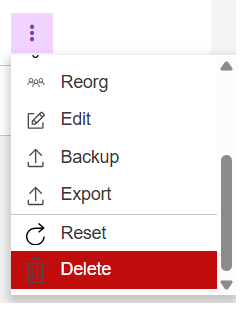
If the repository is deleted successfully, all disk/dasd space occupied by the repository will be returned to the available disk space. The deleted repository is no longer available for use.
Note:
This process is permanent and irreversible without a
repository restore file available.
Note:
Your default repository cannot be deleted. Change the
default repository first if you wish to delete your current default
repository.