
Canonical/UDS Interface Enablement Process Flow
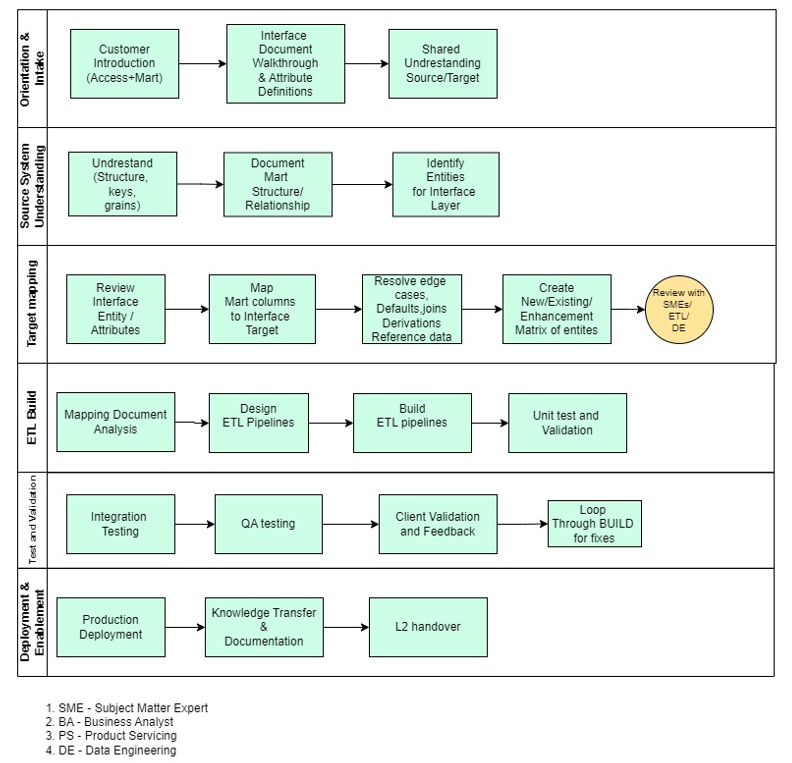
PHASE 1 — Orientation & Intake
Kickoff & Knowledge Transfer (Client → Product Team)
Actors: Tech BA, Implementation Lead, Client SMEs
Purpose: Establish shared understanding of the marketing landscape.
Flow:
- Client walks through their Marketing Data Mart (high level only).
- The product team introduces the Interface Layer and 360 model that already exists.
- Agreement that Interface Layer is the fixed target, and the Mart is the only source for this activity.
- Define communication structure and content ownership (who signs off mapping, who signs off ETL).
Output:
- Shared vocabulary
- Access to Mart documentation
- Access to sample Mart data
- Access to interface layer metadata / ERDs
PHASE 2 — Source System Understanding (Marketing Data Mart)
Source Exploration (Tech BA)
Purpose: Understand what the Mart contains and how it behaves.
Flow:
- Review Mart subject areas (e.g., customer, campaign, events).
- Identify tables, keys, relationships, and granularity.
- Understand existing derivations inside the Mart (e.g., channel grouping already done?).
- Note gaps vs canonical meaning (even though we do not change the target).
Output: Source Understanding Notes, and Draft list of Interface Entities impacted (example: Customer, Campaign, Events).
PHASE 3 — Target Mapping (Pre-defined Interface Layer)
Interface Layer Review (Tech BA)
Purpose: Understand the contract the client must populate.
Flow:
- Review Interface Entity definitions (e.g., Customer_360_Interface, Campaign_Interface).
- Review each attribute: purpose, datatype, required fields.
- Review relationships between interface entities.
- Document “canonical meaning” for each attribute so mapping can be done accurately.
Output:
- Interface Layer Understanding Notes
- List of mandatory vs optional attributes
- List of canonical semantics that must be respected
- GAP document that will identify the scope of work for the teams
Detailed Source-to-Interface Mapping (Tech BA)
Purpose: Define exactly how every interface field is populated from the Mart.
Flow:
- For every Interface Entity → list attributes.
- For each attribute → identify Mart source column(s).
- Document join logic when multiple source tables are needed.
- Document derivation or transformations (simple expressions only).
- Define default values when Mart doesn’t provide a field.
- Identify edge cases (e.g., “campaign_code missing? → default X”).
- Validate feasibility with ETL Developer (quick technical check).
- Walk-through with client SME for correctness.
Output: Master Source → Interface Mapping Specification (This is the blueprint ETL developers implement.)
STEP 4 — ETL Build (Core ETL Developer Work)
Pipeline Design
Purpose: Convert mapping into a runnable job design.
Flow:
- Determine extraction logic from Mart (tables, filters).
- Determine required joins/lookups.
- Define load sequence (e.g., load Customer before Events).
- Confirm expected frequencies (daily batch unless specified).
- Decide orchestration (e.g., Airflow/Dag, serverless job, native ETL tool).
Output: ETL Job Design Document (simple, implementation-focused).
Pipeline Development
Purpose: Build the working ETL pipelines.
Flow:
- Write extraction queries or components.
- Apply transformation and derivation steps per mapping.
- Build logic to assemble interface records.
- Load into interface tables/documents with correct structure.
- Ensure final output conforms exactly to the Interface Layer spec.
- Execute test runs using sample data.
Output: Working ETL pipelines populating Interface Layer entities
Unit Testing (ETL Developer)
Purpose: Confirm pipeline accuracy against mapping spec.
Flow:
- Validate record counts.
- Validate field values match mapping logic.
- Document test queries and results.
- Fix mismatches (mapping errors go back to BA; implementation errors fixed by ETL).
Output: Unit Test Package and Updated mapping (if required).
STEP 5 — Validation With Client
SIT/UAT (Tech BA + ETL + Client)
Purpose: Ensure the client understands the outputs and signs them off.
Flow:
- Walk through Interface Layer outputs with clients.
- Compare against their expected business meaning.
- Capture feedback.
- Make final adjustments (mapping or ETL implementation).
- Obtain formal sign-off.
Output: Client-approved Interface Layer outputs and Finalized pipelines.
STEP 6 — Deployment & Enablement
Production Cutover
Purpose: Move the data flow into the client's production environment.
Flow:
- Deploy pipelines.
- Validate first full run.
- Confirm correct load schedule with client ops.
Output: Production-ready Marketing→Interface data pipelines.
Knowledge Transfer & Documentation
Purpose: Ensure client L2 & implementation teams can operate the solution.
Flow:
- Walk through mapping documents.
- Walk through pipeline design and execution flow.
- Provide "How the interface layer is populated" overview.
- Provide troubleshooting guide (simple, non-governance).
Output: Redbook-ready documentation and empowered L2 & implementation teams