ミーティングのダイヤルアウトを有効にする
このセクションでは、Docker と Kubernetes でダイヤルアウト・オプションを有効にする手順について説明します。
このタスクについて
Docker
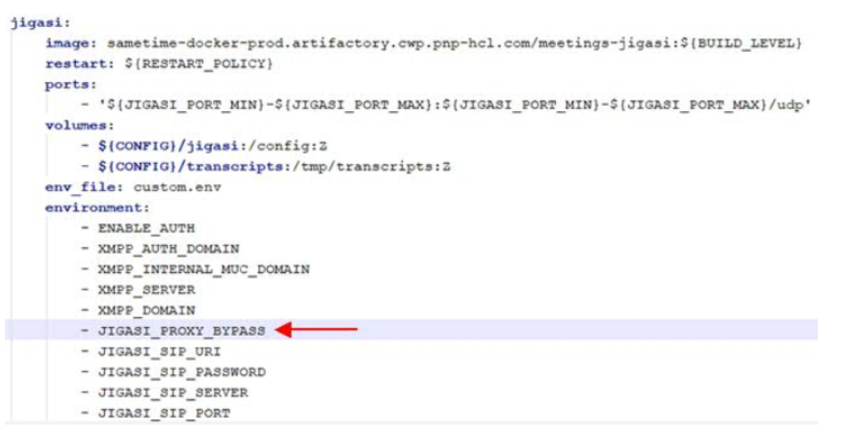
.envファイルを編集し、変更を保存します。注: () にコメントを付けずに以下の設定を追加します。JIGASI_SIP_SERVER= (This is the SIP server/proxy IP or hostname. For hostname, this must be in DNS or added as extra_hosts entry in docker-compose.yml for the jigasi service.) JIGASI_SIP_PORT=5060 (This is the SIP server/proxy port) JIGASI_SIP_TRANSPORT=UDP (This is SIP server/proxy protocol) JIGASI_SIP_URI= (This is the SIP URI, in plain text. Example: [mailto:mysipuser@mysipserver.com mysipuser@mysipserver.com] ) JIGASI_SIP_PASSWORD= (This is the SIP user password, in plain text.)docker_compose.ymlを編集し、変更を保存します。注: 「-」はパラメーターの前に必要です。「JIGASI 環境」セクションで、以下を追加します。– JIGASI_PROXY_BYPASS
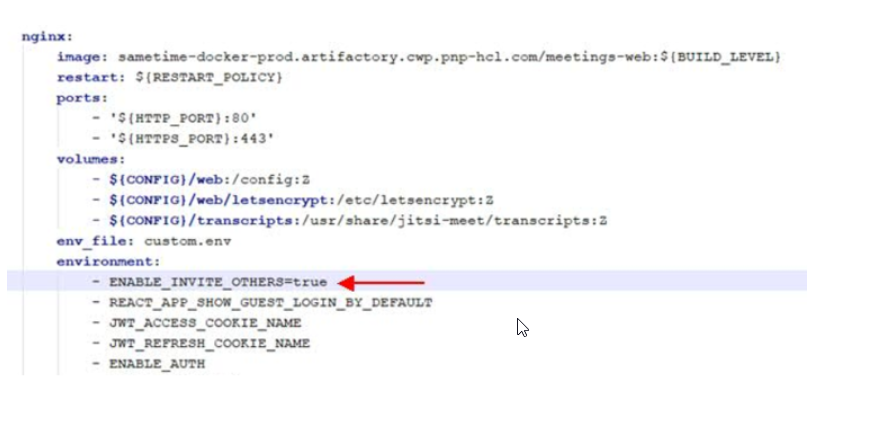
「NGINX 環境」 セクションで、以下を追加します。- ENABLE_INVITE_OTHERS=true
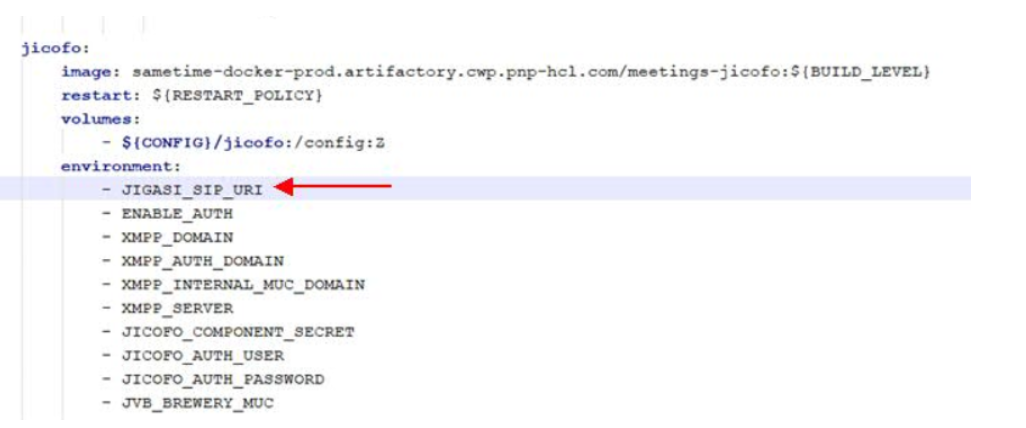
「JICOFO 環境」 セクションで、以下を追加します。- JIGASI_SIP_URI
- これらの設定を Docker に適用するには、以下を実行します。
cd to directory holding docker-compose.yml

> docker-compose down
> rm -rf jitsi-config/jigasi
> docker-compose up -d
Kubernetes
helm/values.yamlファイルを編集し、 enableJigasi を 「true」に変更します (デフォルトは false)。注: () にコメントを付けずに以下の設定を追加します。jigasiSipServer: (This is the SIP server/proxy IP or hostname. For hostname, this must be in DNS or added to CoreDNS config of Kubernetes.) jigasiSipPort: 5060 (This is the SIP server/proxy port) jigasiSipTransport: UDP (This is the SIP server/proxy protocol) jigasiProxyBypass: true (If the SIP proxy is the only network path to the SIP infrastructure, this must be “false”. If the meeting infrastructure can directly hit the SIP endpoints, such as the SIP gateway to the PSTN, “true” can be set to bypass the proxy after a call is set up.) ENABLE_INVITE_OTHERS=true- 以下を
helm/templates/meeting-secrets.yamlファイルに追加して、SIP ユーザー・アカウント資格情報を構成します。注: () にコメントを付けずに以下の設定を追加します。JigasiSipUri: (This is the base64 encoded sip URI value. Copy/Paste the output from the command: "echo -n 'mysipuser@mysipserver.com' | base64" ) JigasiSipPassword: (This is the base64 encoded password of the SIP user/ Copy/Paste the output from the command: "echo -n 'myuserpassword' | base64" ) - 更新された設定を Kubernetes に適用します。
helm listコマンドを実行して、デプロイメント名と現在のバージョンを確認します。これは、ロールバックが必要な場合に必要です。以下に例を示します。
NAME            NAMESPACE       REVISION        UPDATED                                 STATUS          CHART                   APP VERSION
meetings        default         11              2020-08-31 00:02:46.596907 -0400 EDT    deployed        sametime-meetings-11.6  1.16.0
helm upgrade meetings helm/コマンドを使用してアップグレードを実行します。helm/は、deployment/configが更新された ディレクトリーです。- 障害が発生した場合は、以下のコマンドを使用してロールバックが変更を行います。
helm rollback meetings 11これにより、失敗したアップグレードが機能するバージョンに戻ります。