General enhancements
Notes 14.5.1 provides the following general enhancements:
Enhanced installation process for the Notes and all client kits on Windows
The Notes installation program now installs deployed modules and places them in the file system, similar to the fast and robust installation methods already in use for the Mac client.
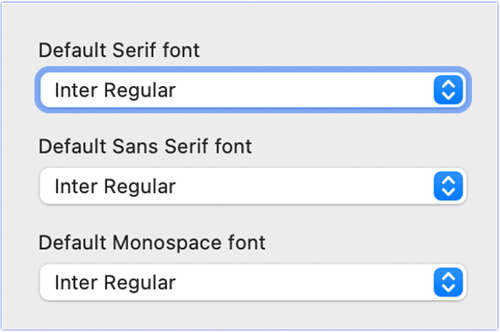
Updated the default font
Enhanced the design by updating the default font to Inter font. This font is
recognized in the industry for its clarity and modern aesthetic, contributing to a
more polished and professional look.
Emoji support in rich-text editor
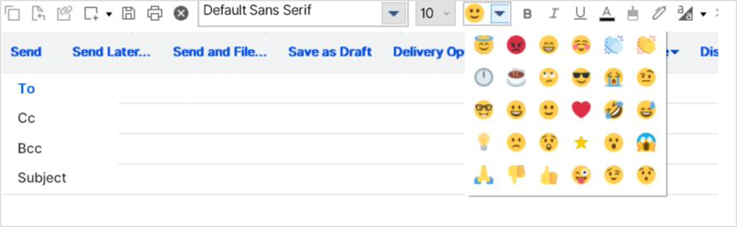
An emoji dropdown list when you're editing text in Notes documents is now available for Mail and Notes applications. There are 30 emoticons to choose from.
More information with "Object Variable not set" message
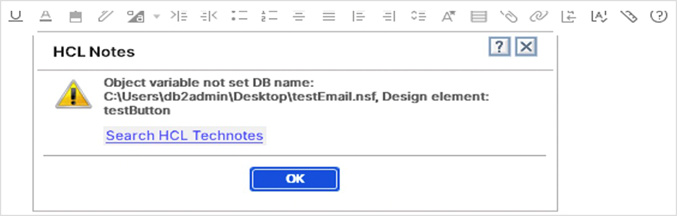
In the "Object variable not set" error dialog box, more information is now provided
to assist you or Notes developers:
- Database name
- Agent name if applicable
- Design element name
Connections Files - Private checkbox improvement
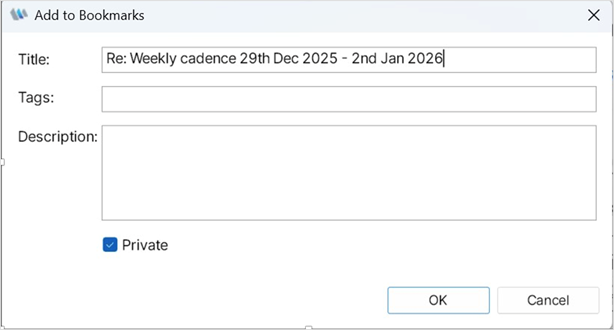
In the Connections Files plugin for Notes, a new checkbox in the "Add to Bookmarks" dialog is enabled when the following plugin_customization.ini is set:
com.ibm.lconn.client.base/enable.private.bookmark=true