
Workspace improvements
Notes 14.5.0 provides the following Workspace enhancement:
Now you can easily search the Notes applications on your workspace - either right from the workspace or from the Notes search center.
Preference for Workspace search
Added EnableWorkspaceSearchBar(=1) in notes.ini file. For more information, see What options are available for customizing the basic Notes client?
Workspace keyboard navigation
- You can navigate up and down the navigator by using the Ctrl + ⏶ and Ctrl + ⏷ keys.
Workspace search
- You can efficiently search from the workspace tab, highlighting selected
items and viewing indicators in the navigator.
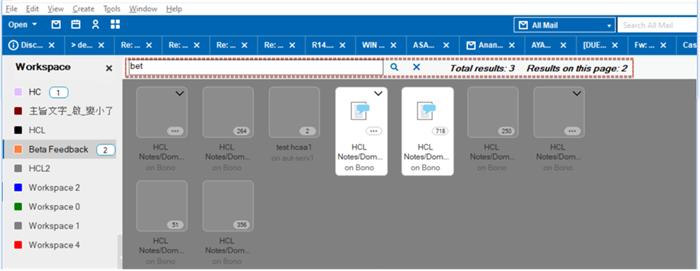
- You can use Notes search center at the main page of the Notes application.
Click the drop-down menu and choose Workspace. The search box will show you
the search results so you can find directly into the Notes application.
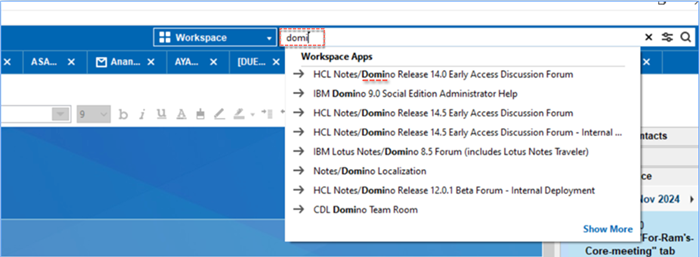
For more information, see How can I search my workspace?
Workspace search
- You can now check or uncheck the Search This View
menu under the View tab. This will display or remove
the workspace search bar. The workspace search bar is check by
default.
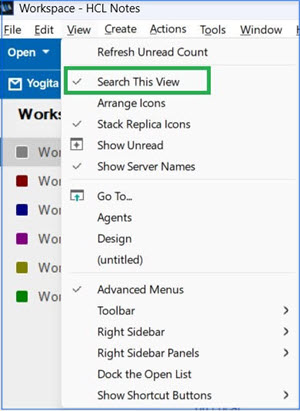
For more information, see How can I search my workspace?