Table 1. Python Services are Not Starting: Scenario 1
Issue Description
Python components’ services hosted using apache are not
starting and error message like “(OS 5) Access is
denied. : AH10231: httpd.exe: Failed creating pid file
C:/Apache24/logs/httpd.pid.5TZumS” can be seen in
apache logs in environment where some kind of monitoring software
is installed.
Monitoring software has a file lock on the logs folder,
that’s why the service that needs to be started cannot
overwrite a PID file there for proper functioning.
Resolution Steps:
Open “services” application from windows search bar.
First, stop all the installed apache 24 services (including “Apache2.4”) (having
name like “HCL.iAutomate.iRecommend”) e.g., iRecommend, iParse, Entity
Model, iUnique, iKnowledgeIndexer (Advanced Knowledge Component), iKnowledgeScreen
(Advanced Knowledge Component), iKnowledgeSearch (Advanced Knowledge Component),
iCrawler, iKnowledgeRating, iScript, iKnowledge.
Go to the path <Apache_Root_Folder_Path>/conf. For e.g. -
“C:/Apache24/conf” has <Apache_Root_Folder_Path> as “C:/Apache24”.
One by one open every python component “.conf” file (e.g.
iRecommend.conf) and repeat the steps 4 and 5 below for each file.
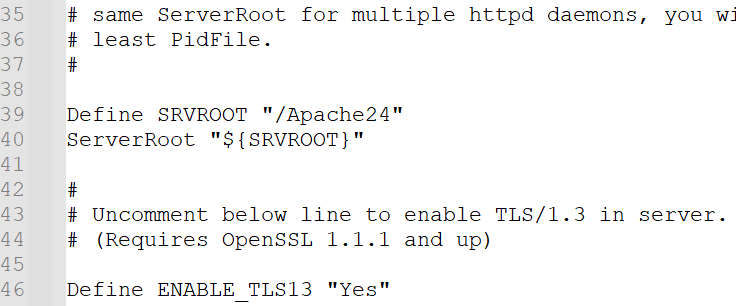
Go to the line as shown below.Figure 1. Location in Conf File to Add Code Line in Newer Versions Of
ApacheFigure 2. Location in Conf File to Add Code Line in Old Apache Version
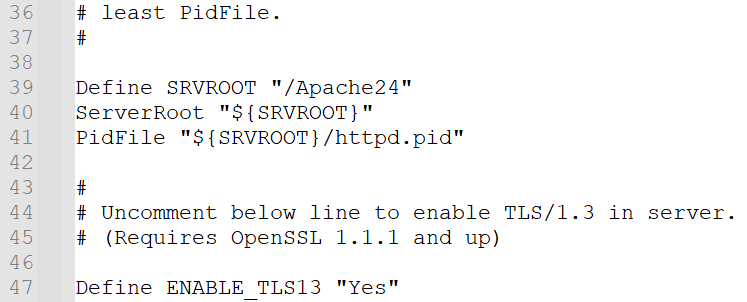
Add the below line as shown in the figure:
Older version of
apache:
PidFile “c:/Apache24/httpd.pid"Figure 3. Code Line Added in Older Versions of Apache
Newer version of apache:
PidFile "${SRVROOT}/httpd.pid"
Figure 4. Code Line Added in Newer Versions of Apache
Save and close the file.
Start all the services that you stopped at step 2. You should be able to start
all the services now.