Error message ‘Not able to reach the
component’ appears in job log details-step remarks
column for iUnique job in manage jobs page, also the status is in
‘failed’ state
Modules Impacted
iUnique
Probable Root Cause
Duplication of keys in .cfg files present in python files
Resolution Steps:
Check for Existence of the file iUnique.conf at location
<Apache_Root_Folder_Path>/conf.
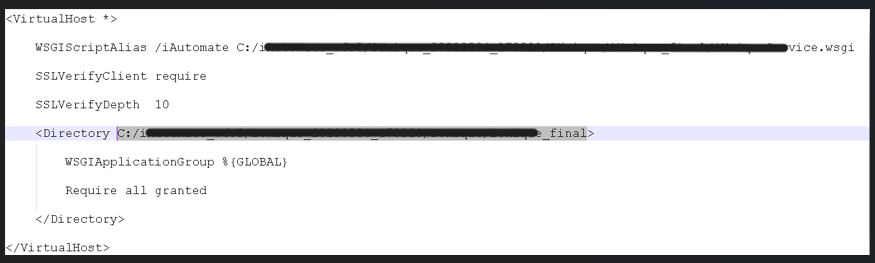
At the bottom of iUnique.conf file you will find the path to the python files as
highlighted in the below figure.Figure 1. HCL.iAutomate.iUnique(cont.)
Open the file iUnique.cfg from the location
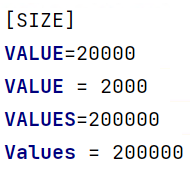
<highlighted_path_in_fig_000>/config and search for any duplicate
keys present in the file. You can refer below keys for reference:Figure 2. Figure 138 - HCL.iAutomate.iUnique(cont.)
Remove the last entry that is duplicate for each key. In the above case delete
the second entry of VALUE = 20000, VALUES = 200000, EncryptionAlgorithm =
aesgcm. Similarly check for any other duplicate keys and remove the last
entry and save the file.
Finally restart the service named HCL.iAutomate.iUnique

.png)