
Managing Tenants
This section describes how a provider can create and manage a tenant in an environment. A tenant is an instance of the cognitive virtual assistant that is mapped to a customer in the environment.
To manage a tenant,
- In the left navigation bar, click Tenants.
- It redirects you to the Tenants screen.
Figure 1. Managing Tenants 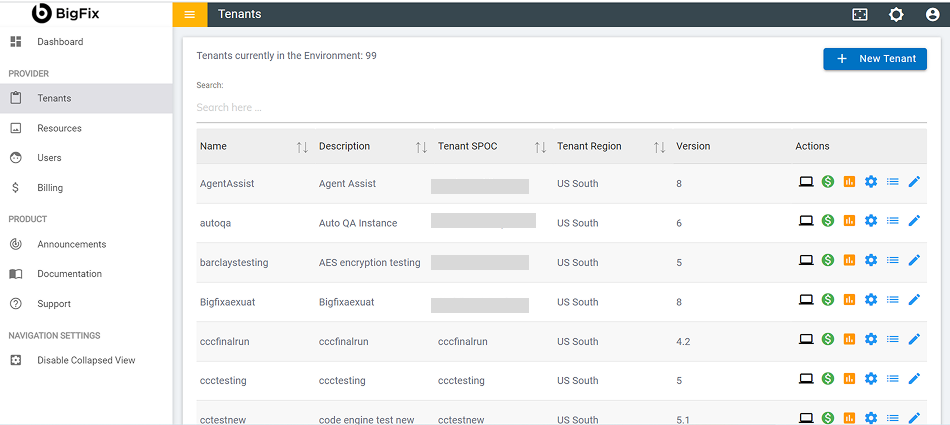
The screen includes the list of existing tenants in the provider environment and a
 button to create a new tenant. A provider can add a new
tenant, configure, edit, or delete the existing tenants’ properties, and view the tenant
bills.
button to create a new tenant. A provider can add a new
tenant, configure, edit, or delete the existing tenants’ properties, and view the tenant
bills.
Listed below are the details of the columns displayed in Managing Tenants
- Name: Name of the tenant instance.
- Description: Brief detail of the tenant instance.
- Name of the contact person for the tenant.
- Tenant Region: Region where the tenant is deployed.
- Version: Release version in which tenant is currently running.
- Action: Option to edit tenant, manage tenant SSO, tenant billing and usage management, and navigate to Cognitive Console.