
Installing AMQ Broker
This section provides a step-by-step guide to installing AMQ Broker.
AMQ Broker is a high-performance messaging implementation based on ActiveMQ Artemis. It uses an asynchronous journal for fast message persistence, and supports multiple languages, protocols, and platforms.
To install AMQ broker, follow the steps below:
- First, install the AMQ Operator from the Operator Hub. In the OpenShift
Container platform, click Operators > OperatorHub, and select the project.
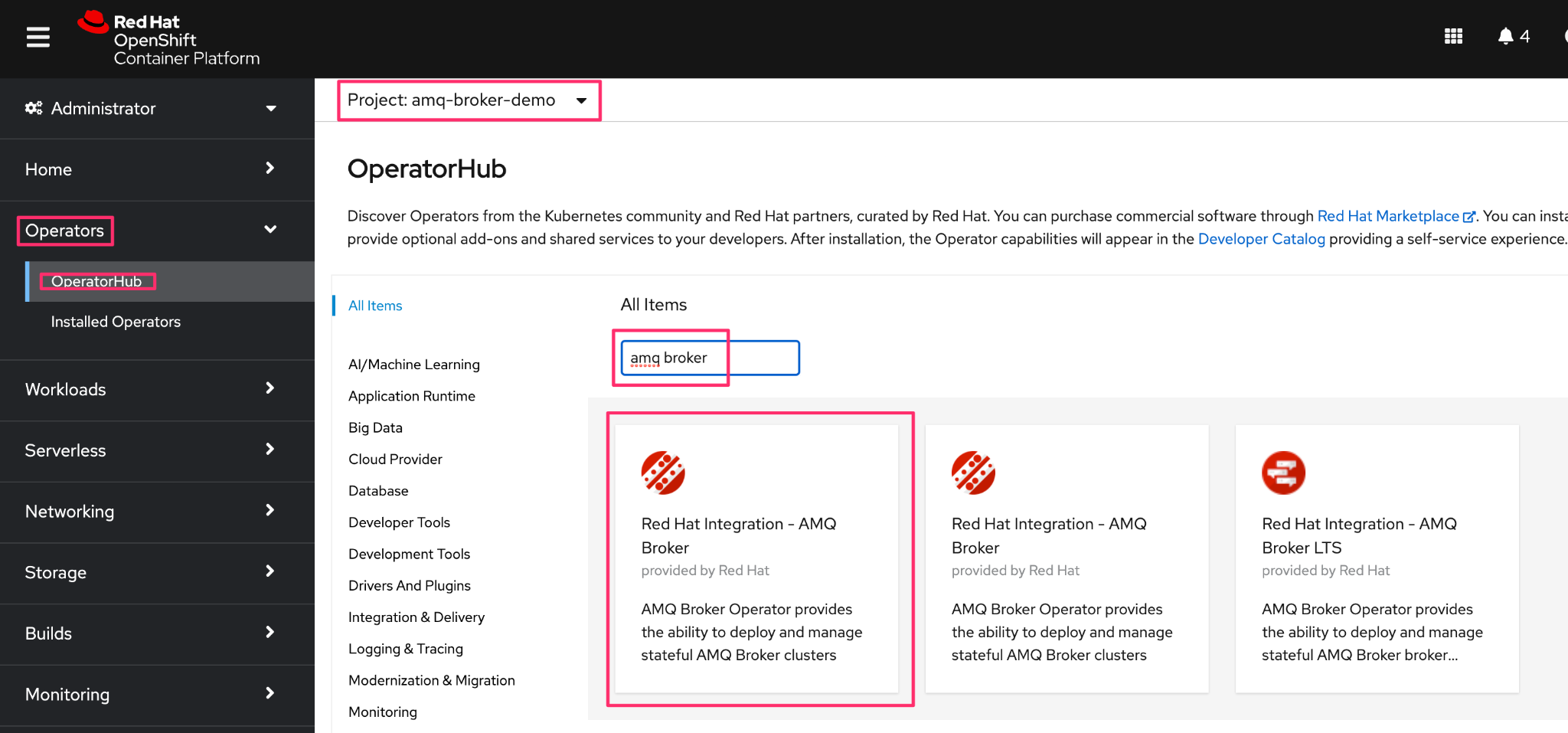
- In the OperatorHub, search for AMQ Broker, and in the Red Hat Integration - AMQ
Broker, click Install.
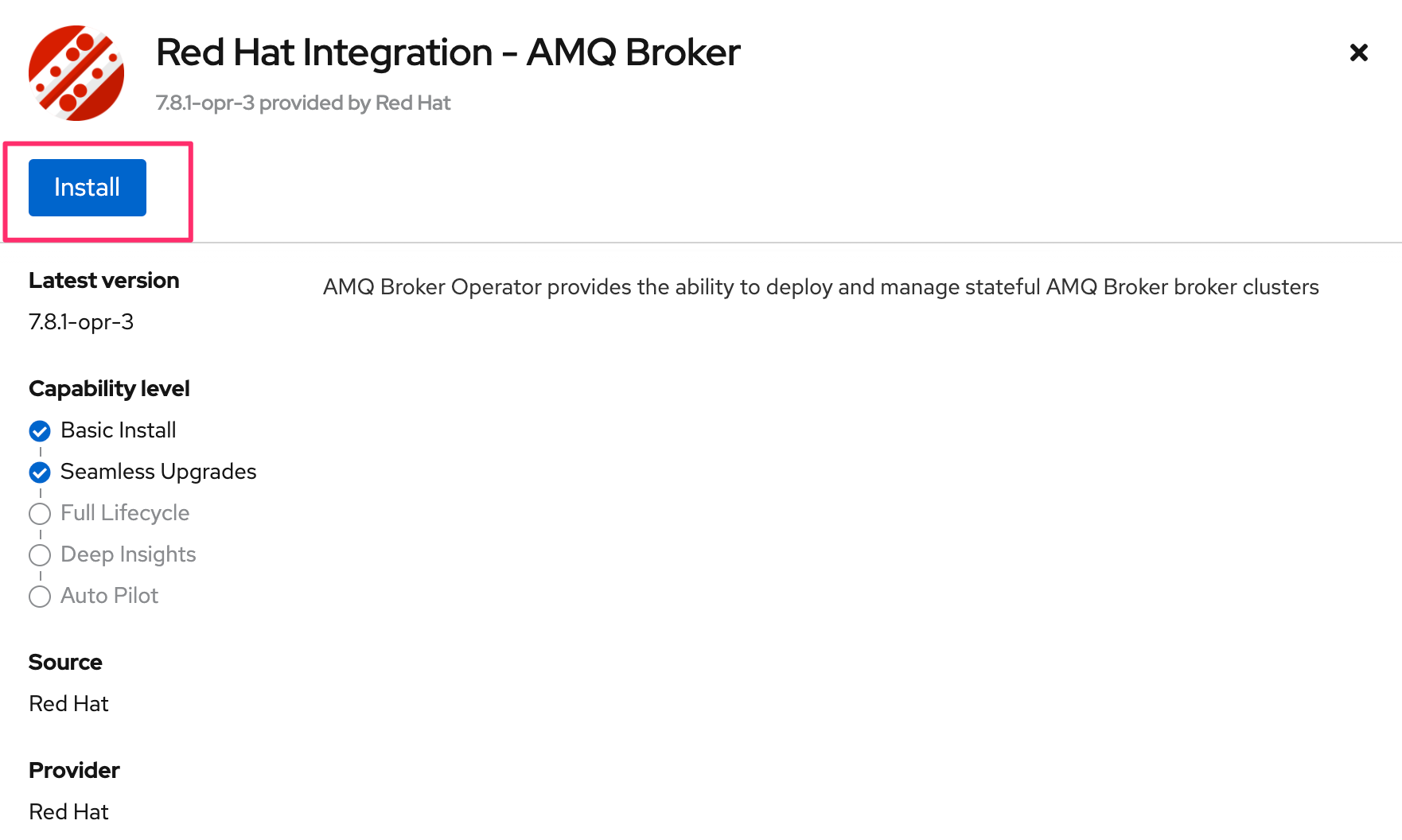
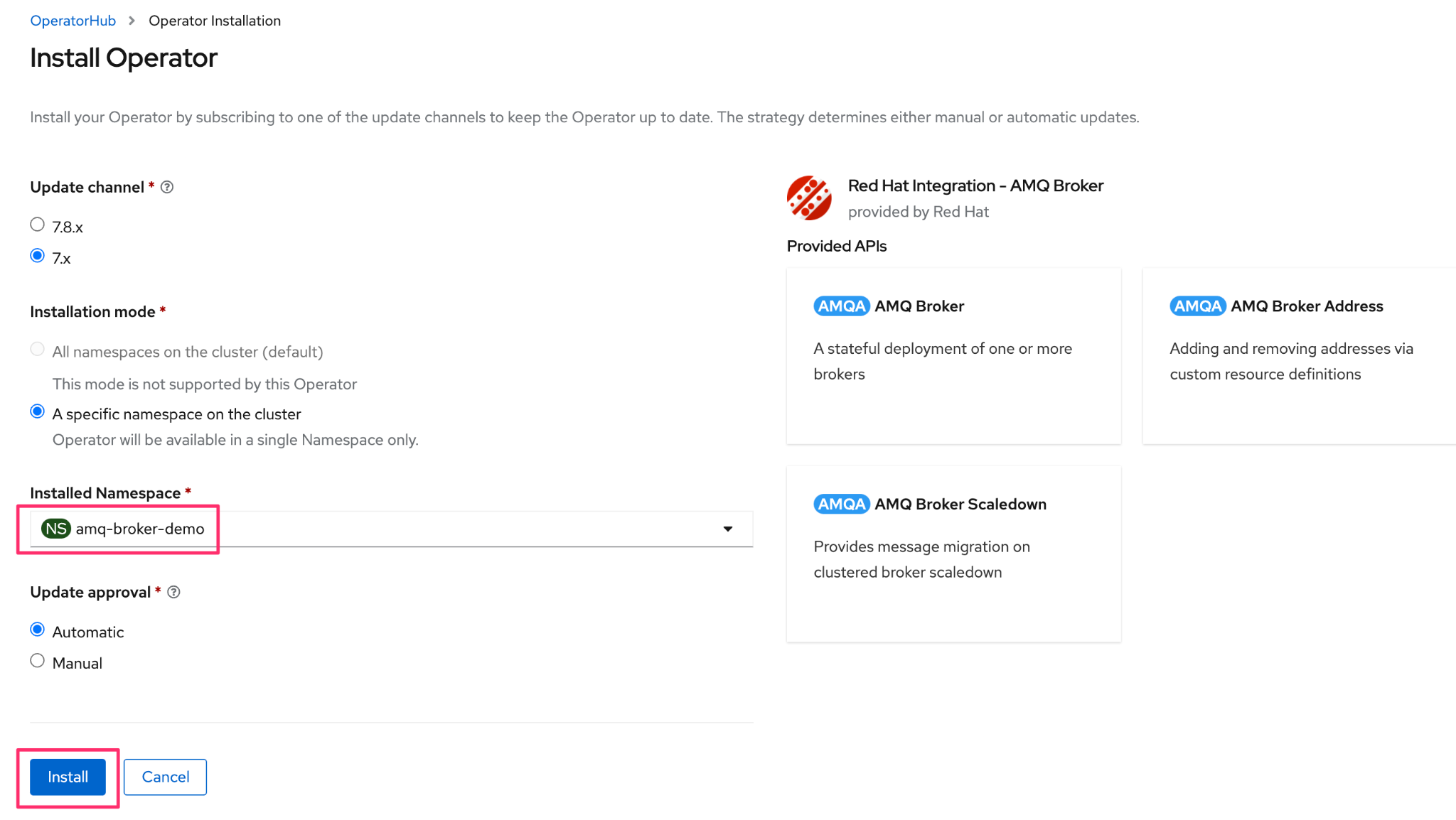
- Select corresponding options like channel, installation mode and approvals, and
click Install.
- On successful installation, you can view the below page.
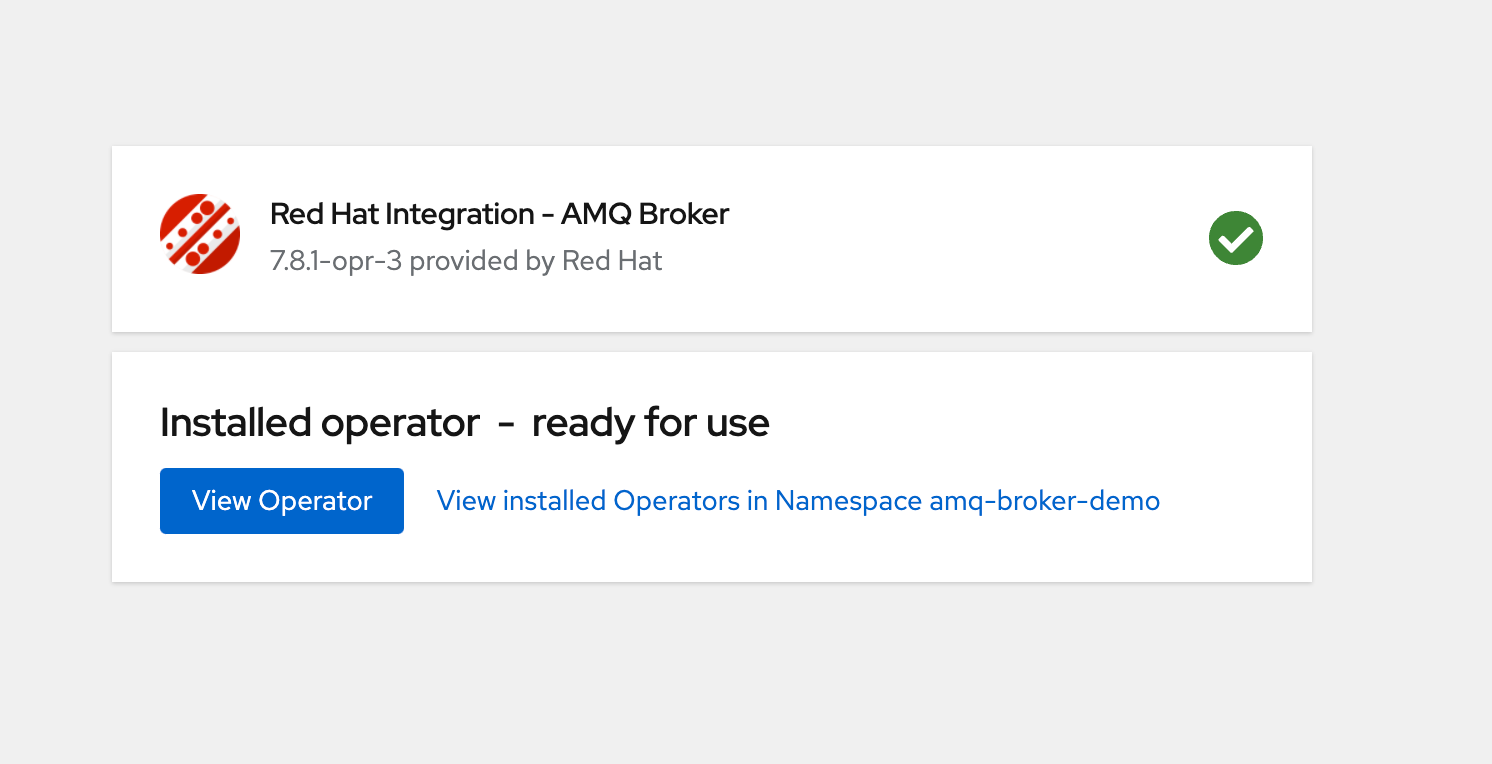
- You can view the installed application as shown below.

Create ActiveMQ Artemis instance:
Using the OpenShift Container Platform web console:
- Log in to the console as a user that has privileges to deploy CRs in the project in which you are creating the deployment.
- Start a new CR instance based on the main broker CRD. In the left pane, click Administration > Custom Resource Definitions.
- Click the ActiveMQArtemis CRD, and then click the Instances tab.
- Click Create ActiveMQArtemis. Within the console, a YAML editor opens,
enabling you to configure a CR
instance.
apiVersion: broker.amq.io/v1beta1 kind: ActiveMQArtemis metadata: creationTimestamp: '2024-07-23T05:45:12Z' generation: 2 managedFields: - apiVersion: broker.amq.io/v1beta1 fieldsType: FieldsV1 fieldsV1: 'f:spec': .: {} 'f:deploymentPlan': 'f:jolokiaAgentEnabled': {} 'f:image': {} .: {} 'f:size': {} 'f:persistenceEnabled': {} 'f:managementRBACEnabled': {} 'f:requireLogin': {} 'f:messageMigration': {} 'f:journalType': {} manager: Mozilla operation: Update time: '2024-07-23T06:42:10Z' - apiVersion: broker.amq.io/v1beta1 fieldsType: FieldsV1 fieldsV1: 'f:status': .: {} 'f:conditions': {} 'f:deploymentPlanSize': {} 'f:podStatus': .: {} 'f:ready': {} 'f:scaleLabelSelector': {} 'f:upgrade': .: {} 'f:majorUpdates': {} 'f:minorUpdates': {} 'f:patchUpdates': {} 'f:securityUpdates': {} 'f:version': .: {} 'f:brokerVersion': {} 'f:image': {} 'f:initImage': {} manager: amq-broker-operator operation: Update subresource: status time: '2024-07-23T12:50:35Z' name: amq-broker namespace: amq-broker-ns resourceVersion: '2781361' uid: 977dc755-fa47-46b0-a222-046467f524eb spec: deploymentPlan: image: placeholder jolokiaAgentEnabled: false journalType: nio managementRBACEnabled: true messageMigration: false persistenceEnabled: true requireLogin: false size: 1 status: conditions: - lastTransitionTime: '2024-07-23T05:45:12Z' message: '' observedGeneration: 2 reason: ValidationSucceded status: 'True' type: Valid - lastTransitionTime: '2024-07-23T12:50:35Z' message: '' reason: Applied status: 'True' type: BrokerPropertiesApplied - lastTransitionTime: '2024-07-23T12:50:35Z' message: '' reason: AllPodsReady status: 'True' type: Deployed - lastTransitionTime: '2024-07-23T12:50:35Z' message: '' reason: ResourceReady status: 'True' type: Ready - lastTransitionTime: '2024-07-23T12:50:35Z' message: '' reason: VersionMatch status: 'True' type: BrokerVersionAligned deploymentPlanSize: 1 podStatus: ready: - amq-broker-ss-0 scaleLabelSelector: 'ActiveMQArtemis=amq-broker,application=amq-broker-app' upgrade: majorUpdates: true minorUpdates: true patchUpdates: true securityUpdates: true version: brokerVersion: 7.12.1 image: 'registry.redhat.io/amq7/amq-broker-rhel8@sha256:10855749104ac3ecefe62a15aa18e22d485b4e9c7cbf9fc1894366ed02fdf28d' initImage: 'registry.redhat.io/amq7/amq-broker-init-rhel8@sha256:3adf4e74ed54043c867f6f444e4dc97471194994b6bb5060f4e9437c2db14029' - When you have finished configuring the CR, click Create.
Creating ActiveMQArtemisAddress (if required)
To create ActiveMQArtemisAddress yaml, follow the steps below:
- Log in to the console as a user that has privileges to deploy CRs in the project for the broker deployment.
- Start a new CR instance based on the address CRD. In the left pane, click Administration > Custom Resource Definitions.
- Click the ActiveMQArtemisAddresss CRD, click the Instances tab.
- Click Create ActiveMQArtemisAddress. Within the console, a YAML editor
opens, enabling you to configure a CR instance.
apiVersion: broker.amq.io/v1beta1 kind: ActiveMQArtemisAddress metadata: creationTimestamp: '2024-07-02T11:41:02Z' generation: 1 managedFields: - apiVersion: broker.amq.io/v1beta1 fieldsType: FieldsV1 fieldsV1: 'f:spec': .: {} 'f:addressName': {} 'f:queueName': {} 'f:routingType': {} manager: Mozilla operation: Update time: '2024-07-02T11:41:02Z' name: artemis-address-queue namespace: vault-server resourceVersion: '48399557' uid: bd5194d5-748e-441d-b054-1258e00a2154 spec: addressName: myAddress0 queueName: myQueue0 routingType: anycast - When you have finished configuring the CR, click Create.
Configuring ActiveMQ Service (Node Port)
Similarly, create another service for node port, and in the YAML editor, configure the service as shown below.
kind: Service
apiVersion: v1
metadata:
 name: amq-broker-svc
 namespace: vault-server
 uid: 6e4a975d-3cd0-41a0-9f82-28d5275e76d6
 resourceVersion: '48454106'
 creationTimestamp: '2024-07-02T12:47:04Z'
 labels:
   ActiveMQArtemis: amq-broker
   application: amq-broker-app
 managedFields:
   - manager: Mozilla
     operation: Update
     apiVersion: v1
     time: '2024-07-02T12:54:04Z'
     fieldsType: FieldsV1
     fieldsV1:
       'f:metadata':
         'f:labels':
           .: {}
           'f:ActiveMQArtemis': {}
           'f:application': {}
       'f:spec':
         'f:allocateLoadBalancerNodePorts': {}
         'f:externalTrafficPolicy': {}
         'f:internalTrafficPolicy': {}
         'f:ports':
           .: {}
           'k:{"port":61616,"protocol":"TCP"}':
             .: {}
             'f:port': {}
             'f:protocol': {}
             'f:targetPort': {}
         'f:selector': {}
         'f:sessionAffinity': {}
         'f:type': {}
spec:
 clusterIP: 172.30.41.165
 externalTrafficPolicy: Cluster
 ipFamilies:
   - IPv4
 ports:
   - protocol: TCP
     port: 61616
     targetPort: 61616
     nodePort: 31635
 internalTrafficPolicy: Cluster
 clusterIPs:
   - 172.30.41.165
 type: NodePort
 ipFamilyPolicy: SingleStack
 sessionAffinity: None
 selector:
   ActiveMQArtemis: amq-broker
   application: amq-broker-app
status:
 loadBalancer: {}
Now, using the assigned port number (31635 - in this case), you can access the AMQ Artemis Service from outside the cluster.
Example:
$./artemis queue stat --url tcp://10.14.108.233:31635
Connection brokerURL = tcp://10.14.108.233:31635
|NAME                     |ADDRESS                  |CONSUMER_COUNT |MESSAGE_COUNT |MESSAGES_ADDED |DELIVERING_COUNT |MESSAGES_ACKED |SCHEDULED_COUNT |ROUTING_TYPE |
|DLQ                      |DLQ                      |0              |0             |0              |0                |0              |0               |ANYCAST      |
|ExpiryQueue              |ExpiryQueue              |0              |0             |0              |0                |0              |0               |ANYCAST      |
|TEST                     |TEST                     |0              |51            |301            |0                |250            |0               |ANYCAST      |
|activemq.management.3dcbfac0-42f6-4772-bfe6-12550f24f042|activemq.management.3dcbfac0-42f6-4772-bfe6-12550f24f042|1              |0             |0              |0                |0              |0               |MULTICAST    |
|myQueue0                 |myAddress0               |0              |0             |0              |0                |0              |0               |ANYCAST      |
$