
Optional passkey configurations
Define additional configurations for passkey authentication.
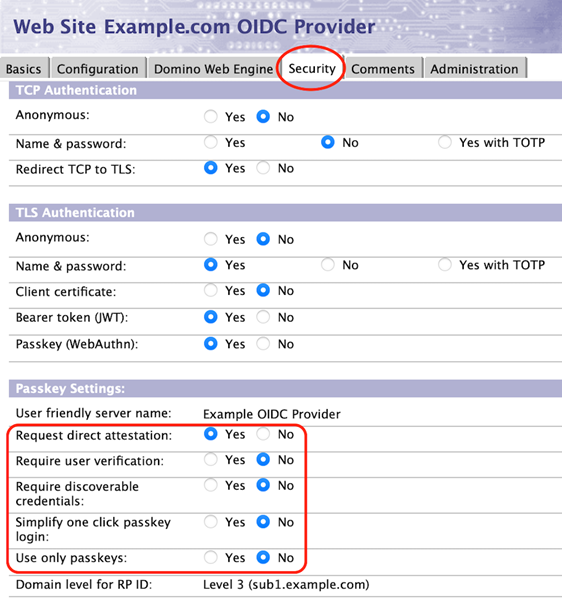
Disabling attestation requests
Attestation statements can improve the security of passkey registration during an actively compromised login session and encourage authenticators to send identifying information to relying parties.
By default, Domino will ask authenticators to provide a "direct" attestation statement during passkey registration in order to populate the "Authenticator name" field in passkey.nsf. This may result in some browser/platform combinations asking the user for permission to give information that could compromise the user's privacy, and may result in passkey registration failing in incognito browser windows. Domino Domino 14.0 was capable of validating "None" and "Self" attestations and will do so upon receipt of those types. Domino 14.5 can use metadata to validate "Packed" and "TPM" attestations. See Passkey Authenticator Metadatafor details regarding metadata.
If the "Require direct attestation" field is set to "No," Domino will request an attestation type of "none." This will cause most authenticators to register an AAGUID of all zeroes, which will correspond to a blank "Authenticator name" field in passkey.nsf.
Requiring user verification
Authenticators will always check for user presence before using a passkey. By default, an authenticator will request user verification if it can, but will not require it if it cannot. For example, some older Yubikey devices only have a button to press to signify user presence, but lack a fingerprint reader or PIN to verify the identity of the user with the device. Similarly, some laptops will allow passkey authentication when the laptop lid is closed and the fingerprint reader is not currently active. Administrators can require user verification by setting the "Require user verification" field to "Yes." This is likely to adversely impact users with FIDO2 devices lacking biometrics that were configured without a PIN, and users with closed and "docked" laptops, but can be used to strictly enforce multi-factor authentication.
Require discoverable credentials
Setting the "Require discoverable credentials" field to "Yes" will cause this site to require that passkeys being registered reside on the computer being used to register the passkey. This will generally prevent use of mobile devices and USB-based authenticators.
Simplify one click passkey login
Setting the "Simplify one click passkey login" field to "Yes" will cause some authenticators to simplify the authentication experience for the end user by assuming that they want to use the same passkey that they most recently used from that web browser. Please note that each browser, operating system, and authenticator might handle the allowCredentials Claim differently, so you might want to test the behavior in your own environment before deciding whether or not this feature is suitable for your environment.
Use only passkeys
Setting the "Use only passkeys" field to "Yes" will cause the passkey login form in domcfg.nsf to initially only display the username field and not the password field in the login form. If the username entered has a registered passkey in passkey.nsf that can be used by this site, only the "Log in with passkey" button will be displayed, preventing that end user from logging in with a password. If the username entered does not have a registered passkey that can be used by this site, the password field will be displayed and the "Create a passkey" checkbox will be checked allowing that user to log in with their password and create a passkey.
When this setting is enabled, end users should be advised to create their first passkey on a mobile device or a USB key (a "roaming authenticator"), so that they can in turn use that passkey to create passkeys residing locally on all of their laptops or desktop computers ("platform authenticators"). Platform authenticators are generally faster and simpler to use than roaming authenticators due to the tight integration with the operating system.
Note that passkeys created using Apple's iCloud Keychain will be available on all devices logged into that Apple ID, so passkeys created on one's iPhone will be available on their macOS system and visa-versa.
Disabling last logged in time updates
By default, Domino will always update the last logged in time for a passkey credential in passkey.nsf after that credential has been used to authenticate successfully. This may negatively impact performance on a heavily trafficked server. Setting PASSKEY_ALWAYS_UPDATE_LAST_LOGIN=0 in the server's notes.ini will disable this functionality and cause Domino to only update the credential's last logged in time if the authenticator sent a non-zero counter during authentication. This will improve performance, but will result in inconsistent last login times in passkey.nsf.
Removing passkey registration limit
Each user is normally limited to registering one passkey per authenticator for each relying party to prevent confusion. If you wish to remove that restriction, possibly for testing purposes, set PASSKEY_ALLOW_REPEATED_REGISTRATION=1 in the server's notes.ini.