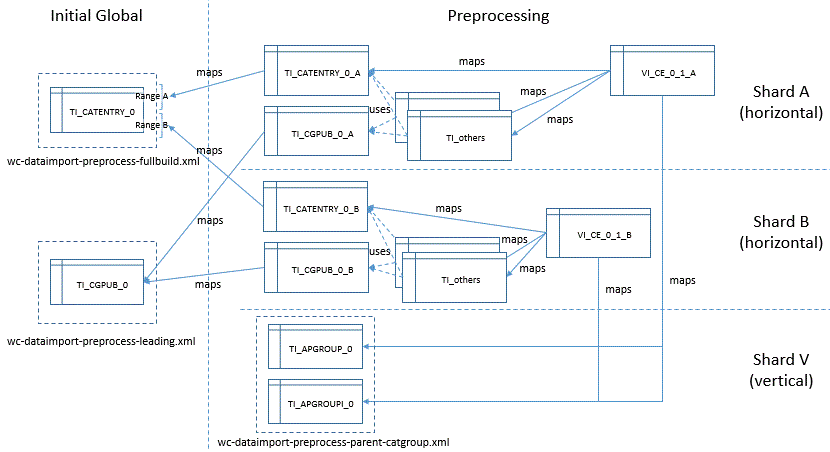
Only horizontal sharding is enabled by default in Commerce+ Transaction Server. You can use
vertical sharding with horizontal sharding if you enable the feature.
About this task
The
/opt/CommerceUtilities/properties/parallelprocess/di-parallel-process.properties
configuration file contains settings for horizontal shards A, B, and C. They are commented out
in favor of auto-sharding, although the old manual sharding is still supported.
Using the example file, you can construct a sharding regime that works as follows:
In this example, two phases happen in the preprocessing run. In the first Initial Global
phase, you process the TI_CATENTRY_0 and TI_CGPUB_0 database tables once, before any shards are
processed. In the second, Preprocessing phase, Shards A, B, and V start their processing in
parallel.
Before you perform the first Initial Global phase, ensure that the
InitialGlobal directory referenced by
Global.preprocessing-initial-global-table-dir contains the files
wc-dataimport-preprocess-fullbuild.xml and
wc-dataimport-preprocess-leading.xml. By default this is the directory
/opt/ol/wlp/usr/servers/transactionServer/apps/ts.ear/xml/search/dataImport/v3/db2/InitialGlobal/wc-dataimport-preprocess-fullbuild.xml.vertical.
It contains the files wc-dataimport-preprocess-fullbuild.xml.vertical and
wc-dataimport-preprocess-leading.xml.vertical. Remove the
.vertical extension from each file and ensure that they both contain
CREATE TABLE statements for the TI_CATENTRY_0 and TI_CGPUB_0 database tables.
The TI_CATENTRY_0_A and TI_CATENTRY_0_B views use the
FinalViewDataPreProcessor function to map to range A or B of
TI_CATENTRY_0.
TI_CGPUB_0_A and TI_CGPUB_0_B are views that map to TI_CGPUB_0 (two aliases of it). Other
temporary tables use TI_CATENTRY and TI_CGPUB in the normal way in each shard.
Both TI_APGROUP_0 and TI_APGROUPI_0 are processed in the vertical shard, so their names
have no shard suffix.
The VI_CE_0_1_A and VI_CE_0_1_B definitions require the
TI_APGROUP_#INDEX_SCOPE_NO_SHARD_TAG# and TI_APGROUPI_#INDEX_SCOPE_NO_SHARD_TAG# to refer to
both the TI_APGROUP_0 and TI_APGROUPI_0 tables.
To enable vertical sharding, follow these steps:
Procedure
Before running this hybrid form of sharding, drop the TI_CATENTRY_0_A, B,... and
TI_CGPUB_0_A, B,... tables.
If there is value in the configuration column, then get the current value first, append the
solr.dih.enableDeepProductSequence=false part to the existed value and then
update.
For
Example:
Update the search configuration srchconfext set config ='solr.dih.enableDeepProductSequence=false' where INDEXSCOPE = 'XXXXX' and INDEXSUBTYPE = 'Structured' and INDEXTYPE = 'CatalogEntry'.
Restart search server.
Confirm that the Search server restarts, go into the search
container, make sure the x-core.properties file under
/search/index/solr/MC_10001/en_US/CatalogEntry directory (assume the
master catalog id is 10001) has the following line in it
solr.dih.enableDeepProductSequence=false.
If the above value is not in the x-core.properties file, please run
the following reload core command:
After step 5, go back to step 3 to check and confirm again.
Move the
./opt/ol/wlp/usr/servers/transactionServer/apps/ts.ear/xml/search/dataImport/v3/db2/wc-dataimport-preprocess-parent-catgroup.xml
configuration file from to the
/opt/ol/wlp/usr/servers/transactionServer/apps/ts.ear/xml/search/dataImport/v3/db2/Shard-V
directory, where database is either
db2 or oracle.
Open the Shards-H/wc-dataimport-preprocess-fullbuild.xml file in an
editor. Comment out the original TI_CATENTRY_#INDEX_SCOPE_TAG# table entry
(everything between the <_config:data-processing-config ... > and
</_config:data-processing-config> tags). In addition, uncomment the
following properties (remove the bolded text from the following):
 <!-- The following definition is only used in hybrid (horizontal + vertical) sharding, comment above definition to use this one -->
  <!--
  <_config:data-processing-config processor="com.ibm.commerce.foundation.dataimport.preprocess.FinalViewDataPreProcessor" fetchSize="1" batchSize="1" >
    <_config:table definition="CREATE VIEW TI_CATENTRY_#INDEX_SCOPE_TAG# AS (
                                   SELECT CATENTRY_ID, CATENTTYPE_ID
                                   FROM (SELECT ROW_NUMBER() OVER(ORDER BY CATENTRY_ID) AS RN, *
                                         FROM TI_CATENTRY_#INDEX_SCOPE_NO_SHARD_TAG#)
                                   WHERE RN BETWEEN ?start_value? AND ?end_value?)" name="TI_CATENTRY_#INDEX_SCOPE_TAG#"/>
    <_config:query sql="SELECT 1 CATENTRY_ID FROM CATENTRY WHERE 1=-1"/>
    <_config:mapping>
      <_config:key queryColumn="CATENTRY_ID" tableColumn="CATENTRY_ID"/>
      <_config:column-mapping>
        <_config:column-column-mapping>
            <_config:column-column queryColumn="CATENTTYPE_ID" tableColumn="CATENTTYPE_ID" />
        </_config:column-column-mapping>
        </_config:column-mapping>
    </_config:mapping>
  </_config:data-processing-config>
  -->
Save and close the file.
Open the
/profile/installedApps/localhost/ts.ear/xml/search/dataImport/v3/database/wc-dataimport-preprocess-finalbuild.xml
configuration file in an editor. Locate the string
TI_APGROUP_#INDEX_SCOPE_TAG# and change it to
TI_APGROUP_#INDEX_SCOPE_NO_SHARD_TAG#. Locate the string
TI_APGROUPI_#INDEX_SCOPE_TAG# and change it to
TI_APGROUPI_#INDEX_SCOPE_NO_SHARD_TAG#.
Save and close the file.
Open the
/profile/installedApps/localhost/ts.ear/xml/search/dataImport/v3/database/wc-dataimport-preprocess-leading.xml
configuration file in an editor. Comment out the definition of the original
TI_CGPUB_#INDEX_SCOPE_TAG# table (everything between the
<_config:data-processing-config ... > and
</_config:data-processing-config> tags). In addition, uncomment the
following properties (remove the bolded text from the following):
<!-- The following definition is only used in hybrid (horizontal + vertical) sharding, comment above definition to use this one. -->
    <!--
    <_config:data-processing-config processor="com.ibm.commerce.foundation.dataimport.preprocess.FinalViewDataPreProcessor" fetchSize="1" batchSize="1">
        <_config:table definition="CREATE VIEW TI_CGPUB_#INDEX_SCOPE_TAG# AS (
                                       SELECT *
                                       FROM TI_CGPUB_#INDEX_SCOPE_NO_SHARD_TAG#
                                   )" name="TI_CGPUB_#INDEX_SCOPE_TAG#"/>
        <_config:query sql="SELECT 1 CATENTRY_ID FROM CATENTRY WHERE 1=-1"/>
        <_config:mapping>
          <_config:key queryColumn="CATGROUP_ID" tableColumn="CATGROUP_ID"/>
          <_config:column-mapping>
            <_config:column-column-mapping>
                <_config:column-column queryColumn="PUBLISHED" tableColumn="PUBLISHED" />
            </_config:column-column-mapping>
            </_config:column-mapping>
        </_config:mapping>
    </_config:data-processing-config>
    -->
Save and close the file.
Open the
utilities_root/properties/parallelprocess/di-parallel-processing.properties
in an editor. Uncomment (remove the bolded number signs) following lines: