Passing extra data to IBM Digital Analytics with the extraparms parameter
extraparms parameter in the WebSphere
Commerce analytics tag when you place the tag in your store page. You
can also use the extraparms parameter to override
the category ID that the WebSphere Commerce analytics tag generates.
Many of the WebSphere Commerce analytics tags support the extraparms parameter. orderExtraparms and extraparmsMap parameters
that are supported by some WebSphere Commerce analytics tags. If
you are passing values with the orderExtraparms parameter,
use the format explained in this
section. How the extraparms parameter passes
data to IBM Digital Analytics
At
run time, the WebSphere Commerce analytics tags generate IBM Digital Analytics data
tags. If you include the extraparms parameter in
the WebSphere Commerce analytics tag, its values are passed as a string
to one or more of the following IBM Digital Analytics data
tag parameters, depending on how you specify the values:
| Parameter in the generated IBM Digital Analytics data tag | Description |
|---|---|
catIDoverride |
Use this parameter to explicitly override the
category ID generated by the following WebSphere Commerce analytics
tags: <cm:cart />, <cm:order />,
and <cm:product /> tag. |
attributes |
This parameter provides Explore attributes to IBM Digital Analytics Explore, an ad hoc reporting solution that you can use to build custom reports. |
extraFields |
This parameter provides more data for custom reports in IBM Digital Analytics. |
cm_vc |
This parameter is the "virtual category" parameter,
used only for the <cm:product /> tag. Use this
parameter to categorize product views that originate from special
links, such as cross-sell recommendations, rather than from the normal
category navigation. |
extraparms values
differs depending on the WebSphere Commerce analytics tag. Format
rules are provided in the following three sections:- 1. Format for setting extraparms values for the <cm:cart /> and <cm:order /> tags
- 2. Format for setting extraparms values for the <cm:product /> tag
- 3. Format for setting extraparms values for other WebSphere Commerce analytics tags
extraparms values.
If your store is not on WebSphere Commerce Version 7 Feature Pack
3 or later, you must specify the values using properly escaped JavaScript: - Simplified syntax example
extraparms="value1-_-value2,value3-_-value4"- Properly escaped JavaScript example
extraparms="\"value1-_-value2\",\"value3-_-value4\""
If any of your extraparms values
are JavaScript variables, see the syntax rules explained in Syntax for passing JavaScript variables as extra parameters.
1. Format for setting extraparms values
for the <cm:cart /> and <cm:order /> tags
When
you set the extraparms values for either of these
tags, you must follow a specific format to control which values are
passed to the catIDoverride parameter, the attributes parameter,
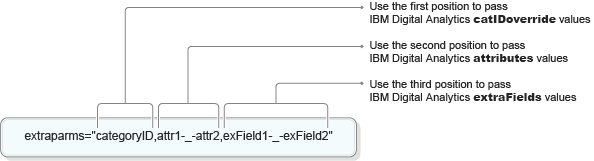
and the extraFields parameter. The following example
illustrates the correct format:
- Specify values for the three IBM Digital Analytics parameters
in the order that is shown in the previous example. Specify the
catIDoverridevalue in the first position, followed by a comma, then one or moreattributesvalues in the second position, followed by a comma, and then one or moreextraFieldsvalues in the third position. - Use the
nullvalue to indicate when no values are being passed forcatIDoverrideorattributes. - To pass multiple values for a parameter, separate each value with the following delimiter: -_-
The following examples show how to apply these format
rules when you use the extraparms parameter. The
examples use the <cm:cart tag />, but they apply
to the <cm:order /> tag as well.
- Example 1:
To pass a value to the
catIDoverrideparameter:<cm:cart databean="${order_OrderDataBean}" extraparms="categoryID" />Because no values are being passed to either the
attributesor theextraFieldsparameter, no commas or null values are required. - Example 2:
To pass a single value to the
attributesparameter:<cm:cart databean="${order_OrderDataBean}" extraparms="null,attr1"/>The
nullvalue to the left of the comma is required to indicate that no values are being passed to thecatIDoverrideparameter. - Example 3:
To pass two values to the
attributesparameter:<cm:cart databean="${order_OrderDataBean}" extraparms="null,attr1-_-attr2"/> - Example 4:
To pass a single value to the
extraFieldsparameter:<cm:cart databean="${order_OrderDataBean}" extraparms="null,null,exField1"/>
2. Format for setting extraparms values
for the <cm:product /> tag
When you
set the extraparms values for the <cm:product
/> tag, you must follow a specific format to control which
values are passed to the catIDoverride parameter,
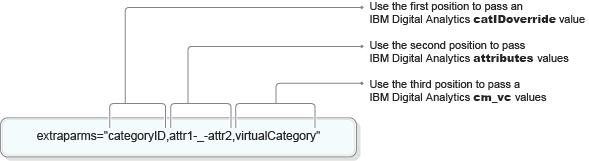
the attributes parameter, and the cm_vc parameter.
The following example illustrates the correct format:
- Specify values for the three IBM Digital Analytics parameters
in the order that is shown in the previous example. Specify the
catIDoverridein the first position, followed by a comma, then one or moreattributesvalues in the second position, followed by a comma, and then a virtual category name as thecm_vcvalue in the third position. - Use the
nullvalue to indicate when no values are being passed forcatIDoverrideorattributes. - To pass multiple values for a parameter, separate each value with the following delimiter: -_-
The following examples show how to apply these format
rules when you use the extraparms parameter with
the <cm:product /> tag:
- Example 1:
To pass a value to the
catIDoverrideparameter:<cm:product databean="${product}" extraparms="categoryID"/>Because no values are being passed to either the
attributesor thecm_vcparameter, no commas or null values are required. - Example 2:
To pass a single value to the
attributesparameter:<cm:product databean="${product}" extraparms="null,attr1"/>The
nullvalue to the left of the comma is required to indicate that no values are being passed to thecatIDoverrideparameter. - Example 3:
To pass two values to the
attributesparameter:<cm:product databean="${product}" extraparms="null,attr1-_-attr2"/> - Example 4:
To pass a single value to the
cm_vcparameter:<cm:product databean="${product}" extraparms="null, null, virtualCategory"/>
3. Format for setting extraparms values
for other WebSphere Commerce analytics tags
The following
format rules and examples apply to the <pageview /> tag,
and to any other WebSphere Commerce analytics tags that pass values
to the IBM Digital Analytics attributes and extraFields parameters.
When you set the extraparms values for these tags,
you must follow a specific format to control which values are passed
to the attributes parameter, the extraFields parameter,
or both. The following example illustrates the correct format:
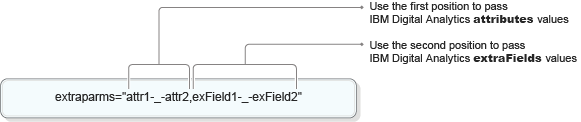
- Specify values for the two parameters in the order that is shown
in the previous example. Specify one or more
attributesvalues in the first position, followed by a comma, and then one or moreextraFieldsvalues in the second position. - Use the
nullvalue to indicate when no values are being passed for theattributesparameter. - To pass multiple values for a parameter, separate each value with the following delimiter: -_-
The following examples show how to apply these format
rules. The examples use the <cm:pageview /> tag,
but they also apply to other tags that pass values to attributes and extraFields.
- Example 1:
To pass a single value to the
attributesparameter:<cm:pageview extraparms="attr1"/>Because no values are being passed to the
extraFieldsparameter, the comma is not required. - Example 2:
To pass a single value to the
extraFieldsparameter:<cm:pageview extraparms="null,exField1"/>The
nullvalue to the left of the comma is required to indicate that no values are being passed to theattributesparameter. - Example 3:
To pass multiple values to the
attributesparameter:<cm:pageview extraparms="attr1-_-attr2"/> - Example 4:
To pass multiple values to the
extraFieldsparameter:<cm:pageview extraparms="null,exField1-_-exField2"/>The
nullvalue to the left of the comma is required to indicate that no values are being passed to theattributesparameter. - Example 5:
To pass multiple values to both the
attributesparameter and theextraFieldsparameter:<cm:pageview extraparms="attr1-_-attr2,exField1-_-exField2"/>