

Upgrade
The upgrade Fixlets are available for each of the four DEX components, which internally refers to the same directory path where the installation was previously performed.
Available upgrade fixlets:
| Name | Category | Description |
|---|---|---|
| Upgrade BigFix Scanner DEX Plugin (WIN) | Upgrade | Use the fixlet to upgrade the DEX Server plugin on Windows. |
| Upgrade BigFix Scanner DEX Plugin (MacOS) | Upgrade | Use the fixlet to upgrade the DEX Server plugin on macOS. |
| Upgrade DEX Server (WIN) | Upgrade | Use the fixlet to upgrade the DEX Server. |
| Upgrade DEX FillDB (WIN) | Upgrade | Use the fixlet to upgrade the DEX FillDB. |
| Upgrade BigFix Root Server DEX Plugin (WIN) | Upgrade | Use the fixlet to upgrade the BigFix Root Server DEX Plugin |
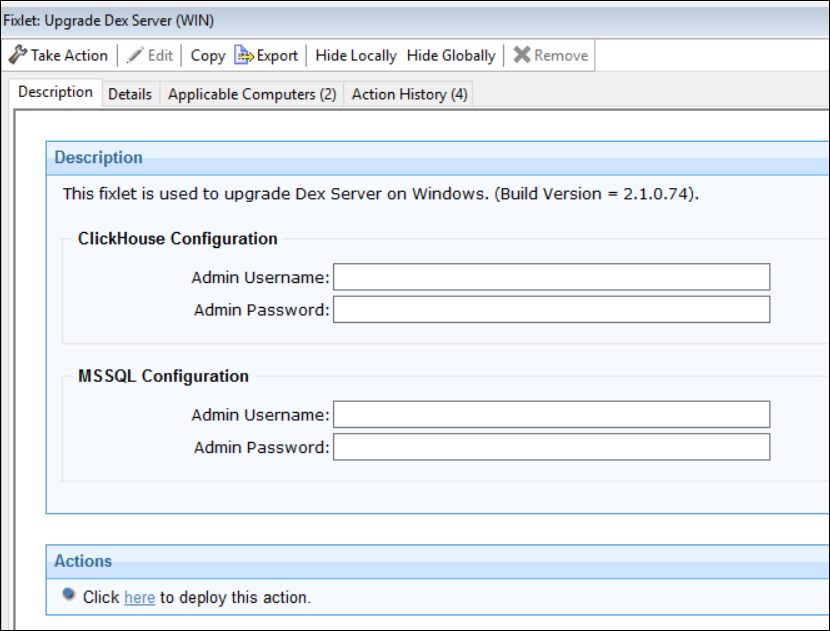
Note: The DEX Server upgrade fixlet requires admin credentials (CH
and MSSQL) to proceed, as the admin credentials are not stored. Other components are
upgraded based on the existing configuration. It is mandatory to upgrade the DEX
Server. For BigFix Scanner DEX Plugin, the minimum version of Scanner should be
>= "11.0.41.1".