
Obtaining Ubuntu Pro credentials for the Ubuntu Download Plug-in
To download packages from the ESM Infra and ESM Apps repositories, the Ubuntu Download Plug-in must be registered with Ubuntu Pro credentials. Obtain an Ubuntu Pro token and extract the user name and passwords that the plug-in requires.
Before you begin
Before you begin, ensure that the following requirements are met:
- You have an Ubuntu Pro account, or you can create one during this procedure.
- You have access to at least one Ubuntu machine on which the Ubuntu Pro token can be attached. This machine is used only to generate the credentials.
- You have sudo privileges on that machine.
About this task
The free personal subscription allows you to use Ubuntu Pro on up to 5 machines, or up to 50 machines if you are an official Ubuntu Community member.
Procedure
-
Create an Ubuntu Pro account.
Go to the Ubuntu Pro sign-in page at https://ubuntu.com/pro and create an account if you do not already have one.
-
Retrieve your free personal token.
Open the Ubuntu Pro dashboard and sign in with your Ubuntu One account. A Free Personal Token is listed under your subscriptions.
Figure 1. Free Personal Token on the Ubuntu Pro dashboard 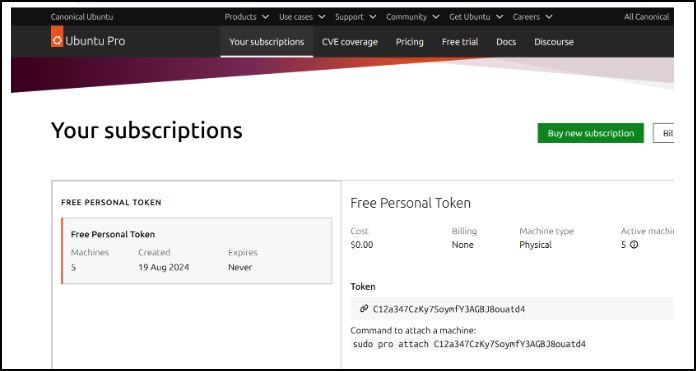
-
Copy the token and attach it to your Ubuntu machine.
sudo pro attach YOUR_TOKEN -
Retrieve the authentication credentials from the generated configuration file.
After the Ubuntu Pro token is successfully attached, a configuration file is automatically generated at the following location:
/etc/apt/auth.conf.d/90ubuntu-advantageThe file contains the authentication details for both ESM Apps and ESM Infra, in the following form:
machine esm.ubuntu.com/apps/ubuntu/ login bearer password <apps_password>
machine esm.ubuntu.com/infra/ubuntu/ login bearer password <infra_password>
Map these values to the Ubuntu Download Plug-in fields as described in the following table.
Table 1. Credential mapping Plug-in field Source in the configuration file Value User name The loginvalue on either linebearerApps password The passwordvalue on theesm.ubuntu.com/apps/ubuntu/line<apps_password>Infra password The passwordvalue on theesm.ubuntu.com/infra/ubuntu/line<infra_password>Important: Treat the Ubuntu Pro token and the Apps and Infra passwords as secrets. Do not share them, store them in unprotected locations, or include them in support tickets, logs, or screenshots. If a credential is exposed, detach and re-attach the token to regenerate it.
Results
You now have the user name, Infra password, and Apps password that are required to register/configure Ubuntu Download Plug-in.
- Ubuntu Pro 18.04: Enable Ubuntu Pro client on endpoints – Ubuntu Pro 18.04 (amd64)
- Ubuntu Pro 20.04: Enable Ubuntu Pro client on endpoints – Ubuntu Pro 20.04 (amd64)