
Firewall port requirements
For BigFix MDM Server and BigFix PlugIn Portal to communicate effectively with managed devices, it is essential to configure the necessary TCP/IP ports. This section outlines the required ports for efficient device management.
Proper firewall configuration is crucial for BigFix Modern Client Management (MCM) and BigFix Mobile, as it regulates secure communication among the MDM server, enrolled devices (Windows, Android, iOS), and external services (e.g., Microsoft, Google, Apple). Firewalls control traffic through specific ports, ensuring that only authorized communication occurs, thus safeguarding the environment from external threats and maintaining reliable connectivity between all components.
Port Requirements & Traffic Flow
- BigFix MCM – On prem deployment
-
Port Flows with LDAP servers for MDM With Internet Connectivity
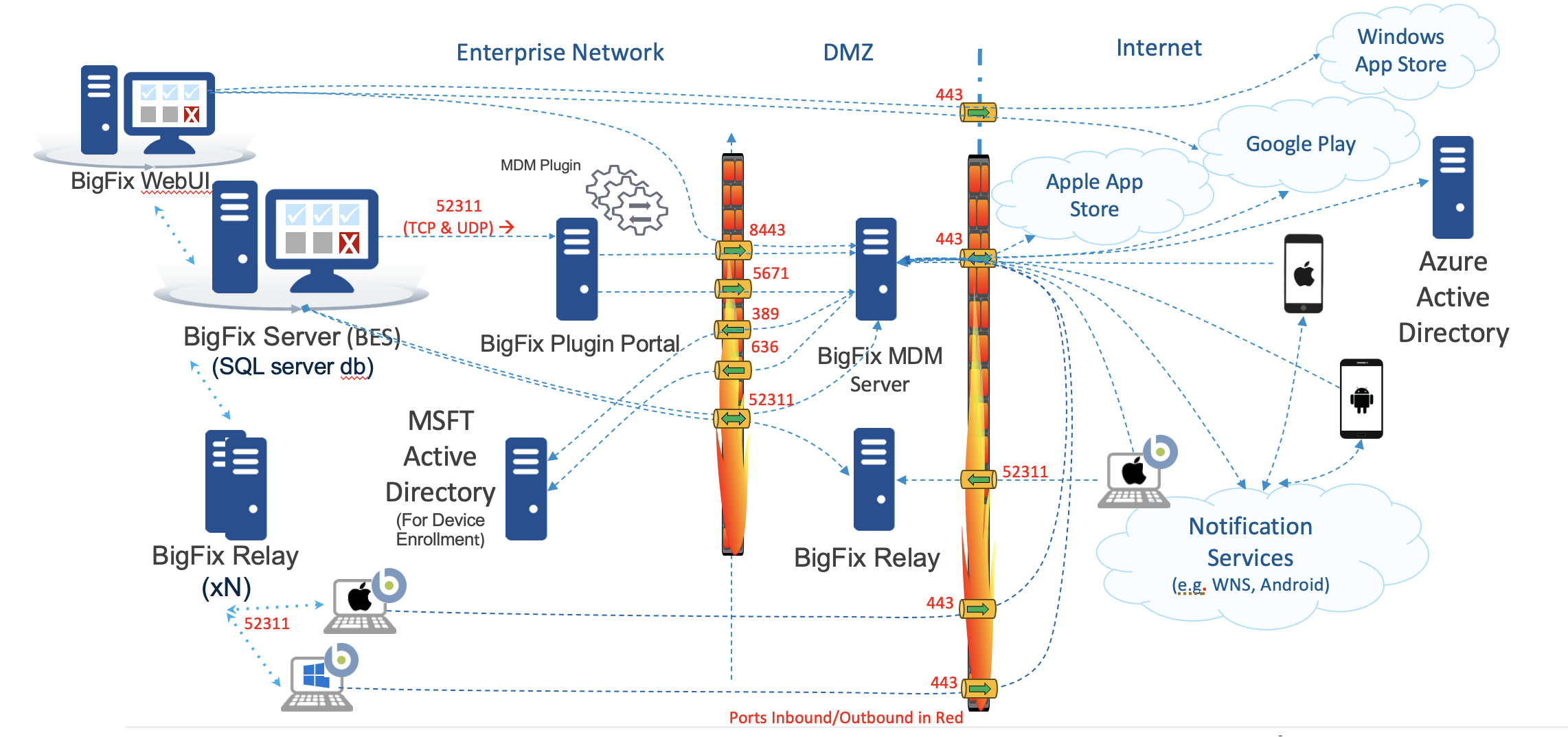
| Port Number | Type | Purpose | Direction |
|---|---|---|---|
| 443 | HTTPS |
All device enrollment and management requests are sent to this port. This must be an internet-facing port for the endpoints to reach the enrollment server. |
Inbound to the MDM Server from the network where MDM managed endpoints are located. |
| 443 | HTTPS | MDM Server to Offline Domain Join Server | Inbound to the Offline Domain Join Server specifically for requests from the MDM Server |
| 443 | HTTPS | For sending messages from MDM Server to notification
services and identity service.
|
Outbound from MDM server to:
|
Outbound from WebUI to:
|
|||
| 5671 | AMQP |
MDM Plugin receives the asynchronous notifications that the MDM Server gets from the enrolled devices through this port. This inbound port to the MDM Server must be opened for the Plugin Portal server to establish the session and subsequently receive the device notifications. |
Inbound to the MDM Server from Plugin Portal server |
| 52311 | TCP | For standard BigFix management traffic to the BESAgents that manage the MDM server and Plugin Portal server. | Inbound to the MDM Server and the Plugin Portal server from the root server |
| 52311 | UDP | For standard BigFix management traffic to the BESAgents that manage the MDM server and Plugin Portal server. | Inbound to the MDM Server and the Plugin Portal server from the root server |
| 8443 | HTTPS | For sending HTTPS requests to the MDM Server REST API. | Inbound to the MDM Server from Plugin Portal server and WebUI |
| 636 | LDAPS | For Active Directory to securely authenticate end users during enrollment. | Outbound from MDM Server to the Customer LDAP |
| 389 | LDAP | For Active Directory insecure authentication of end users during
enrollment. Note: In case the Active
Directory secure port is not enabled, the default insecure port
is 389. For best results, use the LDAPS (secure communication)
with Active Directory. |
Outbound from the MDM Server to Customer LDAP |
| 2197* | TCP | Backup port for sending messages from the MDM Server to APNs. Used by the MDM Server to connect to APNs for feedback. | Outbound from the MDM Server to the APNs Server (Internet). |
| 5223 | TCP | For sending messages to APNS from the computers in your network. | Outbound from Mac devices (whichever network they are on) to the APN Server (Internet). |
| 8080 | TCP | For internal NDES configuration or as configured in the SCEP URL in the fixlet Configure settings for SCEP functionality on MDM server | Outbound from MDM Server to SCEP |
*To ensure reliable Apple MDM server communication, allow outbound connections from the MDM Server to the Apple 17.0.0.0/8 block over TCP ports 2197.
MDM Server outbound to Internet whitelist
The following are the required outbound ports for the MDM server to communicate with external services for each platform.
- Windows
- Purpose: These ports and destinations are required for communicating with Microsoft's cloud services, enabling push notifications, and managing device policies for Windows devices.
Port Number Protocol Destination Purpose 443 TCP *.notify.windows.com WNS 443 TCP *.wns.windows.com WNS 443 TCP *.notify.live.net Microsoft Notification Service 443 TCP login.microsoftonline.com Microsoft Account Authentication 443 TCP login.live.com Microsoft Account Authentication
- Android
- Purpose: These ports facilitate communication between the MDM server and Google's services, enabling authentication, device management, and policy enforcement for Android devices.
Port Number Protocol Destination Purpose 443 TCP oauth2.googleapis.com Google OAuth2 Authentication 443 TCP accounts.google.com Google Account Services 443 TCP cloudresourcemanager.googleapis.com Google Cloud Resource Manager 443 TCP androidmanagement.googleapis.com Android Management API 443 TCP iam.googleapis.com Google Identity and Access Management 443 TCP pubsub.googleapis.com Google Cloud Pub/Sub Service 443 TCP www.googleapis.com General Google API Access
- Apple
- Purpose: This port is used for communication with Apple’s APNs, which is essential for managing and sending notifications to iOS devices. The 17.0.0.0/8 block represents Apple's dedicated IP address range for APNs.
Port Number Protocol Destination Purpose 2197 TCP Apple 17.0.0.0/8 Apple Push Notification Service (APNs) 443 TCP Apple 17.0.0.0/8 Apple Push Notification Service (APNs)
Frequently Asked Questions
- Q1: Can Windows MDM work if the URLs login.live.com and login.microsoftonline.com are blocked on the device?
-
Answer: Yes, MCM can still function. However:
-
Without login.live.com, push notifications won’t work. If blocked on the device, the MDM server will switch to polling mode, which may cause delays in applying actions or receiving updates. However, it is not required for enrollment or basic MCM actions.
-
Without login.microsoftonline.com, Microsoft account sign-ins won’t work on the device, if device sign-in is tied to Azure AD. Blocking this URL on the server side will prevent authentication and break MDM operations. If not using Azure AD, it can be safely blocked without affecting core MCM functions.
-