
Set Global Policy
Learn how to reset the Application Control policy on target endpoints to its original default state. This task removes all custom-defined rules, establishing a clean security baseline and ensuring that only explicitly allowed applications are permitted.
About this task
This task allows an administrator to reset the Application Control policy
on target endpoints to its original default state. By running this action, you will
be able to remove all custom-defined rules and restore the policy to the initial
configuration created during the agent's installation.
Warning: Running this task will permanently delete all the existing custom
application control rules from the bes_bac.pol file on the
selected endpoints. This action is irreversible.
Note: Proceed only if you want to revert the endpoints to a
factory default security policy.
This task is useful for establishing a clean security baseline, troubleshooting policy conflicts, or removing obsolete rules in bulk before deploying a new ruleset.
This task's
action script performs the following steps on each target endpoint:
- It generates a new default policy object. This policy configuration consists of the control mode set to block and an empty list of rules.
- It encrypts the new default policy into the bes_bac.pol file, overwriting any existing versions.
- Lastly, it restarts the BES Application Control service (BESBAC) to ensure the default policy is immediately enforced.
Procedure
-
From the Fixlets and Tasks pane, select Task:
Set Global Policy.
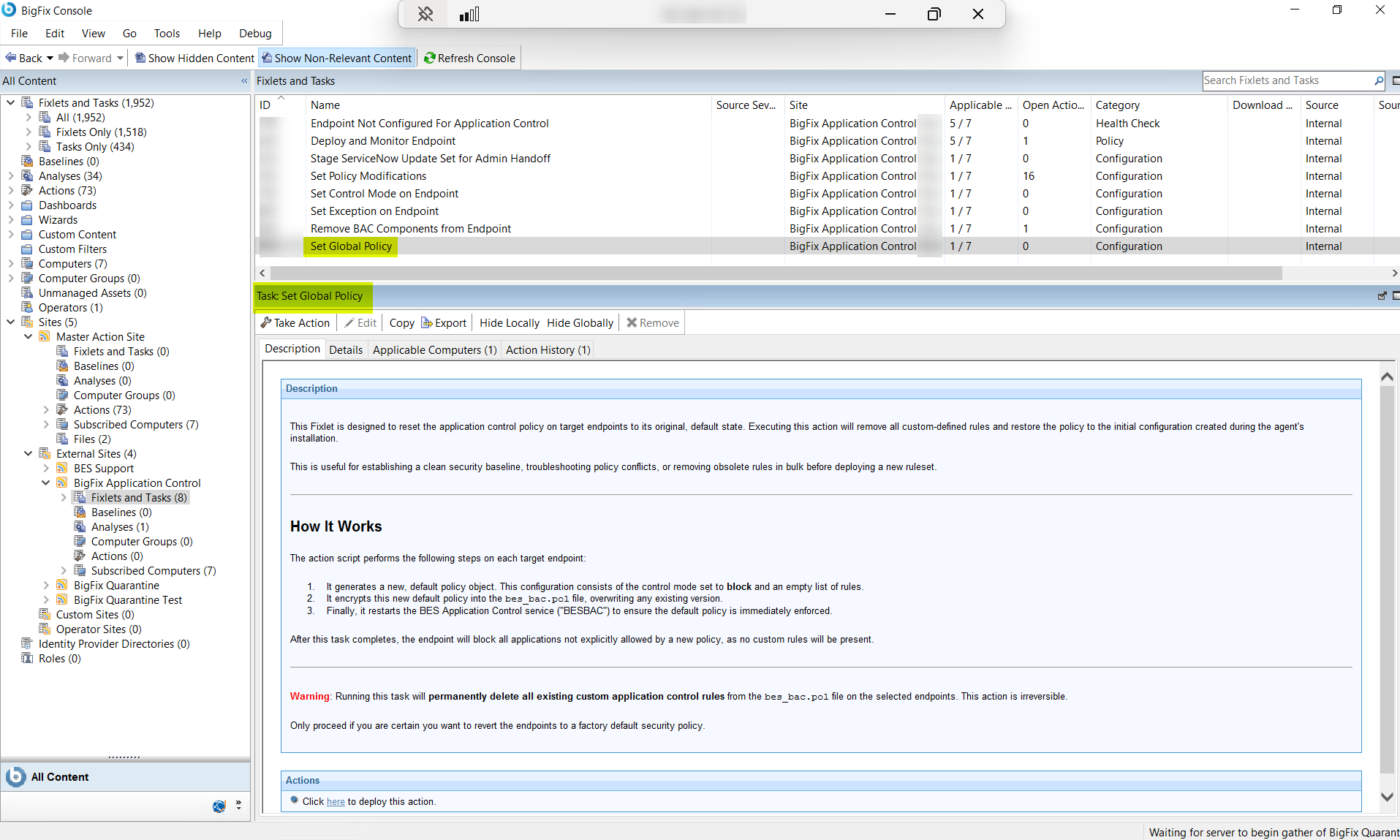
- Select the Take Actions tab and select the endpoints on which you want to apply this task.
- Click OK.