Installing Windows Bundle Creators
From the Bundle and Media Manager dashboard, you can install Windows Bundle Creators on selected targets.
In the Bundle and Media Manager dashboard, select the Windows Bundle Creators and Windows Media tab and click Install Windows Bundle Creator to start the wizard.
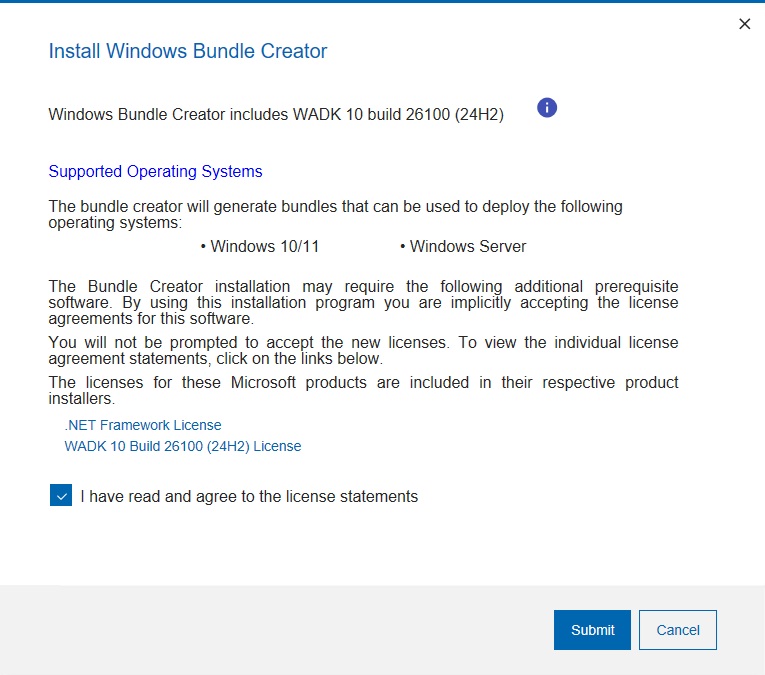
Here you can check the tools that the Windows Bundle Creator will include and the list of operating systems that can be deployed.
- The computers on which you install the Windows Bundle Creators must have direct internet access for the prerequisites to be correctly downloaded and installed through the wizard.
- You don't need to create an Windows Bundle for Windows 10/11 in-place upgrades. For more information, see Installing Windows 10/11 or Windows Server using in-place upgrade.
- If you select to install the Windows Bundle Creator on a target machine that already has deprecated deployment tools, the existing tools are not replaced. To ensure that the tools you select are downloaded on the target, check it beforehand and manually remove the preexisting tools if necessary.
- The Windows Bundle Creator computer requires 7-Zip. Install your preferred version beforehand, or the version defined in the Fixlet 40 of OSD site (Deploy 7-zip) will be installed when running the task. You can then upgrade it manually later if needed.
Windows Bundle Creators
| Operating System | Windows Bundle Creator 1 | WIM Toolkit |
|---|---|---|
| Windows 11 | 3.12.15 | WADK for Windows 11 24H2 (build 26100) |
| Windows 10 | 3.12.15 | WADK for Windows 11 24H2 (build 26100) |
| Windows Server 2025 | 3.12.15 | WADK for Windows 11 24H2 (build 26100) |
| Windows Server 2022 | 3.12.15 | WADK for Windows 11 24H2 (build 26100) |
| Windows Server 2019 | 3.12.15 | WADK for Windows 11 24H2 (build 26100) |
| Windows Server 2016 | 3.12.15 | WADK for Windows 11 24H2 (build 26100) |
Notes
- Windows Bundle Creator 3.12.15 supersedes all earlier versions.
The following table lists the valid combinations for components using the deprecated MDT Bundle Creator Tool 3.11.141. For each combination, here is a corresponding list of operating systems that you can deploy.
| Operating System | MDT Bundle Creator | Microsoft Deployment Toolkit | WIM Toolkit |
|---|---|---|---|
| Windows 11 | 3.11.14 | MDT build 8456 | WADK for Windows 11 24H2 (build 26100) |
| Windows 102 | 3.11.14 | MDT build 8456 | WADK for Windows 11 24H2 (build 26100) |
| Windows Server 2025 | 3.11.14 | MDT build 8456 | WADK for Windows 11 24H2 (build 26100) |
| Windows Server 2022 | 3.11.14 | MDT build 8456 | WADK for Windows 11 24H2 (build 26100) |
| Windows Server 2019 | 3.11.14 | MDT build 8456 | WADK for Windows 11 24H2 (build 26100) |
| Windows Server 2016 | 3.11.14 | MDT build 8456 | WADK for Windows 11 24H2 (build 26100) |
| Windows Server 2012 R2 | 3.11.14 | MDT build 8456 | WADK for Windows 11 24H2 (build 26100) |
| Windows Server 2012 | 3.11.14 | MDT build 8456 | WADK for Windows 11 24H2 (build 26100) |
- For windows 10 x86, the last supported WADK is WADK 10 2004, refer to https://learn.microsoft.com/en-us/windows-hardware/get-started/adk-install.
For the list of other deprecated component combinations for MDT Bundle Creator, see Deprecated Component Combinations for MDT Bundle Creator.
For a complete list of WADK(WinPE) versions and Operating System support, refer to the Microsoft Technet website.