表示 Automation Plan actions
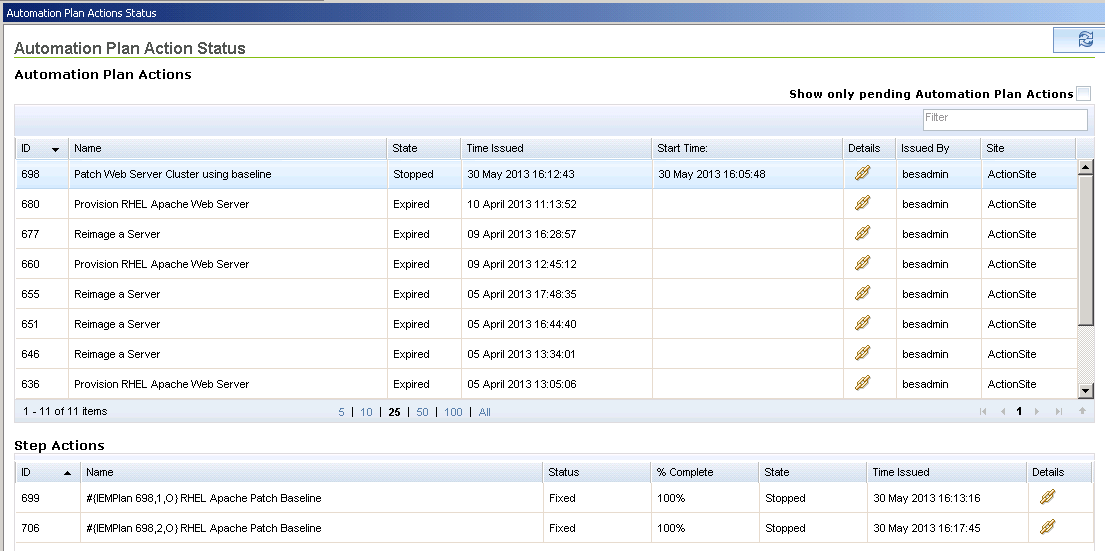
「自動化計画アクションの状況」パネルで、すべての Automation Plan actions リストおよびそれに対応する step actions を表示できます。このリストにはスケジュール済み Automation Plan actions がすべて含まれます。
始める前に
このタスクについて
保留中の Automation Plan actions のみを表示するには、「保留中の Automation Plan アクションのみ表示」チェック・ボックスを選択します。保留中の Automation Plan actions には step actions はありません。
ヒント: 保留中の Automation Plans actions は Server Automation domain の「すべて」Automation Plan Actions>「保留中」Automation Plan Actionsに表示されます。
重要: このパネルの Automation Plan action と step action の情報はすべて読み取り専用です。「自動化計画アクションの状況」パネルでは、action を削除、停止、または再起動することはできません。
Automation Plan action を表示するには、以下のステップを実行します。手順
- Server Automation domain を開きます。
- Domain Panel のナビゲーション・ツリーから「自動化計画アクションの状況」をクリックします。「自動化計画アクションの状況」パネルが開きます。最新順に Automation Plan action を並べたすべての Automation Plan actions リストが表示されます。リストをソートするには、任意の列のタイトルをクリックします。リスト内のすべての列をフィルタリングするには、「フィルター」 フィールドを使用します。
- Automation Plan action のBigFix console 「アクション」パネルを表示するには、リスト内の Automation Plan action の「詳細」の値をクリックします。「自動化計画アクションの状況」パネルに戻るには、メニュー・バーの「戻る」をクリックします。
- Automation Plan action で step actions を表示するには、リストで Automation Plan action を選択します。「ステップ・アクション」ペインには、選択した Automation Plan action の step actions が表示されます。
- step action のBigFix console 「アクション」パネルを表示するには、リスト内の step action の「詳細」の値をクリックします。「自動化計画アクションの状況」パネルに戻るには、メニュー・バーの「戻る」をクリックします。以下の図は「自動化計画アクションの状況」ダッシュボードの例を示しています。