
Configuring a Private Site Server proxy for the Presence
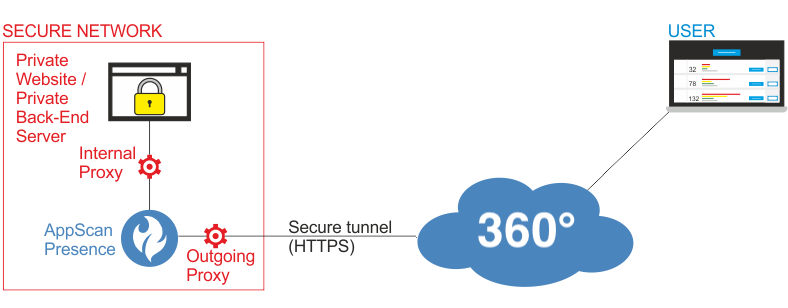
If your private network requires the Private Site Server to use a proxy to connect with the web application or back-end server (internal proxy), or with the AppScan 360° server (outgoing proxy), configure it as follows.
About this task
Procedure
-
In the root folder of the presence, locate
appsettings.jsonand open it with a text editor. -
Add the relevant settings by removing the
//at the start of each relevant line, and save the file."Host"can be a name or an IP address.For example, to configure internal proxy IP 192.168.1.100, and port 3128, edit:
to//"InternalProxyEndpoint": { // "Host": "localhost", // "Port": 8899 //},"InternalProxyEndpoint": { "Host": "192.168.1.100", "Port": 3128 },Note: Configuring both an internal proxy and a PAC file is not supported. - If the Presence is running, terminate it (Ctrl + C) for the changes to take effect.
- Start the Presence or, if the Presence is running as a service, stop and start the service.