
Packages
A Package is a deployable unit that consolidates a group of related agents. Packaging enables users to manage and deploy agents collectively, simplifying version control and promoting reuse across different environments. This is particularly useful when multiple agents work together to support a shared business function such as HR, Finance, or Customer Support.
The Packages interface provides a centralized view of all packages, organized by libraries and categories such as Domains, Industries, and Horizontal Processes.
Users can search, filter, and manage packages efficiently through this intuitive dashboard.
Filter Options
Use the status filters to narrow down the list of packages:
-
In Progress: Shows packages that are currently under development.
-
Ready: Displays packages that are fully configured and available for deployment.
Package Cards
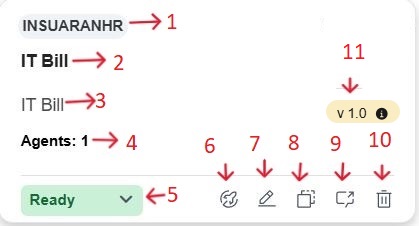
Each package is represented by a tile (card) that displays essential metadata and available actions. The components of a typical package card include:
-
Tags: Displays the tags assigned to the package.
-
Package Name: Name assigned to the package.
-
Description: A short summary of the package. function.
-
Agents Count: Displays the number of agents associated with the package
-
Status Indicator: Indicator: Indicates current status - Ready (green) or In Progress (blue).
Note: This field is not auto generated; it requires manual input from the user to update the package's current status. - Deploy: Deploys the agent.
-
Edit: Modify the package details.
-
Duplicate: Creates a copy of the package.
You can edit the name, adjust the configuration, and update the logic as needed. This feature helps save time and promotes standardization when building multiple agents with similar functionality.
By default, the duplicated package appears in the Package page with a suffix like “_copy” in its name.
-
Test: This action launches the package in test mode.
-
Delete: Remove the package from the library.
- Version: Displays the current agent package version (example, v1.0), and hovering over it reveals additional deployment details such as the Endpoint ID and Deployment Date.