
AI Agents
The AI Agents page provides a centralized view of all available AI agents within the application. These agents are organized by libraries and categories such as domains, industries, horizontal processes and so on. This structure enables users to efficiently browse, locate, manage, and interact with agents using various filters and controls.
The interface is designed for intuitive navigation and supports comprehensive search, filter, and management capabilities.
Filter Options
Users can refine the catalogue view using the following filters:
-
In Progress: Displays agents currently under development.
-
Ready: Displays agents that are fully configured and available for use.
-
Show Also Template: Includes template-based agents in the list, useful for reference or reuse.
Agent Cards
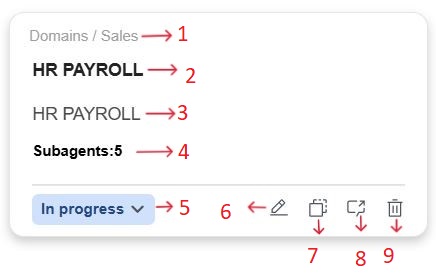
Each agent is displayed as a tile (card) that contains key information and quick-action controls. A typical agent card includes the following elements:
-
Category Path: Displays the library/categories such as Sales, Healthcare, Training, and so on.
-
Agent Name: The name you give to your agent. It helps you identify what the agent does, example HR PAYROLL.
-
Description: A short summary of the agent’s function (for example, search user queries).
-
Subagents Count: Displays the number of subagents associated with the agent.
-
Status Indicator: Indicator: Indicates current status :Ready (green) or In Progress (blue).
Note: This field is not auto generated; it requires manual input from the user to update the agent’s current status. -
Edit: Modify agent details.
-
Duplicate: Create a copy of the agent.
You can edit the name, adjust the configuration, and update the logic as needed. This feature helps save time and promotes standardization when building multiple agents with similar functionality.
By default, the duplicated agent appears in the catalog with a suffix like copy in its name.
-
Test: This action launches the agent in test mode.
-
Delete: Remove the agent from the library.