
Catalog
The Catalog or Agent Catalog is a central library of reusable Agentic AI templates. They are organized by libraries and categories such as domains, industries, horizontal processes and so on.
This page allows you to search and launch predefined agents to accelerate agent creation and deployment workflows.
The catalog supports easy navigation and reuse of templates, enabling users to jumpstart their automation flows without needing to build every agent from scratch. The Catalog page displays, by default, only agent templates. To include additional agents marked as Ready those that are pre-configured and considered deployment-ready, select the Show also Agents Ready checkbox. Once selected, the list expands to show both standard templates and ready-to-deploy agents.
This intuitive combination of keyword search and tag-based filtering ensures that users can quickly discover relevant agent templates suited to their needs, whether by functional domain, industry, or operational category.
Agent Template Cards/Tiles
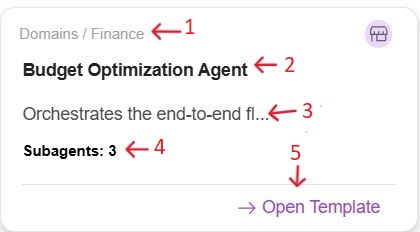
Each agent is displayed as a card or tile that includes the following details:
-
Category Path: Displays the library and categories such as Domains, Sales, Healthcare, Finance and so on.
-
Agent Name: Name of the agent.
-
Description: A short summary of the agent’s function.
-
Subagents Count: Indicates how many subagents are included in the template
-
Open Template Link: Launches the selected agent template in the builder for customization.
For details on creating an agent using the Templates, refer to the Templates section.