Joining or combining conditional dependencies
You can combine a set of dependencies into a single join dependency.
About this task
Example:
A
PROBLEM_SOLVING join dependency within a job stream aggregates three
conditional dependencies from different predecessor jobs. The rule requires only one conditional
dependency to be met to satisfy the PROBLEM_SOLVING join.
The
ABSENCES_RETRY job follows the PROBLEM_SOLVING join and runs
when at least one of the three predecessor jobs completes successfully. If the conditions do not
satisfy the join, HCL Workload Automation places the
ABSENCES_RETRY job in the SUPPR state.
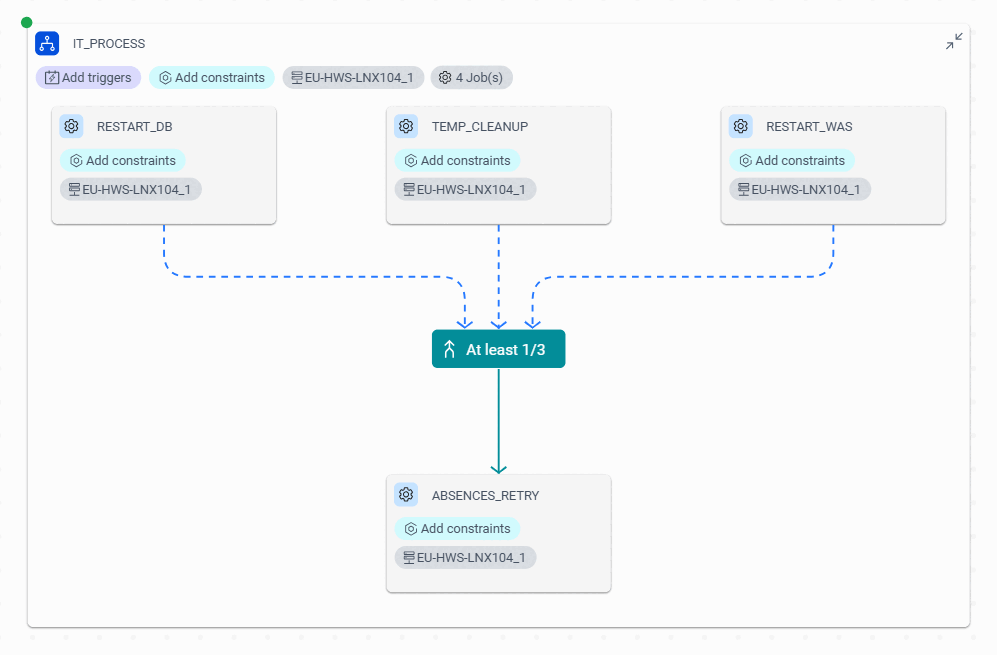
To create the PROBLEM_SOLVING join dependency from the Dynamic Workload Console, complete the following
steps:
Procedure
-
From the Graphical Designer, create the following job definitions and configure their
properties:
RESTART_DB,RESTART_WAS,TEMP_CLEANUP, andABSENCES_RETRY. -
From the Blocks tab, drag a job stream onto the canvas and name it
IT_PROCESS, then define information about it. -
From the Assets tab, drag
RESTART_DB,RESTART_WAS,TEMP_CLEANUP, andABSENCES_RETRYjobs onto theIT_PROCESSjob stream. -
From the Blocks tab, drag a Join condition
item onto the
ABSENCES_RETRYjob within theIT_PROCESSjob stream. -
Drag the connecting arrow from the Join condition to the
RESTART_DBjob, and repeat this action for theRESTART_WASandTEMP_CLEANUPjobs. -
In the Join condition properties panel, in the
Name field, enter
PROBLEM_SOLVING. - Set the How many value to 1 to specify that at least one of the dependencies must be satisfied.
-
Select the arrow that connects
RESTART_DBto thePROBLEM_SOLVINGjoin dependency and click the Edit icon. -
In Status condition, select SUCC from the
menu and repeat this action for the
RESTART_WASandTEMP_CLEANUPjobs. - Deploy the workspace.
Results
PROBLEM_SOLVING join condition aggregates the three conditional
dependencies on the ABSENCES_RETRY job. For the ABSENCES_RETRY
job to run, at least one predecessor job must satisfy the condition by completing in the
SUCC state.Example
SCHEDULE WK1#PROCESSINFO
ON RUNCYCLE RULE1 "FREQ=DAILY;"
AT 1800
 :
WK1#ABSENCES_RETRY
JOIN PROBLEM_SOLVING 1 OF
 [DESCRIPTION “...”]
  FOLLOWS WK2#RESTART_DB IF SUCC
  FOLLOWS W32#RESTART_WAS IF SUCC
  FOLLOWS W32#TEMP_CLEANUP IF SUCC
ENDJOIN
END