Monitoring conditional dependencies
Monitor HCL Workload Automation jobs by using the Dynamic Workload Console or the Orchestration CLI.
The Dynamic Workload Console displays the following
sample information:
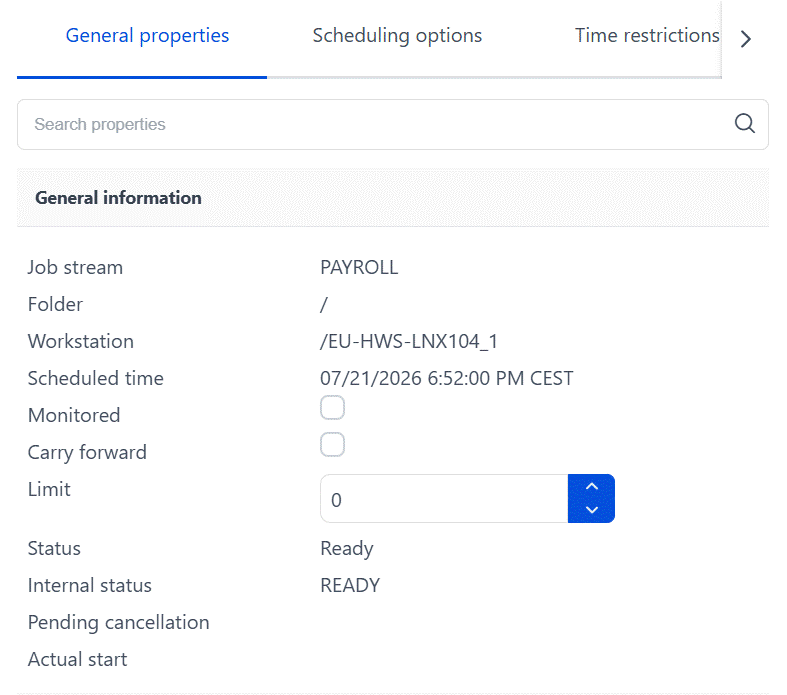
You can monitor output conditions using the ocli plan showjobs and
showschedules commands.
In this example, you can see the status of the PAYROLL job stream after submission and before it
is
run:
%ss @#PAYROLL
                                                       (Est)  (Est)    Jobs  Sch
Workstation      Job Stream       SchedTime   State Pr Start  Elapse   #  OK Lim
NC050024        #PAYROLL          0958 11/19  HOLD  10                 7   0
%sj @#PAYROLL
                                                                                               (Est)  (Est)
Workstation      Job Stream       SchedTime  Job                       State Pr Start  Elapse ReturnCode Dependencies

NC050024        #PAYROLL          0958 11/19 ************************** READY 10
                              (NC050024_1_1#)OPERATOR_INTERVENTION      HOLD  10                         ABSENCES IF UNKNOWN_ERR
                              (NC050024_1_1#)DB_BACKUP                  HOLD  10                         JOIN SUCCESS 1 OF
                                                                                                          ABSENCES IF SUCC
                                                                                                     ABSENCES_RETRY IF SUCC
                              (NC050024_1_1#)ABSENCES                    READY 10
                              (NC050024_1_1#)RESTART_DB                  HOLD  10                       ABSENCES IF DB_FAIL
                              (NC050024_1_1#)RESTART_WAS                 HOLD  10                       ABSENCES IF WAS_FAIL
                              (NC050024_1_1#)TEMP_CLEANUP                HOLD  10                       ABSENCES IF TEMP_FULL
                              (NC050024_1_1#)ABSENCES_RETRY              HOLD  10                       JOIN PROBLEM_SOLVING 1 OF
                                                                                                              RESTART_DB
                                                                                                              RESTART_WAS
                                                                                                              TEMP_CLEANUP
If you run the showjob;info command on one of the jobs, you can obtain some details about
the job:
%sj NC050024#PAYROLL.ABSENCES;info
-------- Restart ---------
Workstation   Job Stream    SchedTime  Job                                    JobFile                  Opt  Job      Prompt
NC050024      #PAYROLL       0958 11/19
                           (NC050024_1_1#)ABSENCES
.......                                                                       oc: DB_FAIL n/a "RC=1"
                                                                              oc: TEMP_FULL n/a "RC=3"
                                                                              oc: UNKNOWN_ERR n/a "RC>3"
                                                                              oc: WAS_FAIL n/a "RC=2"
To obtain more details, run the showjob;props command. The
following sample output is a subset of the information you obtain
by running this command:
%sj NC050024#PAYROLL.ABSENCES;props
General Information
  Job = ABSENCES
  Workstation = NC050024_1_1
  .....
  Other Output Conditions
    DB_FAIL = n/a "RC=1"
    TEMP_FULL = n/a "RC=3"
    UNKNOWN_ERR = n/a "RC>3"
    WAS_FAIL = n/a "RC=2"

........
Monitoring join conditional dependencies
Here is an example of how the join conditional dependencies are displayed using conman.
You can see that the PROBLEM_SOLVING join dependency has been satisfied and is no longer displayed.
The SUCCESS join dependency will be evaluated next:
%sj @#PAYROLL
                                                                                               (Est)  (Est)
Workstation      Job Stream       SchedTime  Job                                      State Pr Start  Elapse ReturnCode Dependencies

NC050024        #PAYROLL          1007 11/19 **************************************** READY 10 10:08 (00:01)
                              (NC050024_1_1#)OPERATOR_INTERVENTION                    SUPPR 10                          ABSENCES IF UNKNOWN_ERR
                              (NC050024_1_1#)DB_BACKUP                                HOLD  10       (00:01)            JOIN SUCCESS 1 OF
                                                                                                                          ABSENCES IF SUCC
                                                                                                                          ABSENCES_RETRY IF SUCC
                              (NC050024_1_1#)ABSENCES                                 ABEND 10 10:08  00:01           1 #J355305499
                              (NC050024_1_1#)RESTART_DB                               SUCC  10 10:08  00:01           0 #J355305500
                              (NC050024_1_1#)RESTART_WAS                              SUPPR 10                          ABSENCES IF WAS_FAIL
                              (NC050024_1_1#)TEMP_CLEANUP                             SUPPR 10                          ABSENCES IF TEMP_FULL
                              (NC050024_1_1#)ABSENCES_RETRY                           SUCC  10 10:09  00:01           0 #J355305501
When
the job stream completes, the ABSENCES job completed in ABEND status,
which caused the RESTART_DB job to start and recover the problem.
The REATART_WAS and TEMP_CLEANUP jobs have been suppressed, because
they are no longer necessary. The PROBLEM_SOLVING join dependency
is now satisfied. The ABSENCES_RETRY job also completes successfully,
causing the SUCCESS join dependency to be satisfied, which in turn
causes the DB_BACKUP job to start. You can retrieve the following
information from the showjobs command:
%sj @#PAYROLL
                                                                       (Est)  (Est)
Workstation      Job Stream       SchedTime  Job                     State Pr Start  Elapse ReturnCode Dependencies

NC050024        #PAYROLL          1007 11/19 **************************************** ABEND 10 10:08  00:02
   (NC050024_1_1#)OPERATOR_INTERVENTION                    SUPPR 10                          ABSENCES IF UNKNOWN_ERR
   (NC050024_1_1#)DB_BACKUP                                SUCC  10 10:09  00:01           0 #J355305502
   (NC050024_1_1#)ABSENCES                                 ABEND 10 10:08  00:01           1 #J355305499
   (NC050024_1_1#)RESTART_DB                               SUCC  10 10:08  00:01           0 #J355305500
   (NC050024_1_1#)RESTART_WAS                              SUPPR 10                          ABSENCES IF WAS_FAIL
   (NC050024_1_1#)TEMP_CLEANUP                             SUPPR 10                          ABSENCES IF TEMP_FULL
   (NC050024_1_1#)ABSENCES_RETRY                           SUCC  10 10:09  00:01           0 #J355305501
Note: There are
some differences in the way dependencies are evaluated and resolved
when plan replication is enabled. When it is enabled (the default
setting), then dependencies are resolved as soon as the conditions
necessary to satisfy the dependencies are present. When plan replication
is not enabled, then a specific order of evaluation is followed where
job streams with dependencies on external job streams or jobs are
resolved first, and then dependencies between jobs within the job
stream are resolved second.
Similarly, when plan replication is enabled, all dependencies of a job or job stream in suppress state are evaluated. When plan replication is not enabled, the evaluation of dependencies stops as soon as a job or job stream is put in suppress state because of a conditional dependency that was not satisfied. In both of these cases, the end result is the same, however, when monitoring the progress of the jobs and job streams in these two situations, you might see differing results.