How a distributed shadow job is bound with a remote job instance
Depending on the type of remote engine, either distributed or HCL Universal Orchestrator, the distributed
shadow job is bound to a remote job instance in a different way, as explained in the following
sections.
On a distributed remote engine
The bind is established in the pre-production plan. Distributed remote job instances
belonging to the JOBS job stream and submitted at run time are not written into the
pre-production plan and so they are not involved in the bind process.
If the pre-production plan does not exist on the remote engine when the bind request is
received, the distributed shadow job status remains WAIT until the pre-production plan
generation is completed and the bind request is processed. This might happen, for example,
when the pre-production plan is created again from scratch on the remote engine.
The pre-production plan does not contain the instances of the jobs belonging to the job
streams. The job instances are added later on to the production plan when the plan is
extended or created.
This means that the bind is established with the job stream instance included in the
pre-production plan and that is scheduled to run on the specified workstation. The
definition of that job stream must contain the definition of the remote job to bind.
The following scenarios describe the possible bind processes for a distributed shadow job
having:
Input arrival (IA): 18:00
Remote job information:
Job stream name: JS2
Job name: JOB2
Job stream workstation: WKST2
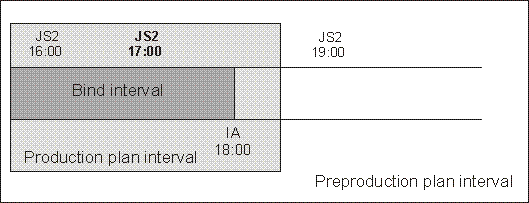
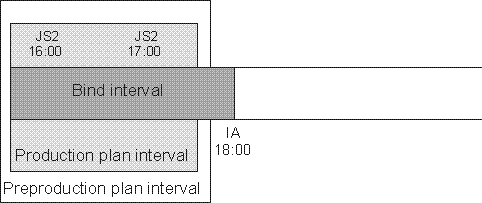
In the figures:
The white box indicates the time interval covered by the pre-production plan.
The light grey box indicates the time interval covered by the production plan.
The dark grey box indicates the interval in the remote engine plan during which the
job instance to bind must be searched.
The JS2 instances shown are scheduled to run on workstation WKST2.
The JS2 occurrence highlighted in bold is the instance selected for the bind.
Scenario 1: The production plan contains the instance of job stream JS2 that closest
precedes the shadow job input arrival.
the JS2 instance that closest precedes the shadow job input arrival is selected
for the bind. This means that the shadow job and the remote job stream instance are
now associated. If, at a later time, a new instance of JS2 that more closely precedes
the shadow job input arrival is submitted ad hoc in the remote engine plan, the match
with the JS2 instance selected for the bind is not modified.
One of the
following situations can now occur:
The selected JS2 instance contains JOB2
The bind is established and a notification containing:
The remote job information identifying the JOB2 instance in the remote
engine plan
The current status of that JOB2 instance in the remote engine plan
is sent back to the HCL Workload Automation for Z
controller, the shadow job instance is updated with the remote job
information, and its status is updated accordingly.
The selected JS2 instance no longer contains JOB2 because it was either
canceled or completed, and was removed from the production plan.
The bind is established and a notification informing about the successful
execution status is sent back to the HCL Workload Automation for Z
controller. The shadow job instance is marked as completed. Its successors can
start.
The selected JS2 instance contains JOB2, but JOB2 is in canceled status
The bind is established and a notification informing about the successful
execution status is sent back to the HCL Workload Automation for Z
controller. The shadow job instance is marked as completed. Its successors can
start.
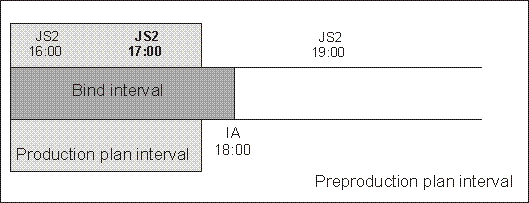
Scenario 2: The production plan interval contains the input arrival of the shadow
job, but no instances of job stream JS2 exist.
Figure 3. The input arrival of the shadow job is included in the production plan but no
instance to bind exists
In this case, the
bind with JOB2 fails. A notification informing that the bind failed is sent back to
the HCL Workload Automation for Z
controller, and the shadow job status is updated according to what you set in the
Complete if bind fails field.
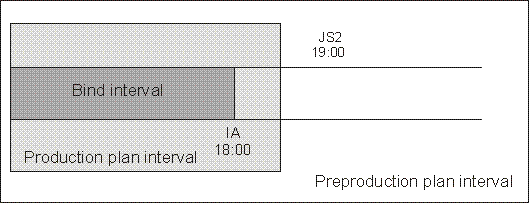
Scenario 3: The pre-production plan interval contains the input arrival of the
shadow job and the production plan does not yet include the closest preceding JS2
instance.
Figure 4. The instance to be bound exists but it is not yet included in the production
plan
A notification informing that the bind is established is sent back to the
HCL Workload Automation for Z
controller and the status of the shadow job is set to "READY-The bind was
established".
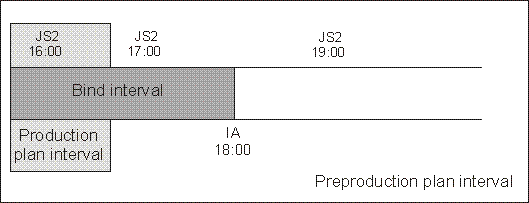
Scenario 4: The preproduction plan interval still does not contain the input arrival
of the shadow job.
Figure 5. The preproduction plan interval still does not contain the input arrival of
the shadow job
In
this case, the bind request is put on hold until the preproduction plan is extended
to include the shadow job input arrival. Until then the status of the shadow job
remains "READY-Waiting for bind result".
On an HCL Universal Orchestrator
remote engine
Depending on whether the workflow (application) is found or not, the bind is established
within the end of the inactive window as follows. For details about the binding process on
the HCL Universal Orchestrator
engine, see the topic about cross dependency definition in the Orchestrating section of the
HCL Universal Orchestrator library.
The workflow instance is found
If the target task (job) is present, a notification is sent back to HCL Workload Automation for Z and the
remote info of the shadow job is updated. The bind status is set to BOUND.
If the target task is not present, the bind fails and an error notification is
sent back to HCL Universal Orchestrator. The
shadow task is set to ERROR.
The workflow instance is not found
If the matching criteria end is after the end of the inactive window, the bind
waits until the inactive window interval covers the matching interval, then
retries the binding process and it can check again.
If the matching criteria end is within the inactive window, the bind fails and
an error notification is sent back to HCL Universal Orchestrator. The
shadow task is set to ERROR.