Enterprise Key Management (EKM) for Volt Foundry
Overview
Enterprise Key Management (EKM) in Volt Foundry provides a secure, centralized way to manage, and use credentials across Foundry services. Administrators and owners can create and manage credentials, which are securely encrypted and stored in the database, while developers provide keys when configuring services — without ever accessing the actual secret values.
Key Capabilities
- Admin-Only Credential Management: Only Admin or Owner users can create, update, delete, and manage credentials in the EKM keystore.
- Credential Abstraction for Developers: Developers reference credential IDs instead of actual secret values when configuring services.
- Encrypted Storage: All credential values are stored encrypted in the Foundry database. Sensitive fields are never exposed in plaintext.
- Credential Masking: Secret fields (passwords, client secrets, access keys) are masked in all API responses and console views.
- Ownership Control: Credential owners can restrict update permissions to themselves, preventing other admins from modifying their credentials.
- Multiple Credential Types: Supports a variety of credential types for different Foundry service adapters.
- Custom Keys: Create flexible JSON-based credentials with named fields that developers reference using placeholder syntax in any service configuration.
- Credential Usage Tracking: The platform tracks which services reference each credential, enabling safe lifecycle management.
- Delete Protection: Credentials actively used by services cannot be deleted until associations are removed.
- Import Validation: When importing Foundry applications, missing EKM credential references are detected and reported as warnings.
Supported Channels
- On-Premises
- Cloud
Access Control
EKM enforces role-based access control at the account level.
| Role | Manage Credentials | Use Credentials in Services |
|---|---|---|
| Owner | Yes | Yes |
| Admin | Yes | Yes |
| Member/Developer | No | Yes (select/provide credential IDs only) |
Note: Only users with Admin or Owner role can access the EKM settings page to create, edit, delete, or change ownership of credentials. Developers can only select available credential IDs when configuring services.
Navigating to EKM
- Log in to the Volt Foundry Console.
- Navigate to Settings from the left sidebar.
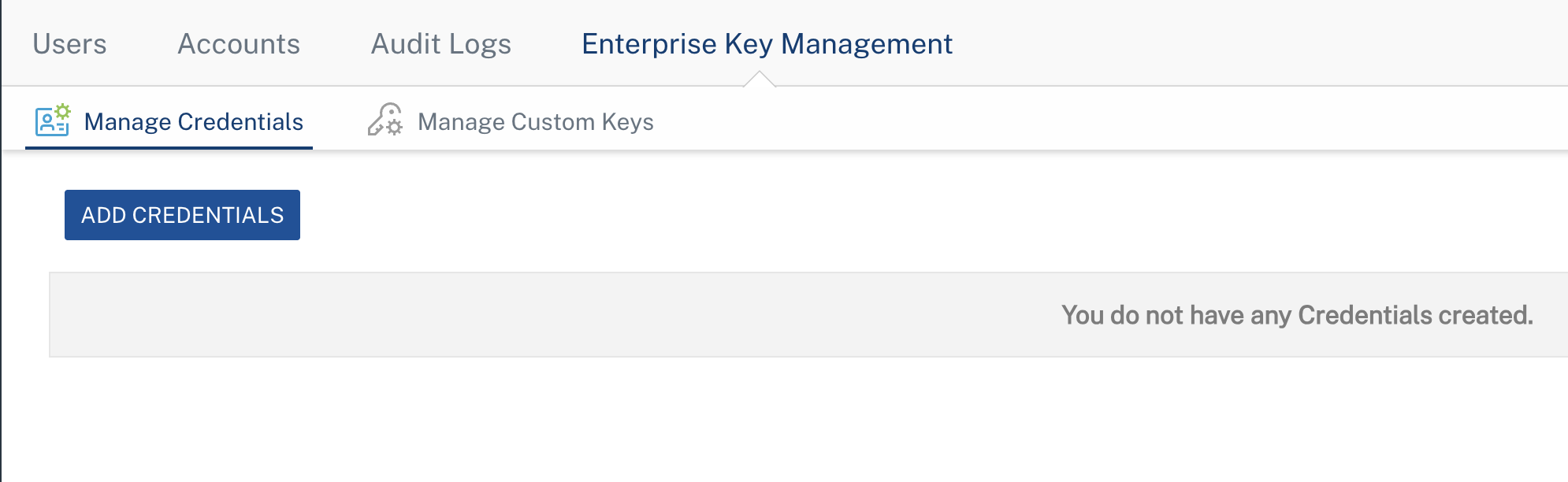
- Click Enterprise Key Management.
- The Manage Credentials tab is displayed, showing two sub-tabs:
- Credentials — For standard credential types linked to specific adapters.
-
Custom Keys — For flexible JSON-based key/value credentials.
Managing Credentials
Supported Credential Types
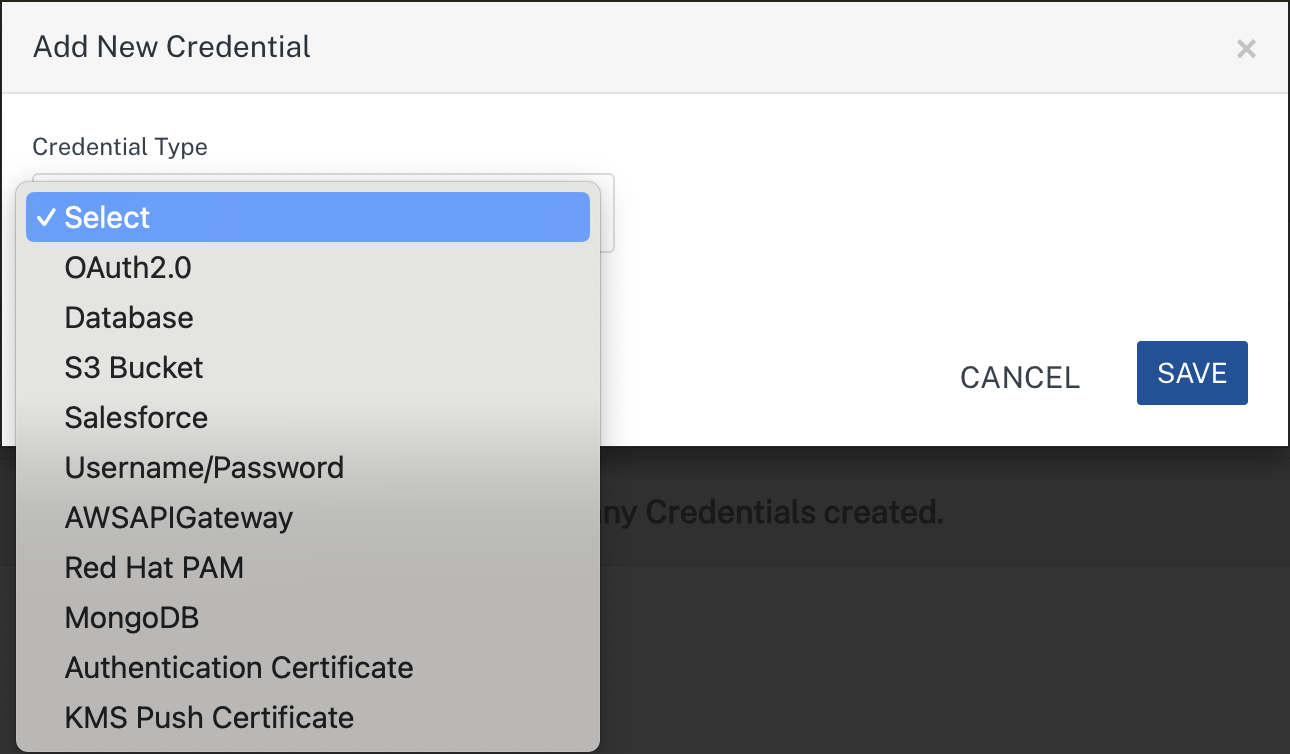
EKM supports the following credential types:
Credential Types
| Credential Type | Fields | Used By |
|---|---|---|
| OAuth2.0 | Client ID, Client Secret | Identity Services (OAuth2 providers) |
| Database | JDBC URL, User ID, Password | Relational Database adapters |
| S3 Bucket | Access Key, Access Secret, Backend URL, Region, Bucket Path, Service Namespace | AWS S3, Cloudian adapters |
| Salesforce | Login URL, Client ID, Client Secret, Username, Password | Salesforce adapters |
| Username/Password | User ID, Password | XML, SOAP, JSON, API Proxy, Text adapters (Basic/NTLM auth) |
| AWSAPIGateway | Access Key ID, Secret Key | AWS API Gateway adapter |
| Red Hat PAM | Endpoint URL, Username, Password | Red Hat PAM adapter |
| MongoDB | Host, Port, Database Name, Username, Password | MongoDB adapter |
| Authentication Certificate | Varies by storage type (see below) | OAuth2 Identity with Certificate-Based Authentication |
| KMS Push Certificate | Certificate File, Certificate Password, Bundle Identifier | Engagement Services (iOS Push) |
Authentication Certificate Sub-Types
The Authentication Certificate credential type supports two storage modes:
| Storage Type | Fields |
|---|---|
| Azure Key Vault | Azure Key Vault URI, Authentication Method (Client Secret or Certificate), Thumbprint, Key Name, Key Version (Optional), API Version, Microsoft Entra Tenant ID, OAuth 2.0 Client ID, JWT Signing Client ID, and Client Secret or Certificate file |
| Foundry Managed | OAuth 2.0 Client ID, Private Key file (.pem/.pfx/.p12) |
Custom Keys Type
The Custom Keys type allows administrators to store arbitrary JSON key/value data that developers can reference using placeholder syntax in any service configuration field.
| Credential Type | Fields | Used By |
|---|---|---|
| Custom Key/Value Pair | User-defined key/value pairs with Type metadata (String, Number, Boolean) | Any Identity, Integration or Object service configuration field |
Creating a Credential
- Navigate to Settings > Enterprise Key Management.
- Ensure the Manage Credentials tab is selected.
-
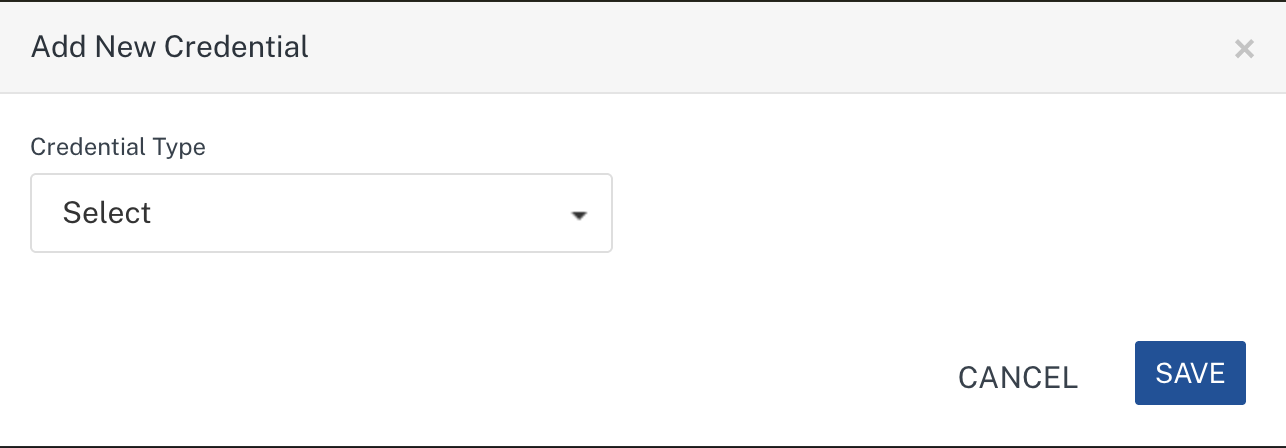
Click ADD CREDENTIALS.
-
In the Add New Credential dialog, select a Credential Type from the dropdown.
-
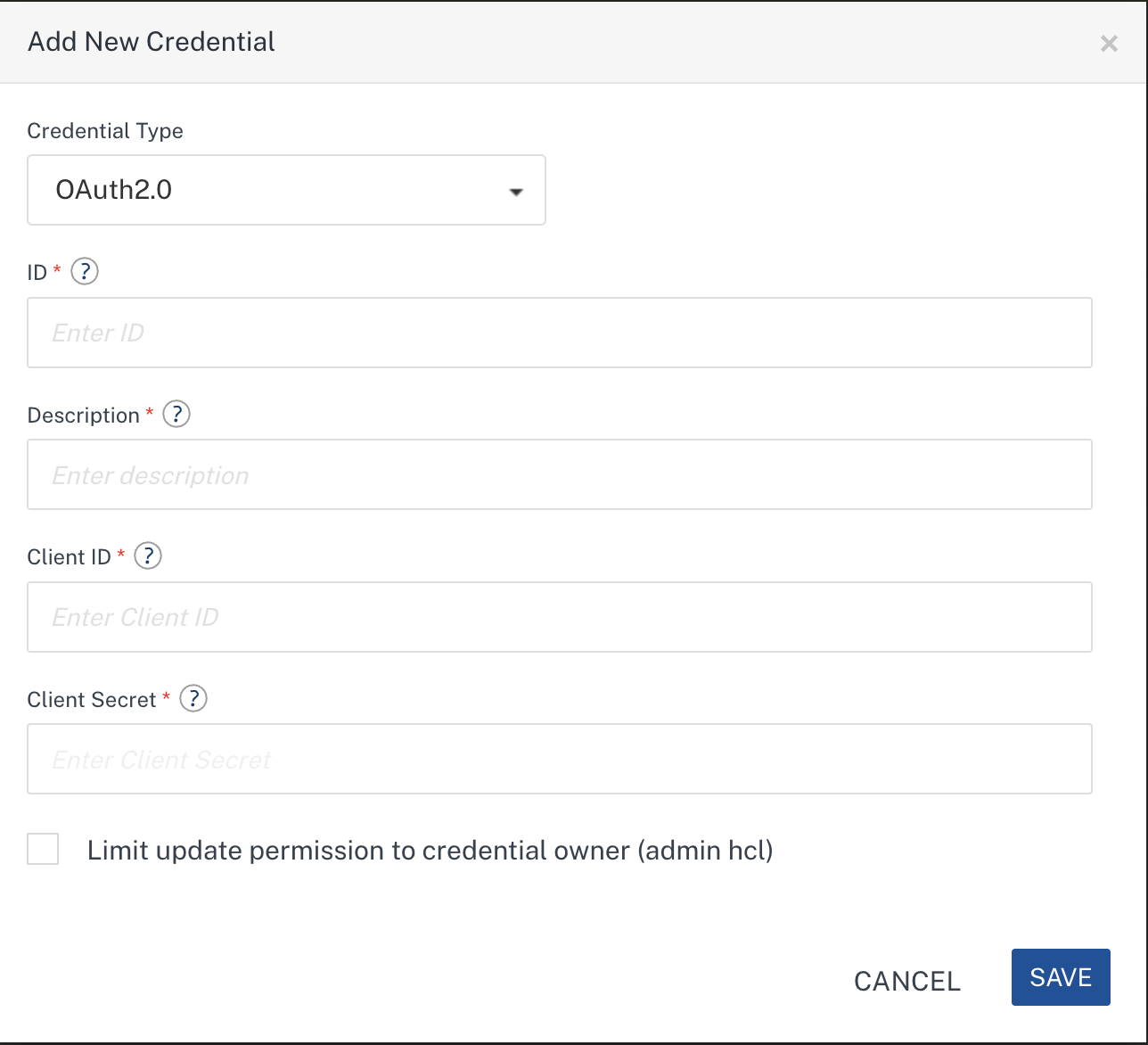
Fill in the required fields based on the selected credential type.
- ID — A unique identifier for the credential (used by developers to reference it in services).
- Description — A brief description of the credential.
- Type-specific fields (for example, Client ID and Client Secret for OAuth 2.0).
-
Optionally, select Limit update permission to credential owner to restrict editing to the creator of this credential.
-
Click Save.
Note: For the Database credential type, the JDBC URL is validated for connectivity before the credential is saved. If the URL is not valid, an error is displayed.
Note: For the Authentication Certificate credential type, you can upload
.pem,.pfx, or.p12certificate files. The maximum file size is 1 MB.
Creating Custom Keys
Custom Keys allow you to store structured JSON data that can be referenced in any service configuration using the ${credentialId.key} placeholder syntax.
- Navigate to Settings > Enterprise Key Management.
- Click the Manage Custom Keys tab.
-
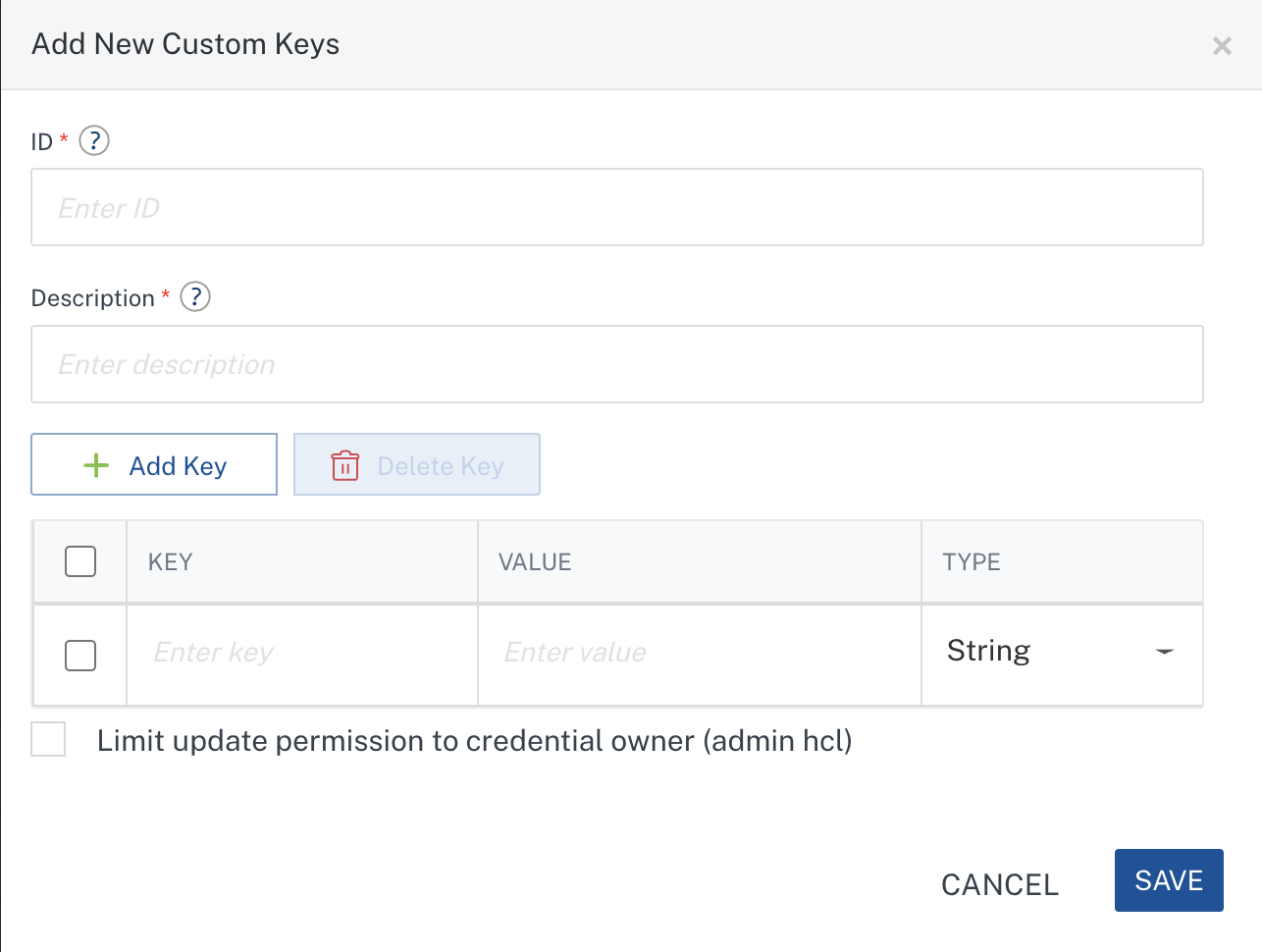
Click Add New Custom Keys.
-
In the Add New Custom Keys dialog:
- ID — Enter a unique identifier (for example,
dbcred,apikeys, orsmtp_config). This ID is used by developers in placeholder syntax. - Description — A brief description of the credential's purpose.
- ID — Enter a unique identifier (for example,
-
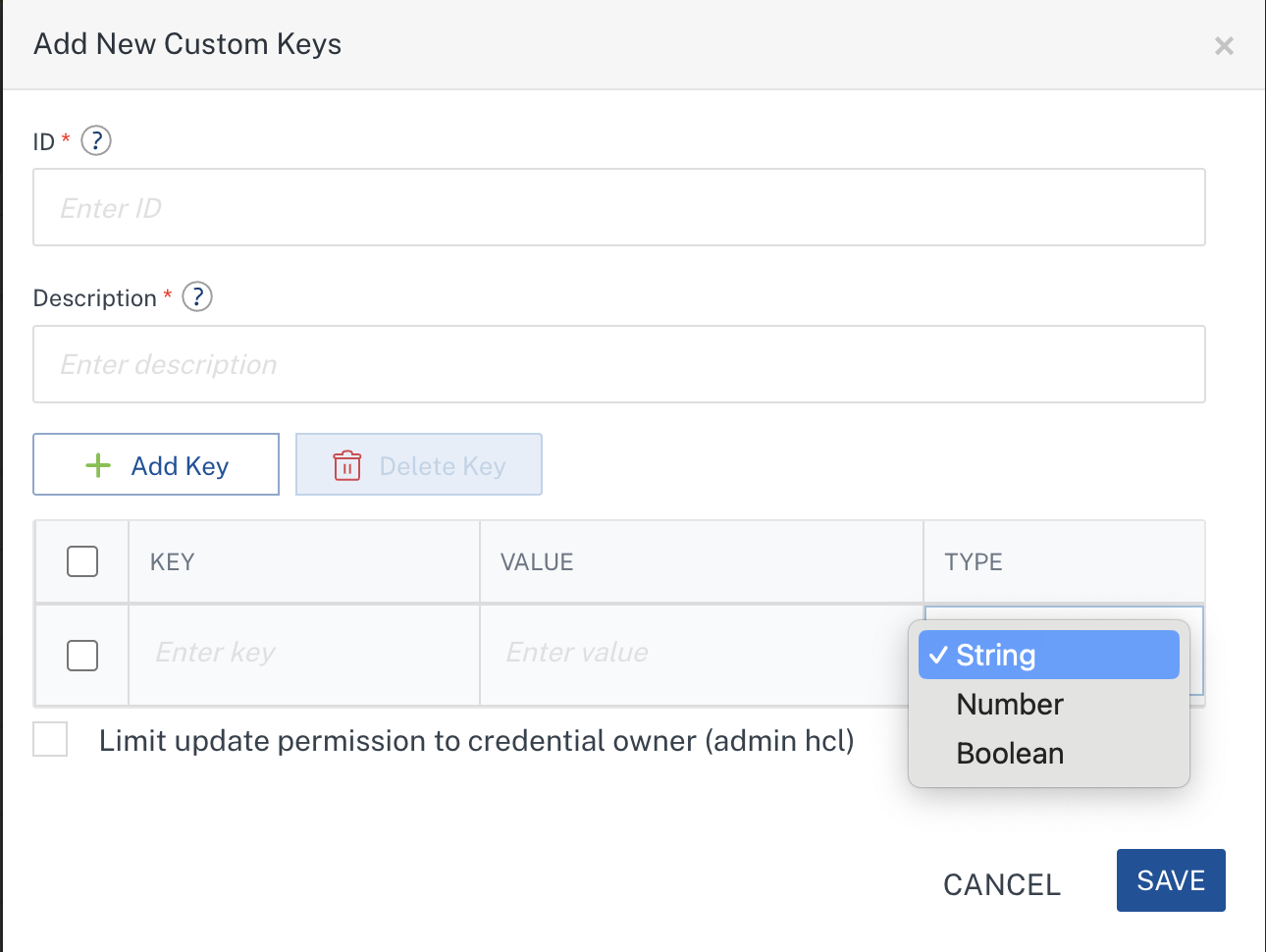
In the Key/Value Pairs section, add one or more rows:
- Key — The field name (for example,
userid,password,host, orport). - Value — The actual secret or configuration value.
- Type — Select the value type: String, Number, or Boolean.
- Key — The field name (for example,
-
Use the Add Key button to add more key/value pairs. Use the checkbox selection and Delete Key to remove rows.
-
Optionally, select Limit update permission to credential owner to restrict editing to the creator.
-
Click Save.
Value Type Validation
The Type field enforces input validation to catch errors early:
| Type | Allowed Values | Example |
|---|---|---|
| String | Any text | admin@example.com, jdbc:mysql://host:3306/db |
| Number | Valid numeric values (integers or decimals) | 3306, 99.95, -1 |
| Boolean | true, false, 1, or 0 |
true, false |
Note: If you select Number and enter a non-numeric value, an error is displayed: "Please enter valid number values for Number type rows." Similarly, for Boolean, only
true,false,1, or0are accepted.
Example Custom Credentials
Credential ID: dbcred
| Key | Value | Type |
|---|---|---|
userid |
app_admin |
String |
password |
S3cur3P@ss! |
String |
host |
db-prod.internal.net |
String |
port |
5432 |
Number |
useSSL |
true |
Boolean |
Developers reference this credential in service configurations as:
- ${dbcred.userid} → resolves to app_admin
- ${dbcred.password} → resolves to S3cur3P@ss!
- ${dbcred.host} → resolves to db-prod.internal.net
- ${dbcred.port} → resolves to 5432
- ${dbcred.useSSL} → resolves to true
Editing Credentials (Or Custom Keys - Via The Corresponding Screens)
- Navigate to Settings > Enterprise Key Management.
- Locate the credential in the credentials list (on either the Manage Credentials or Manage Custom Keys tab).
-
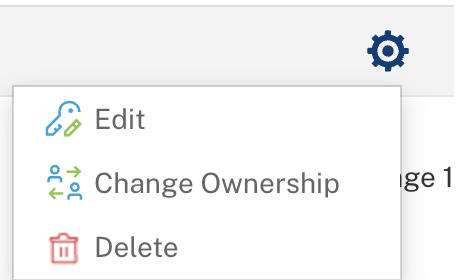
Click the gear icon (⚙) for the credential and select Edit.
-
Modify the required fields in the Edit Credential dialog.
Note: The Credential Type and ID cannot be changed after the credential is created.
Note: Sensitive fields (passwords and secrets) are displayed as
****. If you leave a masked field unchanged, the existing value is retained.Note: For Custom Keys, you can add new key/value pairs, remove existing pairs, or update values. Removing a key permanently deletes it from the credential, and any placeholder referencing that key will no longer resolve.
-
Click Save.
Deleting Credentials (Or Custom Keys - Via The Corresponding Screens)
EKM enforces delete protection for credentials that are actively referenced by services. This prevents accidental deletion of credentials that would break running services.
When No Services Reference the Credential
- Navigate to Settings > Enterprise Key Management.
- Locate the credential in the credentials list.
- Click the gear icon (⚙) on the credential row and select Delete.
-
A confirmation dialog appears:
"Are you sure you want to delete?"
-
Click Delete to confirm.
When Services Reference the Credential (Delete Blocked)
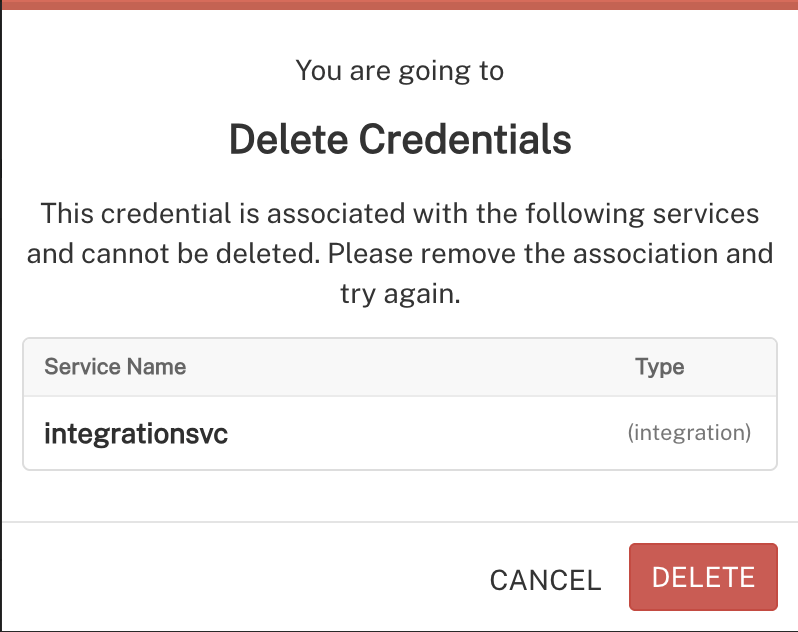
If the credential is currently used by one or more services, delete operation is blocked and you will see a message listing the affected services:
"This credential is associated with the following services and cannot be deleted. Please remove the association and try again."
The dialog displays a list of associated services including their name and type (Identity, Integration, Object, or Engagement).
Resolution Steps:
- Open each listed service configuration.
- Remove or replace the credential reference:
- For credentials: Select a different credential from the dropdown, or uncheck Use credentials from Enterprise Key Management and enter credentials manually.
- For custom keys: Update any
${credentialId.key}placeholders to reference a different credential or replace with direct values. - Save the service configurations.
- Return to EKM settings and retry delete operation.
Important: This protection ensures you never accidentally break published services by removing the credentials they depend on.
Changing Credentials (Or Custom Keys - Via The Corresponding Screens) Ownership
- Navigate to Settings > Enterprise Key Management.
- Locate the credential in the credentials list.
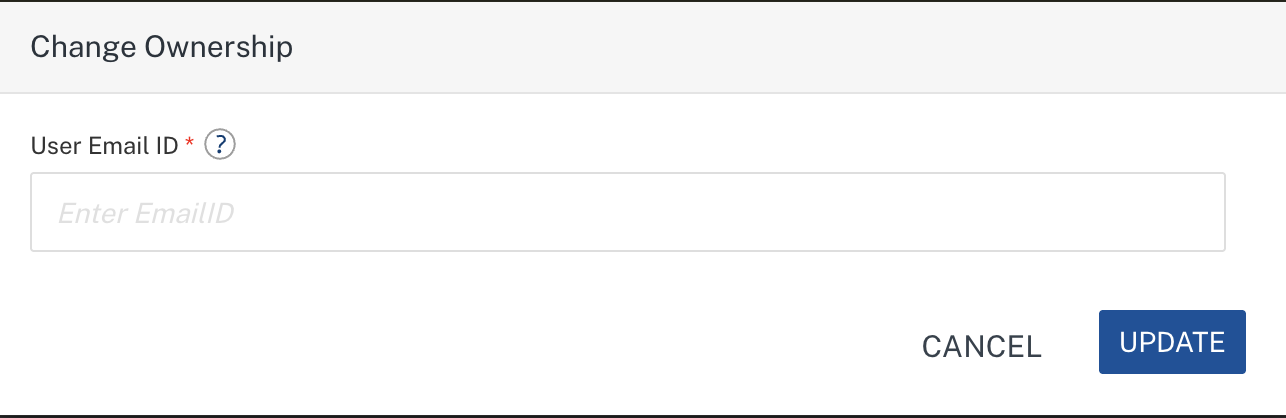
- Click the gear icon (⚙) for the credential and select Change Ownership.
-
Enter the email ID of the new owner.
-
Click UPDATE.
Note: The new owner must have the Admin or Owner role for the account. Ownership cannot be transferred to users with the Member or Developer role.
Using EKM Keys in Services
Developers can reference EKM keys when configuring Identity, Integration, Object, and Engagement services. EKM supports two usage models:
- Credentials Selection — Select a credential ID from a dropdown; the platform automatically maps credential fields to service adapter fields.
- Custom Keys — Enter
${credentialId.key}syntax in any configuration field; the platform resolves the placeholder to the actual value at test/publish time.
Both models can co-exist within the same service configuration.
Using Custom Keys
Custom Keys uses a placeholder syntax that developers enter directly into service configuration fields:
Syntax: ${credentialId.key}
Where:
- credentialId — The unique ID of the Custom Keys (as created by an Admin).
- key — The specific key within that credential's JSON metadata.
Naming Constraints:
- Both credentialId and key may only contain: letters (A-Z, a-z), digits (0-9), underscores (_), and hyphens (-).
- IDs and keys are case-sensitive.
Supported Services
Custom Keys Pair (${credentialId.key}) can be used in:
| Service Type | Supported Fields |
|---|---|
| Identity Services | Provider configuration fields (Client ID, Client Secret, OAuth URLs, custom parameters) |
| Integration Services | Endpoint URL, authentication fields, custom headers, request parameters, connection parameters |
| Object Services | Endpoint configuration fields, connection parameters |
How Placeholder Resolution Works
-
At design time: Developers enter placeholders like
${dbcred.userid}in configuration fields. The placeholder text is stored as-is — no secret values are exposed in the console. -
At test time: When a developer tests a service, the platform resolves all placeholders in the configuration before executing the test. The resolved values are used only for the duration of the test and are never stored in the service configuration.
-
At publish time: When an application is published to a runtime environment, all placeholders are resolved and the actual values are securely embedded into the published artifacts.
Note: If a placeholder cannot be resolved (e.g., the credential ID does not exist, or the key is not found in the credential's metadata), the placeholder text remains unchanged in the configuration. For custom keys this is the best match resolution — it will not cause rejection of the pattern but the service may not function correctly at runtime until the credential is properly configured. For credentials, if the corresponding id is not found, publishing the corresponding service is blocked.
Example: Using Custom Keys in an Integration Service
Suppose an Admin has created Custom Keys with ID orderdb:
| Key | Value |
|---|---|
jdbcUrl |
jdbc:mysql://prod-db:3306/orders |
user |
order_svc |
pass |
Prod!Secret |
A developer configuring a Database Integration service can enter:
| Field | Value Entered |
|---|---|
| Database URL | ${orderdb.jdbcUrl} |
| User ID | ${orderdb.user} |
| Password | ${orderdb.pass} |
When the developer clicks Test Connection, the platform resolves these placeholders securely and tests connectivity with the actual values. The developer never sees the resolved secrets.
Identity Services (OAuth2.0)
EKM custom Keys can be used in any identity providers.
EKM credentials can be used in OAuth2 identity providers (e.g., Okta, Google, Microsoft, Facebook, LinkedIn, Amazon, Yahoo, Instagram, Box).
Using Credentials
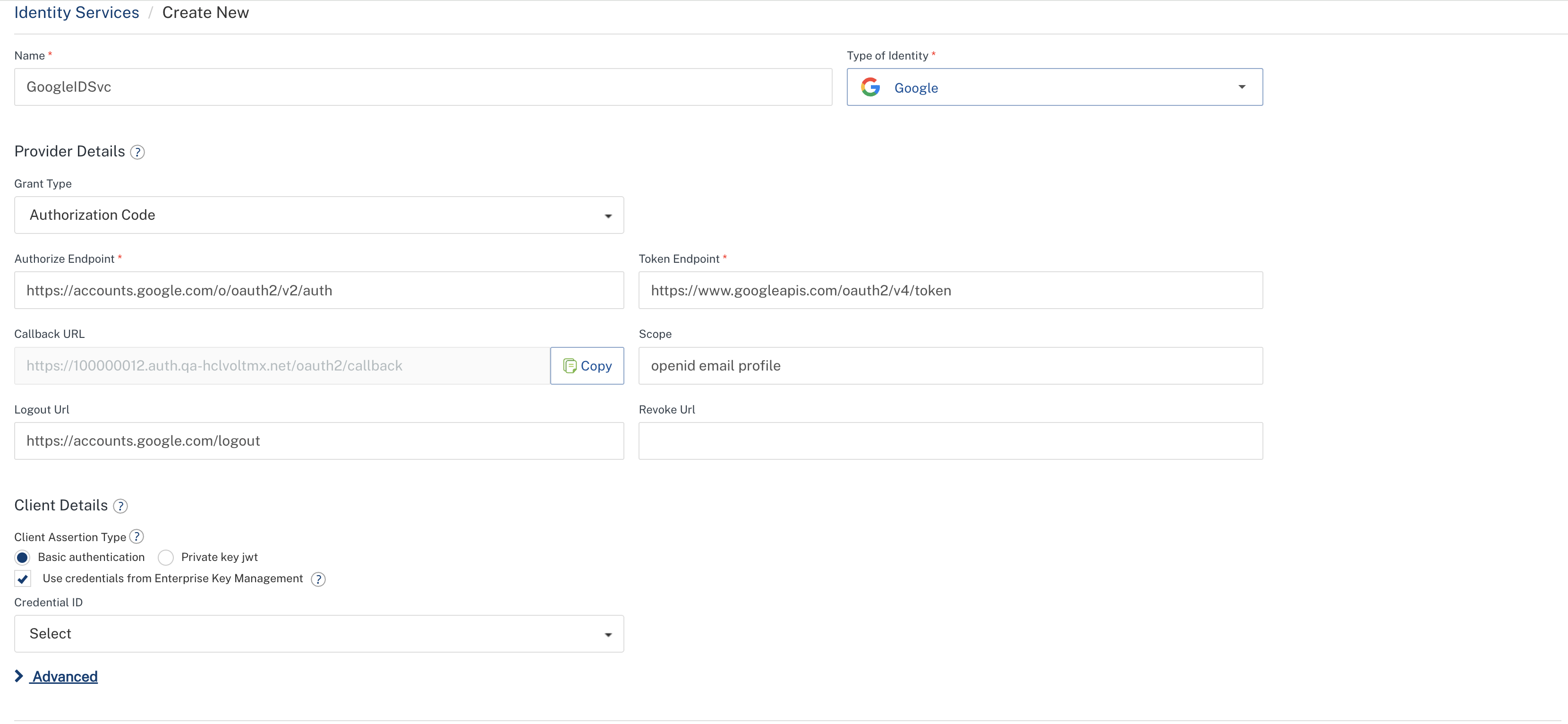
- Navigate to your app, then go to Identity, and select or create an OAuth2 provider.
-
The Use credentials from Enterprise Key Management checkbox is automatically selected if a corresponding credential exists in Enterprise Key Management. If no matching credential exists, the checkbox remains unselected.
-
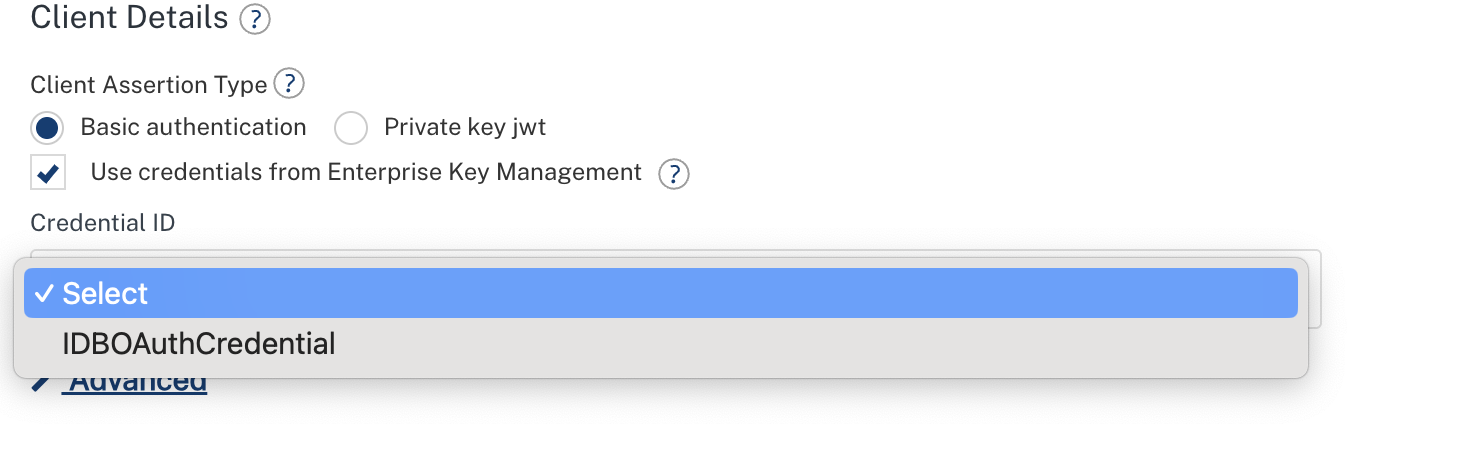
A Credential ID drop-down list appears. Select the appropriate credential ID.
-
When Enterprise Key Management is enabled, the Client ID and Client Secret fields are hidden. These values are automatically resolved from the selected Enterprise Key Management credential.
-
Save the identity provider configuration.
Using Custom Keys
- Navigate to your app > Identity > select or create a provider.
- In any supported configuration field, enter
${credentialId.key}(e.g.,${oauth_cred.client_id}). - Save the identity provider configuration.
- When testing login or at publish time, placeholders are resolved automatically.
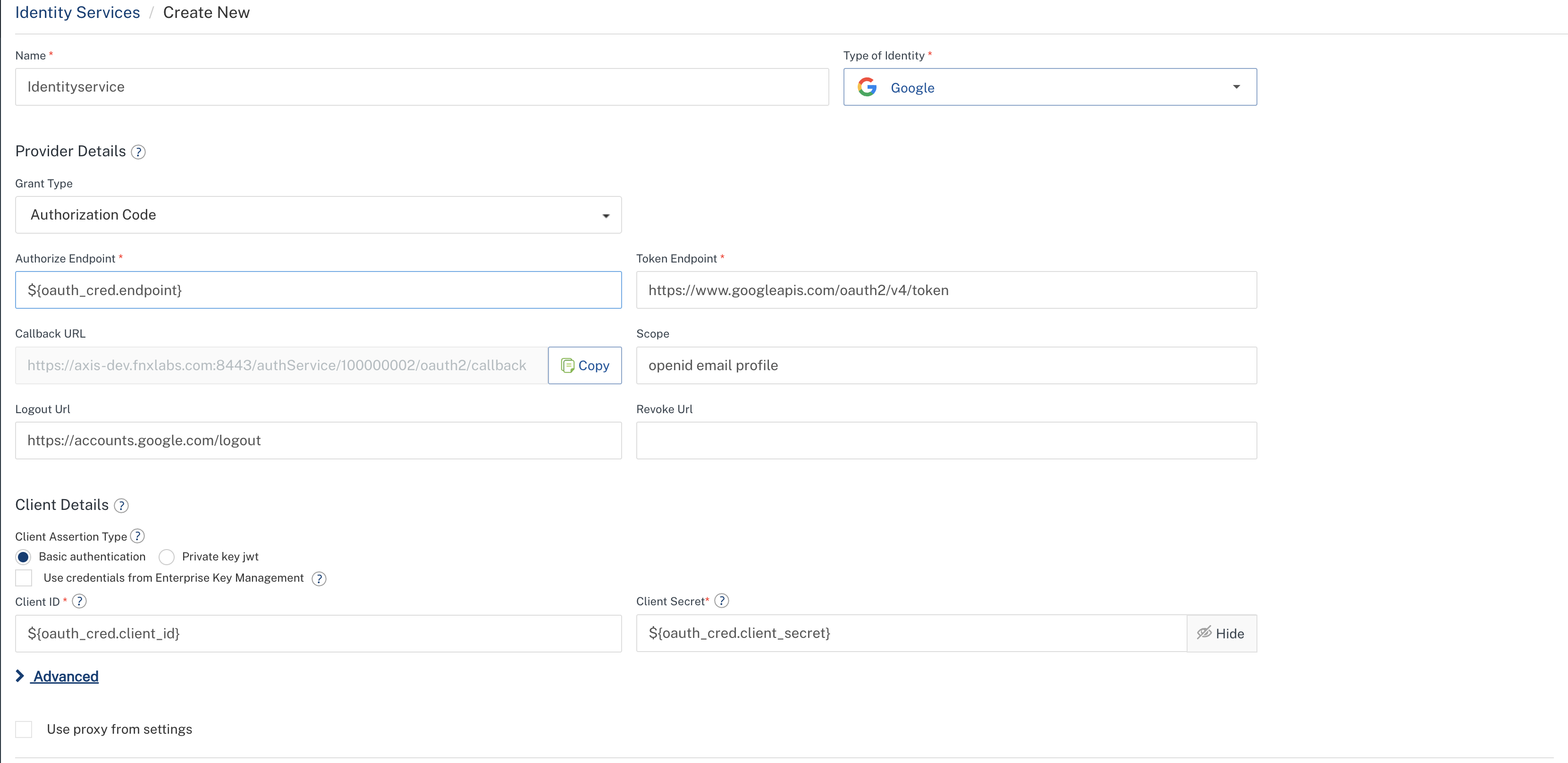
Note: The Test Login functionality works with both credentials and custom keys. When testing, the credential values are resolved securely before authenticating with the provider.
Integration Services
EKM Custom Keys can be used in any integration service adapters.
EKM Credentials can be used with the following integration service adapters:
-
Technology Adapters:
-
XML, SOAP, JSON, API Proxy, Text — Use Username/Password credentials for Basic or NTLM authentication.
-
Business Adapters:
-
AWS API Gateway — Use AWSAPIGateway credentials.
- Salesforce — Use Salesforce credentials.
- Relational Database — Use Database credentials.
- MongoDB — Use MongoDB credentials.
- AWS S3, Cloudian — Use S3 Bucket credentials.
- Red Hat PAM — Use Red Hat PAM credentials.
Steps to Configure Credentials For Usage
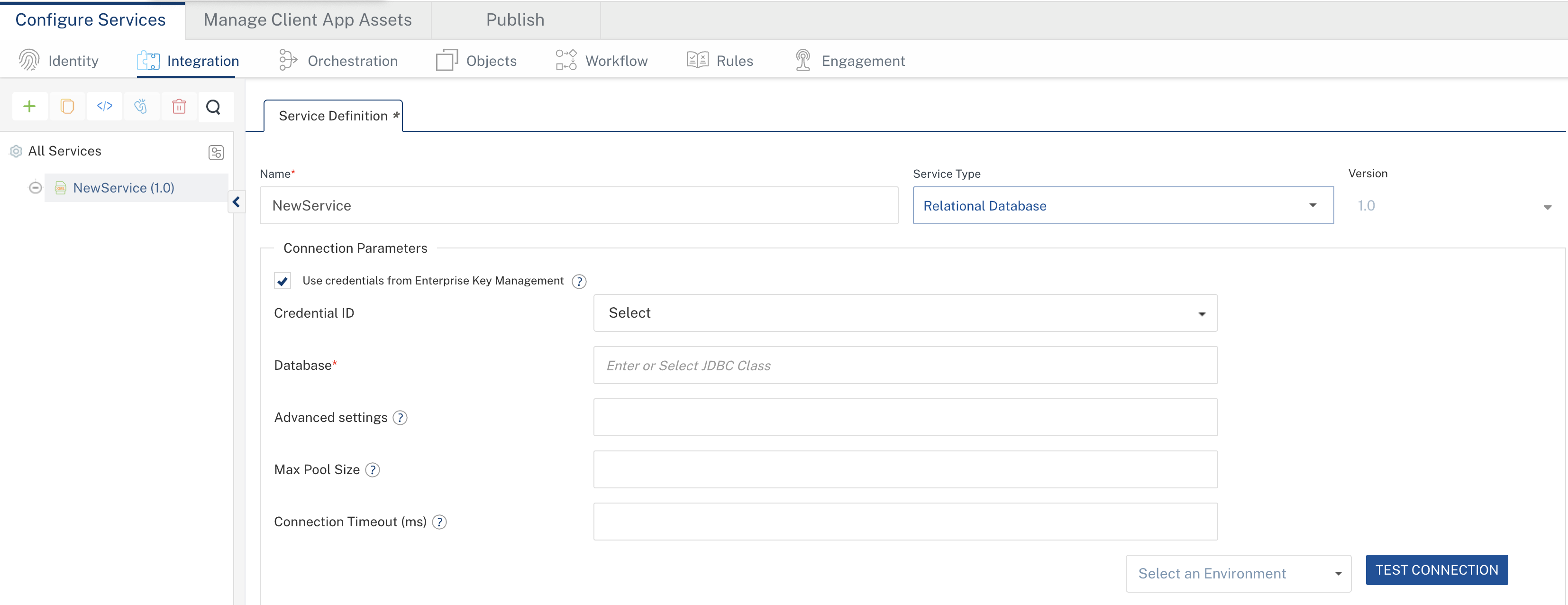
- Navigate to your app, then go to Integration, and select or create a service.
- In the service configuration, locate the Authentication section (for technology adapters) or the Connection Parameters section (for business adapters).
-
The Use credentials from Enterprise Key Management checkbox is automatically selected if a corresponding credential exists in Enterprise Key Management.
-
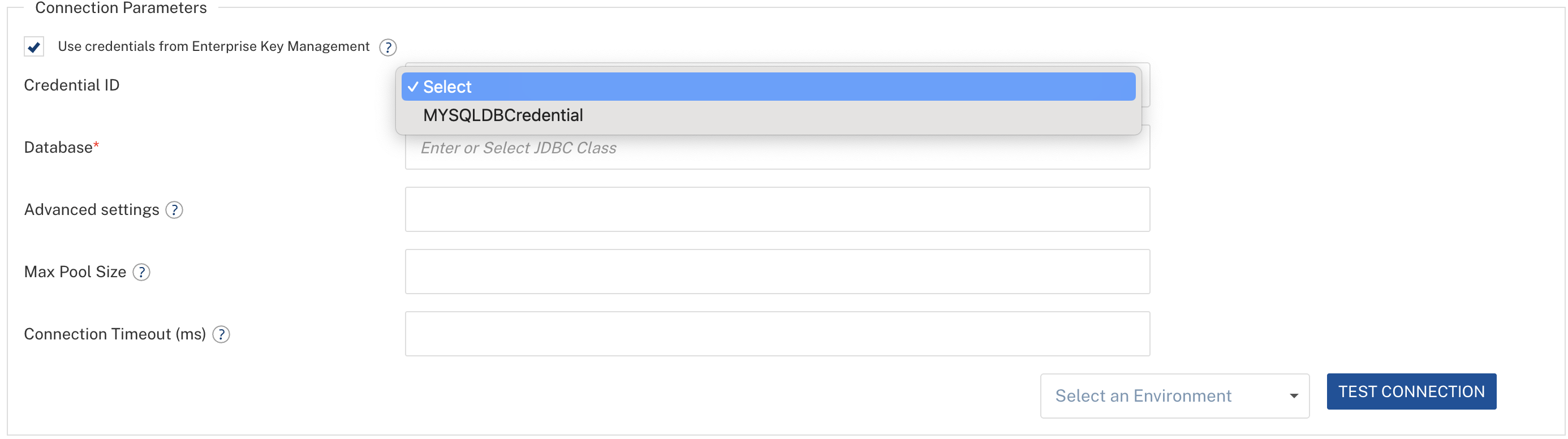
A Credential ID drop-down list appears. Select the appropriate credential ID.
-
The individual credential fields (such as User ID, Password, and Access Key) are hidden. Their values are automatically resolved from the selected Enterprise Key Management credential.
-
Save the service configuration.
Steps to Configure Custom Keys For Usage
- Navigate to your app > Integration > select or create a service.
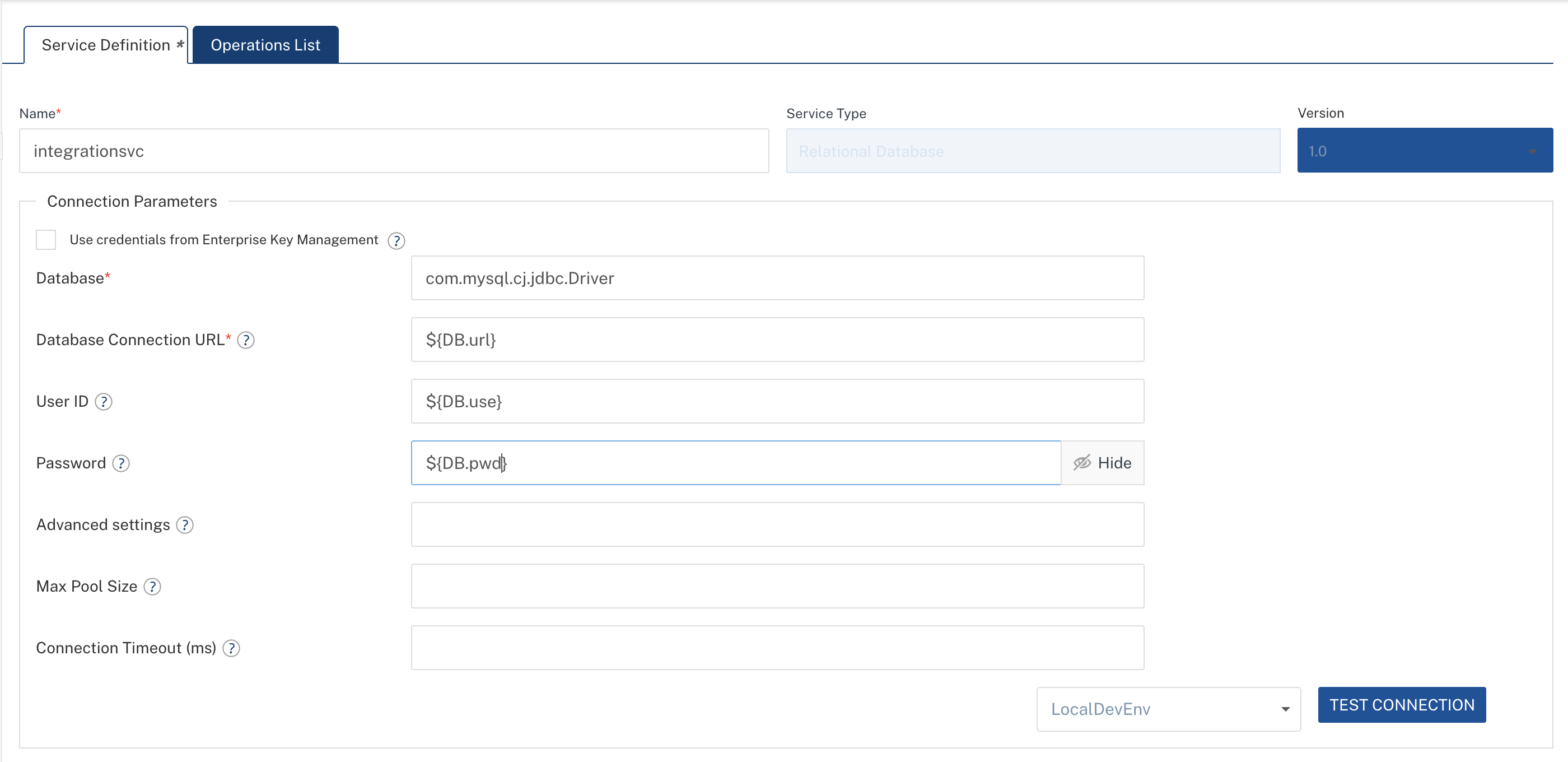
- In any configuration field (endpoint URL, username, password, custom headers, etc.), enter the placeholder syntax:
${credentialId.key}. - Save the service configuration.
- Use Test to verify connectivity — placeholders are resolved before the test request is sent.
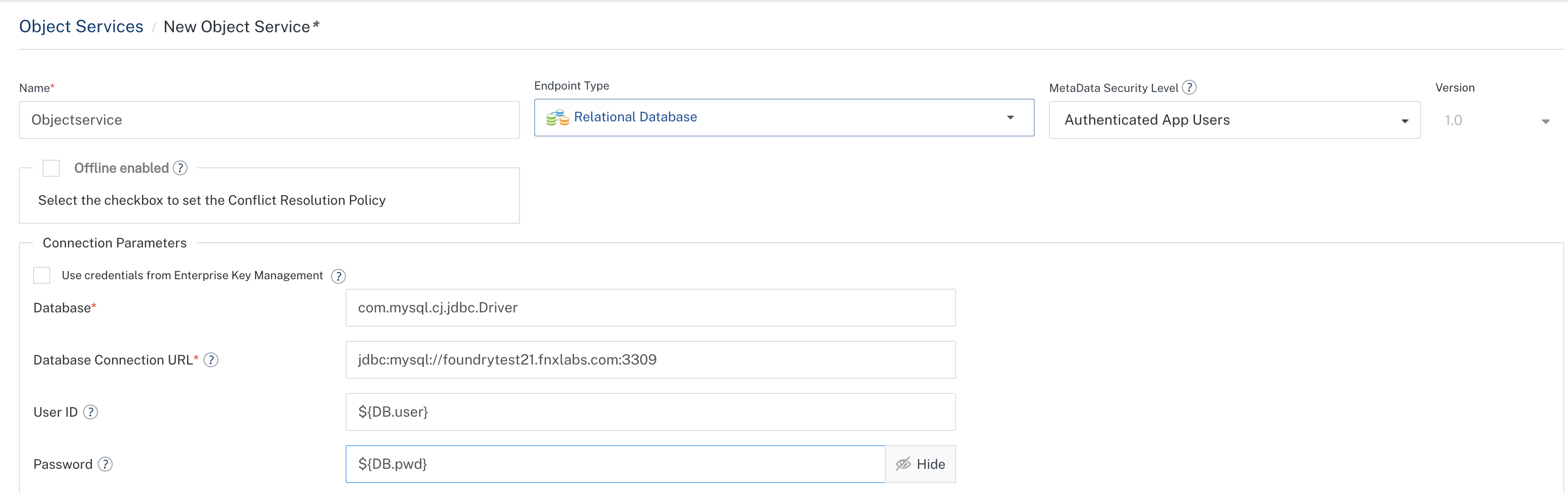
Object Services
EKM Custom Keys can be used in any Object service adapters.
EKM credentials can be used with the following Object service adapters:
- Salesforce — Use Salesforce credentials.
- Relational Database — Use Database credentials.
- MongoDB — Use MongoDB credentials.
- AWS S3, Cloudian — Use S3 Bucket credentials.
Steps to Configure Credentials For Usage
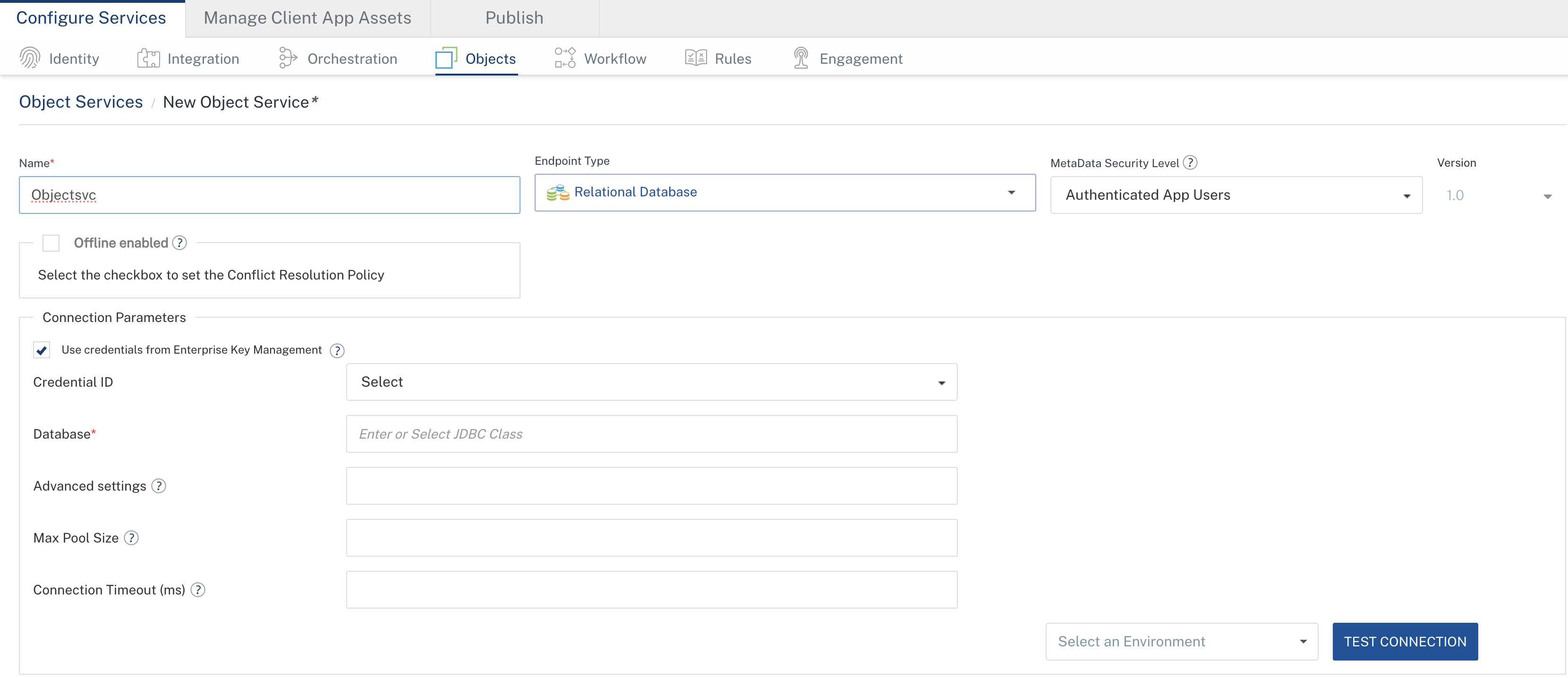
- Navigate to your app, then go to Objects, and select or create an Object service.
-
The Use credentials from Enterprise Key Management checkbox is automatically selected if a corresponding credential exists in Enterprise Key Management.
-
Select the appropriate Credential ID from the drop-down list.
-
Save the endpoint configuration.
Steps to Configure Custom Keys For Usage
- Navigate to your app > Objects > select or create an Object service.
- In supported endpoint configuration fields, enter
${credentialId.key}placeholders. - Save the endpoint configuration.
Engagement Services
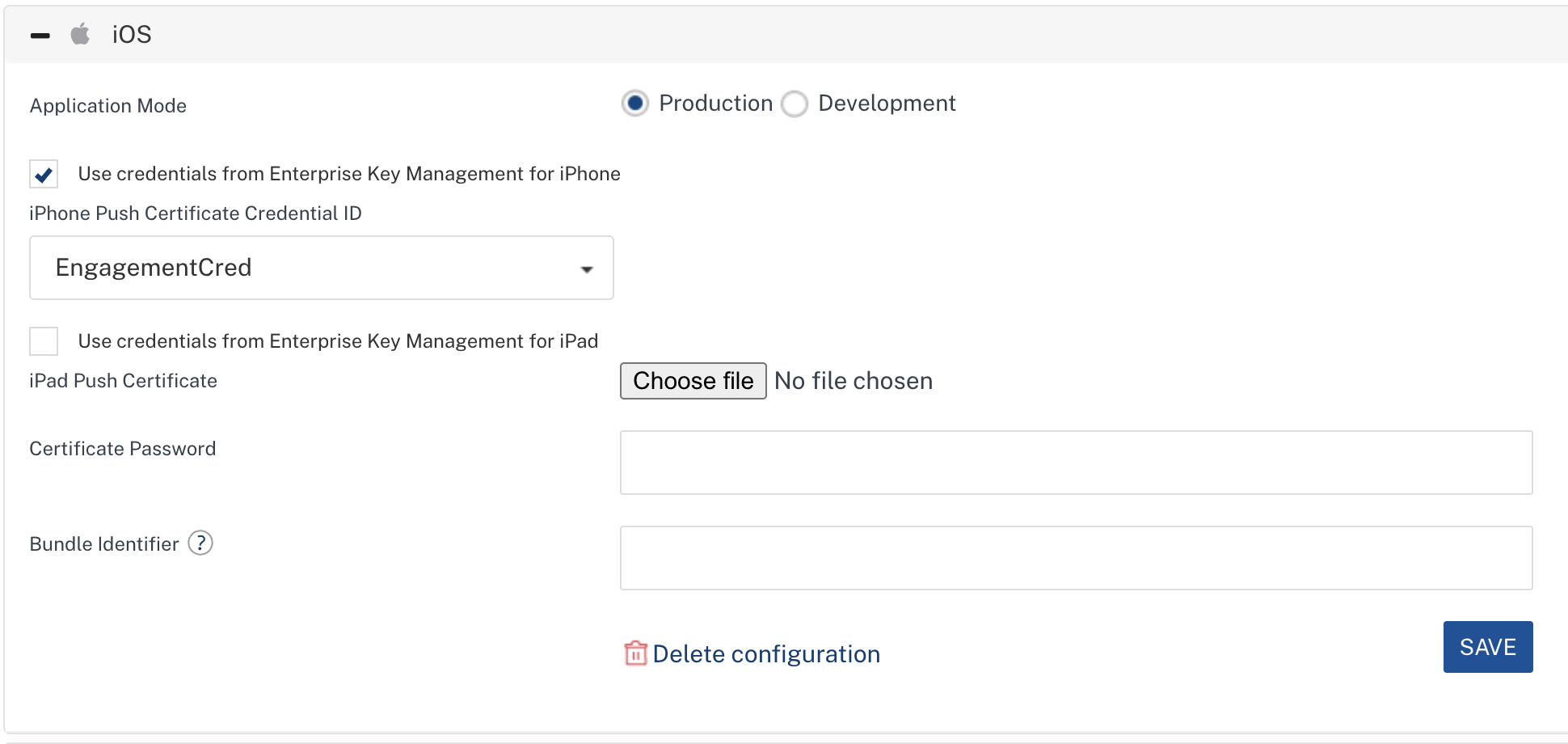
EKM credentials can be used with Engagement (messaging) services for managing iOS push notification certificates.
EKM custom keys cannot be used in Engagement services.
Using Credentials (KMS Push Certificate)
EKM supports separate push certificate credentials for each iOS device profile:
| Device Profile | Description |
|---|---|
| iPhone Production | Push certificate for iPhone production builds |
| iPad Production | Push certificate for iPad production builds |
| iPhone Development | Push certificate for iPhone development/debug builds |
| iPad Development | Push certificate for iPad development/debug builds |
Each device profile has its own EKM credential toggle and credential ID selection.
- Navigate to your Engagement service configuration (Engagement > iOS).
- Enable the Use credentials from Enterprise Key Management toggle for the desired device profile (iPhone Prod, iPad Prod, iPhone Dev, or iPad Dev).
- Select the Credential ID from the dropdown (must be a KMS Push Certificate credential type).
- The certificate fields are resolved from the selected EKM credential during runtime.
- Save the configuration.
Credentials / Custom Keys Resolution During App Publish
When an application is published to a runtime environment, all EKM credentials / custom keys references in the service configurations are automatically resolved to their actual secret values. This resolution happens securely during the publish process:
- At design time, service configurations reference only credential IDs (via dropdown selection or
${credentialId.key}placeholders) — no actual secrets are stored in app configurations. - At publish time, credential IDs and placeholders are resolved to actual values and securely embedded into the published application artifacts.
- At runtime, the middleware operates with the resolved actual credentials.
Import and Export Behavior
Exporting Applications with EKM References
When you export a Foundry application that uses EKM credentials:
- Service configurations contain only credential IDs and placeholder references (e.g.,
${dbcred.userid}). - No actual secret values are included in the export package. This ensures credentials are not leaked when sharing application packages.
Importing Applications with EKM References
When importing a Foundry application package into a target environment, the platform validates EKM credential references and provides warnings for credentials / custom keys that cannot be mapped in the local configuration.
Import Validation Behavior
During the import process, the platform scans the application package for:
- Credentials — Credential IDs referenced via the
preConfigCredValuefield in service configurations. - Custom Keys — All
${credentialId.key}patterns found in service configuration values.
For each referenced credential, the platform checks whether it exists in the target workspace. Missing credentials are collected and returned as warnings in the import response.
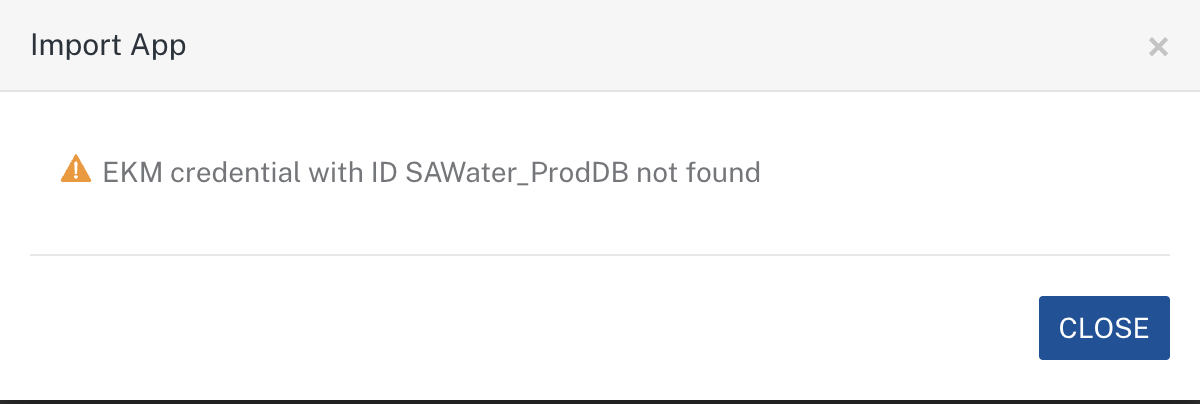
Import Warning Behavior
- Warnings do not block the import. The application is imported successfully even if some keys are missing.
- Warnings are displayed in the import result dialog, so administrators can take corrective action.
- Warning messages follow the format:
EKM credential with ID <credentialId> not found
Resolving Import Warnings
After importing an application with EKM warnings:
- Review the list of missing keys in the import result.
- Navigate to Settings > Enterprise Key Management.
- Create the missing credentials with the same IDs as referenced in the imported application.
- Verify service configurations in the imported app — once credentials exist, services will resolve correctly on next test or publish.
Important: Always create the required EKM credentials in the target environment before publishing the imported application. Publishing with missing credentials may cause runtime failures.
EKM APIs for CI/CD Automation
You can automate EKM credential management using the Foundry workspace REST APIs. These APIs help automate creating, updating, deleting, and listing credentials without using the Foundry Console.
Note: All EKM APIs are secured and require authentication via the
X-VoltMX-Authorizationheader.
Supported EKM APIs
| API | Description |
|---|---|
| createCredentials | Create a new EKM credential (Credentials or Custom Keys) |
| getCredentials | Retrieve all credentials in the account |
| getCredentialIDByType | Retrieve credential IDs filtered by type |
| updateCredential | Update an existing credential |
| deleteCredential | Delete a credential by ID (blocked if in use) |
| changeOwnership | Transfer credential ownership to another admin |
| service-maps | View which services reference a credential |
Base URL
https://<workspace-host>/api/v1/ws/{workspaceId}/ekm
Replace <workspace-host> with your workspace URL (e.g., 100000012.workspace.sit-hclvoltmx.net for Cloud, or your on-premises hostname).
createCredentials
Endpoint:
POST https://<workspace-host>/api/v1/ws/{workspaceId}/ekm/createCredentials
Headers:
| Header | Required | Description |
|---|---|---|
X-VoltMX-Authorization |
Yes | Auth token |
Content-Type |
Yes | application/json |
Request Body (Credential):
{
    "credentialId": "my_oauth_cred",
    "credentialType": "OAuth2.0",
    "description": "OAuth credential for Okta",
    "credOwnerOnly": false,
    "meta": "{\"client_id\":\"abc123\",\"client_secret\":\"secret456\"}"
}
Request Body (Custom Keys):
{
    "credentialId": "dbcred",
    "credentialType": "Custom Key/Value Pair",
    "description": "Database credentials for order service",
    "credOwnerOnly": false,
    "meta": "{\"userid\":\"app_admin\",\"password\":\"S3cur3P@ss!\",\"host\":\"db-prod.internal.net\",\"port\":5432,\"useSSL\":true}"
}
Request Body Fields:
| Field | Type | Required | Description |
|---|---|---|---|
credentialId |
String | Yes | Unique identifier (max 50 chars) |
credentialType |
String | Yes | One of the supported credential types (see table below) |
description |
String | Yes | Brief description (max 80 chars) |
credOwnerOnly |
Boolean | No | If true, only the creator and Owners can edit/delete |
meta |
String | Yes | JSON string containing type-specific key-value pairs |
Supported credentialType Values:
| Value | Credential Type |
|---|---|
OAuth2.0 |
OAuth2.0 |
Database |
Database |
S3 Bucket |
S3 Bucket |
Salesforce |
Salesforce |
Username/Password |
Username/Password |
AWSAPIGateway |
AWS API Gateway |
Red Hat PAM |
Red Hat PAM |
MongoDB |
MongoDB |
Secret Text Credentials |
Secret Text |
Authentication Certificate |
Authentication Certificate |
KMS Push Certificate |
KMS Push Certificate |
Custom Key/Value Pair |
Custom Key/Value Pair |
Meta Fields by Credential Type:
| Credential Type | Meta Fields |
|---|---|
OAuth2.0 |
client_id, client_secret |
Database |
jdbcUrl, userId, password |
S3 Bucket |
accessKey, accessSecret, backendURL, region, bucketPath, serviceNamespace |
Salesforce |
loginUrl, clientId, clientSecret, username, password |
Username/Password |
userid, pwd |
AWSAPIGateway |
AWSAPIGatewayAccessKeyId, AWSAPIGatewaySecretKey |
Red Hat PAM |
endPointUrl, username, password |
MongoDB |
host, port, databaseName, username, password |
Secret Text Credentials |
secretText |
Authentication Certificate |
See Authentication Certificate Sub-Types |
KMS Push Certificate |
certificate_file, certificate_file_name, certificate_password, bundle_identifier |
Custom Key/Value Pair |
Any user-defined keys with String, Number, or Boolean values |
Sample Response (201 Created):
{
    "credentialId": "my_oauth_cred",
    "credentialType": "OAuth2.0",
    "workspaceId": "100000012",
    "meta": "{\"client_id\":\"abc123\",\"client_secret\":\"****\"}",
    "description": "OAuth credential for Okta",
    "credOwnerOnly": false,
    "createdBy": "admin@example.com",
    "updatedBy": "admin@example.com",
    "createdAt": "2026-03-31T10:00:00Z",
    "updatedAt": "2026-03-31T10:00:00Z"
}
Note: Sensitive fields in the response are always masked as
****.
Validations:
credentialIdmust be unique within the workspace.credentialTypemust be a supported type.- For Credentials,
metamust contain only the allowed keys for the selected type. - For Custom Keys,
metacan contain any user-defined keys. Values must be of type String, Number, or Boolean. - Only Admin or Owner users can call this API.
getCredentials
Endpoint:
GET https://<workspace-host>/api/v1/ws/{workspaceId}/ekm/getCredentials
Headers:
| Header | Required | Description |
|---|---|---|
X-VoltMX-Authorization |
Yes | Auth token |
Sample Response (200 OK):
[
    {
        "credentialId": "my_oauth_cred",
        "credentialType": "OAuth2.0",
        "workspaceId": "100000012",
        "meta": "{\"client_id\":\"abc123\",\"client_secret\":\"****\"}",
        "description": "OAuth credential for Okta",
        "credOwnerOnly": false,
        "createdBy": "admin@example.com",
        "updatedBy": "admin@example.com",
        "createdAt": "2026-03-31T10:00:00Z",
        "updatedAt": "2026-03-31T10:00:00Z"
    },
    {
        "credentialId": "dbcred",
        "credentialType": "Custom Key/Value Pair",
        "workspaceId": "100000012",
        "meta": "{\"userid\":\"****\",\"password\":\"****\",\"host\":\"****\",\"port\":\"****\",\"useSSL\":\"****\"}",
        "description": "Database credentials for order service",
        "credOwnerOnly": false,
        "createdBy": "admin@example.com",
        "updatedBy": "admin@example.com",
        "createdAt": "2026-06-15T08:30:00Z",
        "updatedAt": "2026-06-15T08:30:00Z"
    }
]
Validations:
- Only Admin or Owner users can call this API.
getCredentialIDByType
Endpoint:
GET https://<workspace-host>/api/v1/ws/{workspaceId}/ekm/getCredentialIDByType?credentialType={type}
Query Parameters:
| Parameter | Required | Description |
|---|---|---|
credentialType |
Yes | Filter by credential type (e.g., OAuth2.0, Custom Key/Value Pair) |
Headers:
| Header | Required | Description |
|---|---|---|
X-VoltMX-Authorization |
Yes | Auth token |
Sample Response (200 OK):
["my_oauth_cred", "prod_oauth_cred"]
Note: This API returns only credential IDs (not full details) and is used by the Foundry Console to populate credential dropdowns. All roles (including Members/Developers) can call this API.
updateCredential
Endpoint:
PUT https://<workspace-host>/api/v1/ws/{workspaceId}/ekm/updateCredential
Headers:
| Header | Required | Description |
|---|---|---|
X-VoltMX-Authorization |
Yes | Auth token |
Content-Type |
Yes | application/json |
Request Body:
{
    "credentialId": "dbcred",
    "credentialType": "Custom Key/Value Pair",
    "description": "Updated DB credentials",
    "credOwnerOnly": true,
    "meta": "{\"userid\":\"new_admin\",\"password\":\"NewP@ss!\",\"host\":\"db-prod-v2.internal.net\",\"port\":5432,\"useSSL\":true}"
}
Note:
credentialTypeandcredentialIdcannot be changed. Include them for identification.Note: To keep an existing sensitive value unchanged, pass its masked value (
****). The system will preserve the original value.
Validations:
- Only Admin or Owner users can call this API.
- If
credOwnerOnlyistrueon the credential, only the credential owner and account Owners can update it. - For Credentials,
metamust contain only allowed keys for the credential type. - For Custom Keys, keys can be added or removed freely. Removed keys are deleted from storage.
Sample Response (200 OK): Same structure as Create Credential response.
deleteCredential
Endpoint:
DELETE https://<workspace-host>/api/v1/ws/{workspaceId}/ekm/deleteCredential/{credentialID}
Path Parameters:
| Parameter | Required | Description |
|---|---|---|
credentialID |
Yes | The credential ID to delete |
Headers:
| Header | Required | Description |
|---|---|---|
X-VoltMX-Authorization |
Yes | Auth token |
Behavior:
- If the credential is not referenced by any services: delete succeeds and returns
200 OKwith empty body. - If the credential is referenced by one or more services: delete is blocked and returns an error response with the list of associated services.
Sample Error Response (Credential In Use):
{
    "message": "This credential is associated with services and cannot be deleted. Remove association first.",
    "associatedServices": [
        {
            "serviceName": "OrderService",
            "serviceType": "integration"
        },
        {
            "serviceName": "UserAuth",
            "serviceType": "identity"
        }
    ]
}
Validations:
- Only Admin or Owner users can call this API.
- If
credOwnerOnlyistrueon the credential, only the credential owner and account Owners can delete it. - Delete is blocked if the credential is actively referenced by any services (checked via credential-service mapping).
changeOwnership
Endpoint:
PUT https://<workspace-host>/api/v1/ws/{workspaceId}/ekm/changeOwnership
Headers:
| Header | Required | Description |
|---|---|---|
X-VoltMX-Authorization |
Yes | Auth token |
Content-Type |
Yes | application/json |
Request Body:
{
    "id": "my_oauth_cred",
    "emailID": "newowner@example.com"
}
Request Body Fields:
| Field | Type | Required | Description |
|---|---|---|---|
id |
String | Yes | The credential ID to transfer |
emailID |
String | Yes | Email of the new owner |
Validations:
- Only Admin or Owner users can call this API.
- The new owner must be an Admin or Owner on the account.
- If
credOwnerOnlyistrue, only the current credential owner and account Owners can transfer ownership.
Sample Response (200 OK): Returns the updated credential with masked meta.
service-maps
Endpoint:
GET https://<workspace-host>/api/v1/ws/{workspaceId}/ekm/{credentialID}/service-maps
Path Parameters:
| Parameter | Required | Description |
|---|---|---|
credentialID |
Yes | The credential ID to look up |
Headers:
| Header | Required | Description |
|---|---|---|
X-VoltMX-Authorization |
Yes | Auth token |
Purpose: Retrieve a list of all services that reference a specific credential. Useful for understanding credential dependencies before making changes.
Sample Response (200 OK):
[
    {
        "credentialId": "dbcred",
        "workspaceId": "100000012",
        "serviceId": "svc-guid-001",
        "serviceName": "OrderService",
        "serviceType": "integration",
        "appId": "app-guid-001",
        "createdAt": "2026-06-15T08:30:00Z",
        "updatedAt": "2026-06-15T08:30:00Z"
    },
    {
        "credentialId": "dbcred",
        "workspaceId": "100000012",
        "serviceId": "svc-guid-002",
        "serviceName": "InventoryObjects",
        "serviceType": "object",
        "appId": "app-guid-001",
        "createdAt": "2026-06-15T09:00:00Z",
        "updatedAt": "2026-06-15T09:00:00Z"
    }
]
Validations:
- Only Admin or Owner users can call this API.
Limitations
- EKM is only available for Admin and Owner roles. Members and Developers can only select credential IDs or use placeholder syntax when configuring services.
- Credential types and IDs cannot be changed after creation.
- Each credential ID must be unique within an account.
- Certificate file uploads for the Authentication Certificate type are limited to 1 MB.
- Custom Keys resolution is best match. If a key is not found, the placeholder text remains unchanged — it does not cause an error during save.
- Custom Keys support only flat key/value structures. Nested JSON objects within credential values are not supported.
- The
${credentialId.key}placeholder syntax is reserved by EKM. Avoid using${...}patterns in configuration values, particularly with EKM configured keys, for non-EKM purposes.
Notes
- All credential values are encrypted and securely stored.
- Sensitive fields (passwords, secrets, access keys) are populated as
****in the Foundry Console and API responses. - EKM is an account-level feature. Credentials created in one account are not accessible from other accounts.
- When editing a credential, if you leave a masked sensitive field unchanged, the original value is preserved.
- Ownership transfer requires the new owner to be an Admin or Owner on the account.
- When the Limit update permission to credential owner option is enabled, only the key's creator (and account Owners) can edit or delete.
- The credential-service mapping is automatically maintained by the platform when services are saved, cloned, imported, or deleted. No manual action is required to keep mappings current.
Troubleshooting
Service Test Fails After Adding Placeholder
Symptom: A service test returns an error (e.g., authentication failure or connection refused) after adding ${credentialId.key} placeholders.
Possible Causes:
- Credential ID is misspelled. Verify the ID matches exactly (case-sensitive) with the credential created in EKM settings.
- Key name is wrong. Verify the key name after the dot matches a key in the credential's metadata (case-sensitive).
- Credential does not exist. Ensure the credential has been created in the current workspace. Credentials from other accounts/workspaces are not accessible.
- Developer does not have access. Ensure the credential's workspace matches where the service is configured.
Resolution: Navigate to Settings > Enterprise Key Management > Manage Custom Keys and verify the credential ID and key names match what is used in the service configuration.
Cannot Delete a Credential / Custom Key
Symptom: Clicking Delete on a credential shows an error listing associated services.
Cause: The key is referenced by one or more services. Delete protection prevents removal of key's that are actively in use.
Resolution:
- Review the list of associated services shown in the error message.
- Open each service and either:
- Remove the EKM credential reference and enter values manually, OR
- Switch to a different credential ID.
- Save the updated service configurations.
- Retry delete operation.
Import Shows EKM Warnings
Symptom: After importing a Foundry application, the import result shows warnings like EKM credential with ID <credentialId> not found.
Cause: The imported application references EKM credentials that do not exist in the target workspace.
Resolution:
- Note the credential IDs listed in the warnings.
- Create the unmapped credentials in Settings > Enterprise Key Management with the exact same IDs.
- Ensure the keys (hierarchy) match what the imported services expect.
- Test the imported services to verify functionality.
Tip: If you are migrating an application between environments (e.g., Dev → QA → Prod), create the required EKM credentials in each target environment before importing the application. The credential values can differ per environment (e.g., different database hosts) while keeping the same credential IDs.
Placeholder Not Resolving (Remains as Literal Text)
Symptom: After publishing, a service uses the literal placeholder text (e.g., ${dbcred.userid}) instead of the actual value.
Possible Causes:
- Credential ID is misspelled. Verify the ID matches exactly (case-sensitive) with the credential created in EKM settings.
- Key name is wrong. Verify the key name after the dot matches a key in the credential's metadata (case-sensitive).
- Syntax error in the placeholder (e.g., missing
$, extra spaces, wrong brackets).
Resolution:
- Verify the credential exists: Settings > Enterprise Key Management > Manage Custom Keys.
- Verify the key exists within the credential metadata.
- Verify the placeholder syntax is exactly
${credentialId.key}— no spaces, no extra characters. - Re-publish the application after confirming the credential and keys are in place.
Engagement Service Not Picking Up EKM Credential
Symptom: Engagement (messaging) push notifications fail after configuring EKM credential for iOS KMS.
Possible Causes:
- Wrong credential type. Engagement KMS expects a KMS Push Certificate credential type.
- Bundle identifier mismatch between the credential and the app configuration.
Resolution:
- Verify the credential type is KMS Push Certificate in EKM settings.
- Verify the certificate file and bundle identifier are correct.
- Re-save the Engagement service configuration and test.
Frequently Asked Questions
Q: Who can create and manage EKM credentials?
Only users with Admin or Owner roles can create, update, delete, and manage credentials. Developers and Members can only reference credential IDs in service configurations.
Q: Can developers see the actual credential values?
No. Credential values are always masked (****) in the Console and API responses. Developers can only see and select credential IDs or enter placeholder syntax.
Q: What happens if I delete a credential that is used by a service?
You cannot delete a credential that is actively used by services (from version 10.0.9.0). The platform blocks the delete and shows a list of associated services. You must first remove the credential references from those services.
Q: Can I use the same credential in multiple services?
Yes. A single EKM credential (Credentials or Custom Keys) can be referenced by multiple Identity, Integration, Object, and Engagement services.
Q: Is EKM usage mandatory?
No. Existing services that use directly configured credentials continue to work as before. EKM is an opt-in feature — developers choose to enable it per service by checking the Use credentials from Enterprise Key Management checkbox or by using ${credentialId.key} placeholders.
Q: What is the "Limit update permission to credential owner" option?
When enabled, only the user who created the key (and account Owners) can edit or delete that key. Other Admins cannot modify it, but owners have unrestricted permission.
Q: Can I change the credential type after creation?
No. The credential type and ID are immutable after creation.
Q: Does EKM support Test Login for Identity services?
Yes. When testing an OAuth2 identity provider that uses EKM credentials (either Credentials or Custom Keys), the system securely resolves the credential values before performing the test authentication.
Q: What is the difference between Credentials and Custom Keys?
| Aspect | Credentials | Custom Keys |
|---|---|---|
| Structure | Fixed fields per credential type | User-defined key/value pairs |
| Usage | Selected from a dropdown in service config | Referenced as ${credentialId.key} in any field |
| Service types | Specific adapters per type | Any service type |
| Flexibility | Fields are predefined by the adapter | Any number of keys with any names |
| Best for | Standard adapter authentication | Multi-field configs, shared across services, environment-specific values |
Q: Can I mix Credentials and Custom Keys in the same service?
Yes. A service can use a Credentials (via dropdown) for its primary authentication AND have additional configuration fields that use ${credentialId.key} placeholders from Custom Keys.
Q: What happens during import if EKM credentials are unmapped in the target environment?
The import completes successfully but returns warnings listing the missing credential IDs. The imported services will not function correctly until you create the unmapped credentials in the target environment.
Q: Does the platform automatically track which services use which credentials?
Yes. Every time a service is saved, cloned, or imported, the platform automatically scans for EKM credential references and updates an internal mapping. This mapping powers the delete protection and the service associations view.
Q: Can I use ${credentialId.key} syntax in any text field?
The syntax is supported in service configuration fields that participate in credential resolution (endpoint URLs, authentication fields, connection parameters, custom headers, and provider configuration fields). It is not supported in metadata fields like service names or descriptions.
Q: What if I use a custom keys that doesn't exist in a placeholder?
The placeholder will remain as literal text (e.g., ${nonexistent.key} stays as-is). The service may fail at test or runtime due to the unresolved placeholder. No error is thrown during save — this allows you to configure services before the credential is created.
Q: How do I migrate EKM credentials across environments?
Create credentials with the same credential IDs in each environment (Dev, QA, Prod) but with environment-appropriate values (e.g., different database URLs or API keys per environment). When you import the application into each environment, the services will automatically resolve to the correct environment-specific values.
Q: Why do I see a "Type" field (String/Number/Boolean) when creating Custom Keys credentials?
The Type field helps validate your input at creation time and preserves data fidelity. For example, selecting "Number" ensures the value you enter is a valid number, catching typos before the credential is saved. The type also ensures values are stored in the correct format (e.g., 3306 as a number rather than a string).
Known Limitations
- Identity Service & External Authentication: Credential substitution (both credential and custom keys) is not supported when using external authentication providers with the Identity Service.
- SAP Gateway Integration: Credential substitution (both credential and custom keys) is not compatible with SAP Gateway connectors in the Object Service.
- Relational Database Support: Credential substitution (both credential and custom keys) for SQL Server and Oracle relational databases is not supported on cloud. Credential substitution for these database types is supported only on-premises deployments.