CarApp Integration Guide
Introduction
This document shows how to add CarApp support to Volt MX applications, leveraging both Apple CarPlay and Android Auto. This guide covers the exposed APIs, the application lifecycle, how to build screens and templates, and technical specifications to support a seamless integration. Today, in-car infotainment systems are an integral part of the driving experience. Apple CarPlay and Android Auto are leading platforms that allow users to seamlessly integrate their smartphones with their vehicle’s infotainment system, providing safe, intuitive access to navigation, music, messaging, and more. Creating apps that work with CarPlay and Android Auto gives you a unique opportunity to reach a broader audience and enhance the driving experience.
Developing for both platforms can be challenging due to their distinct ecosystems, design guidelines, and technical requirements. Volt MX cross-platform development allows you to build apps for both CarPlay and Android Auto from a shared codebase, reducing development time and effort. Volt MX leverages frameworks and tools that abstract platform differences, allowing you to focus on delivering a consistent and engaging user experience across both platforms.
In this guide, we will explore the key considerations, tools, and strategies for building Volt MX apps for Apple CarPlay and Android Auto, ensuring compatibility, performance, and adherence to platform-specific guidelines.
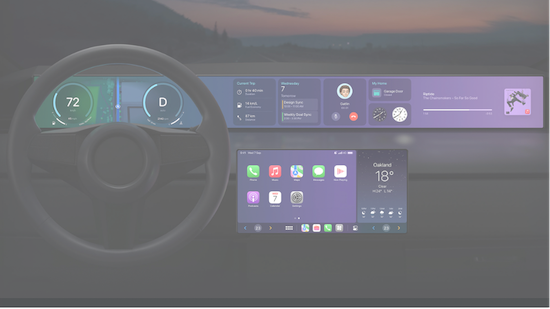
CarPlay Home Sample
Supported App Categories
Currently supported application categories include:
| Category | Description |
|---|---|
| EV Charging and Fuel | Assists users in locating charging stations for electric vehicles and fuel stations for traditional vehicles. |
| Food Ordering | Enables users to browse menus, place orders, and make payments for food from restaurants or other food providers. |
| Parking | Helps users find and reserve parking spaces. |
Note: Volt MX will support other application categories in future releases.
For each supported category, certain capabilities must be enabled, which will be detailed later in this document.
Car Application Lifecycle
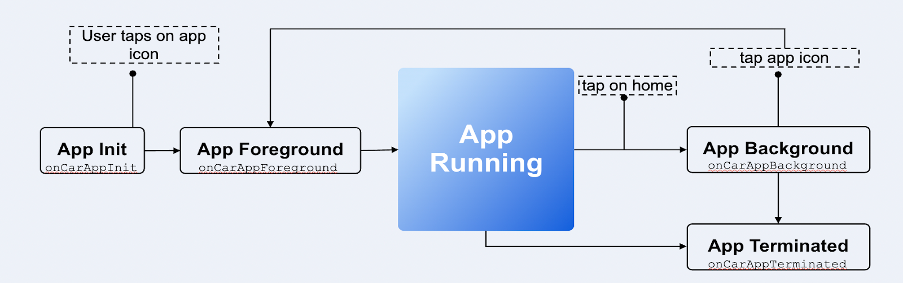
The car application follows a distinct lifecycle where various events are triggered by user interactions and system occurrences.
The following events are associated with the car application's lifecycle:
- onCarAppInit: Triggered when the user taps the application icon on their device.
- onCarAppDataUpdated: Invoked when data within the application is modified by the phone app.
- onCarAppForeground: Executed when the application transitions from the background to the foreground.
- onCarAppBackground: Executed when the application moves from the foreground to the background.
- onCarAppTerminate: Executed when the system terminates the application.
Car Application lifecycle diagram
Key terms and concepts
CarForm
CarForm is a fundamental UI component for car applications. It represents a single screen displayed on the CarScreen, using a template to describe its structure and layout. Each screen in a car application must use a template.
Template
CarApp for Android and iOS uses templates to describe pre-defined user interfaces for various use cases. The UI element layouts in these templates cannot be modified, but you can dynamically populated the elements with data.
Each template possesses unique properties, detailed in the subsequent section.
Currently, Supported Templates:
- List
- Grid
- Tab
- Point of Interest
- Alert
- ActionSheet
- Information
- Message Template
- Long Message template
Note: Volt MX will support other templates in future releases.
Car Application UI hierarchy
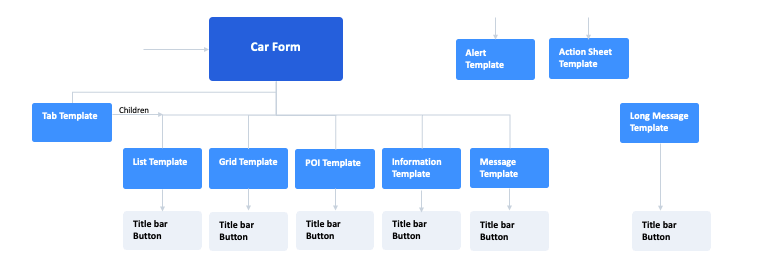
- A CarForm represents a single screen displayed in the car.
- Every CarForm requires an associated template.
- Templates are created using data specific to their type.
- Tab Templates can incorporate other templates.
- Templates can include Title Bar buttons to add action buttons at the top of the screen.
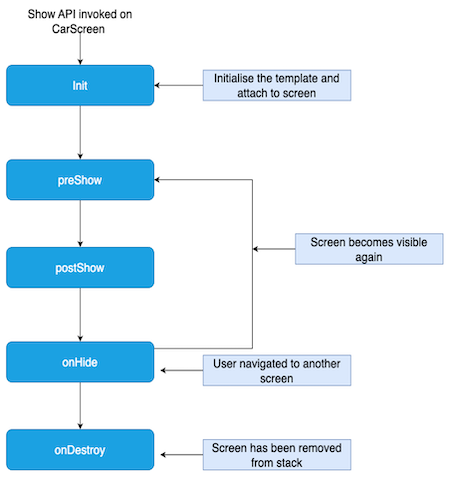
CarForm Lifecycle
Below are the lifecycle events and their explanation.
- Init: This event gets executed immediately when the show API on CarForm is called.
- preShow: This event gets executed when the CarForm is about to be visible on screen.
- postShow: This event gets executed immediately after the car screen is visible on the screen.
- onHide: This event gets called when the CarForm leaves the screen. A CarForm can leave the screen when another form is to be shown.