
Pipelines overview
A pipeline is the core runtime workflow in Detect that evaluates streaming feed data, applies business rules, and sends qualified events to configured destinations.
Use pipelines to convert real-time feed input into actionable events. A pipeline combines audience qualification, event conditions, destination mapping, schedule controls, and contact policy limits.
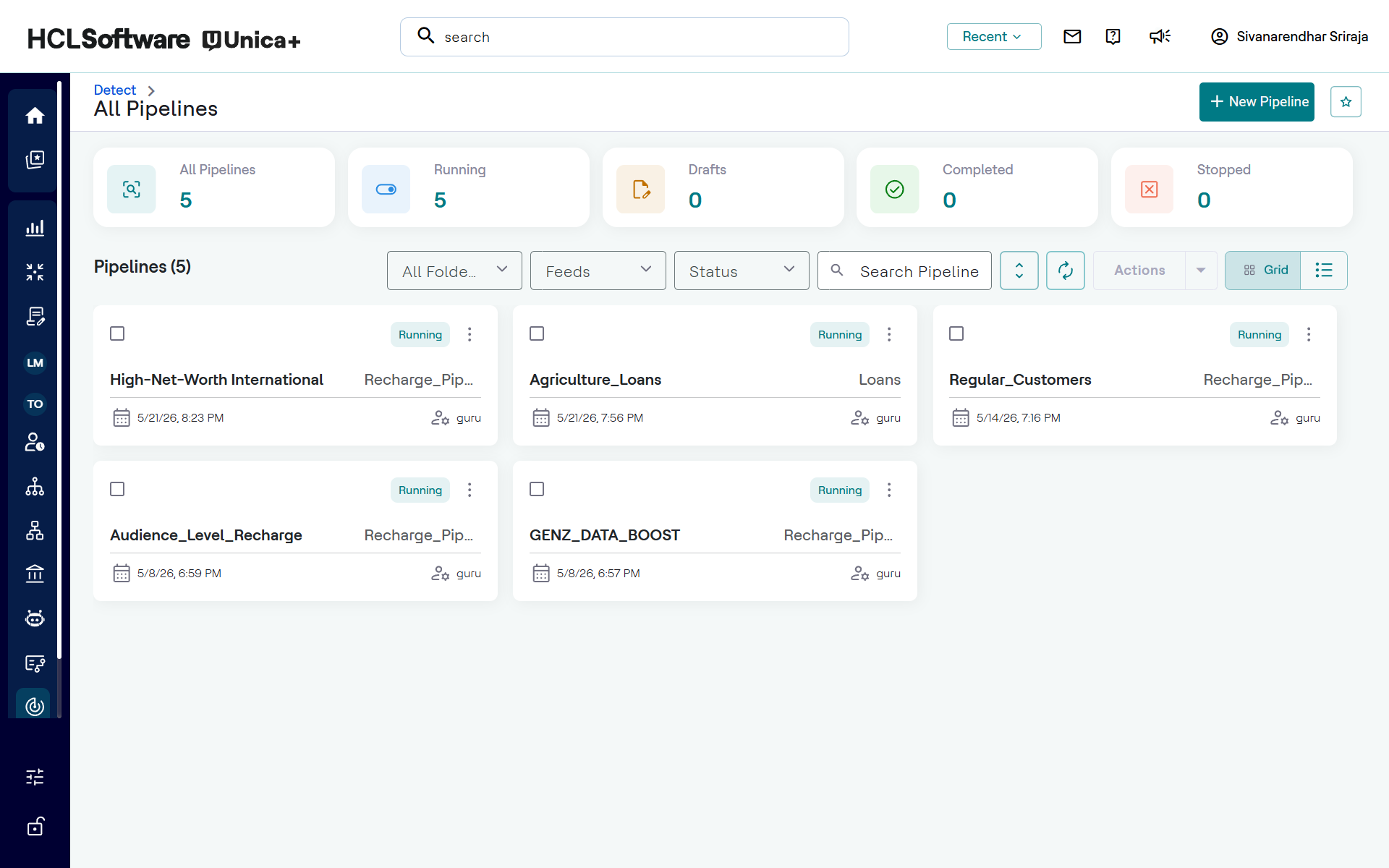
All Pipelines dashboard
The All Pipelines dashboard provides operational visibility and control for pipeline management. You can review overall status counts, narrow the list by filters, search for a specific pipeline, and open tile-level actions.
- Summary cards show All Pipelines and status totals for Running, Drafts, Completed, and Stopped.
- Filter controls are available for folders, feeds, and status.
- The status filter supports Draft, PendingApproval, Approved, Declined, Ready, Running, and Stopped.
- + New Pipeline to create a new pipeline.
- Search is available to locate pipelines by name.
- Grid and list display toggles are available for pipeline results.
- Action menu is available to delete multiple pipelines simultaneously.
Pipeline building blocks
A pipeline is configured from the following functional blocks:
- Audience: Defines the eligible audience by using attribute-based matching conditions.
- Trigger: Selects the source feed and transactional conditions that determine when an event is matched.
- Destination: Specifies the target system and attributes to forward for each matched event.
- Schedule: Controls active days and time windows for pipeline execution.
- Contact Policy: Applies global and per-user limits to control event frequency.
Pipeline lifecycle
Pipeline execution follows a governed lifecycle:
- Create and configure the pipeline on the visual canvas.
- Save as draft.
- Submit for approval or review based on your access model.
- Approve where administrator approval is required.
- Review and deploy.
- Start immediately or configure schedule start and end criteria.
- Monitor runtime status and throughput from reports.
Lifecycle states visible from the dashboard filter are Draft, PendingApproval, Approved, Declined, Ready, Running, and Stopped.
Pipeline reporting
After deployment, open the pipeline report to validate performance and delivery quality. Key metrics include:
- Total events matched
- Total events sent
- Matched-versus-sent percentage