To view the analysis report, click View Report or user can navigate by clicking on
Dashboard menu. The user is available with different set of widgets namely:Figure 1. View Report Grid
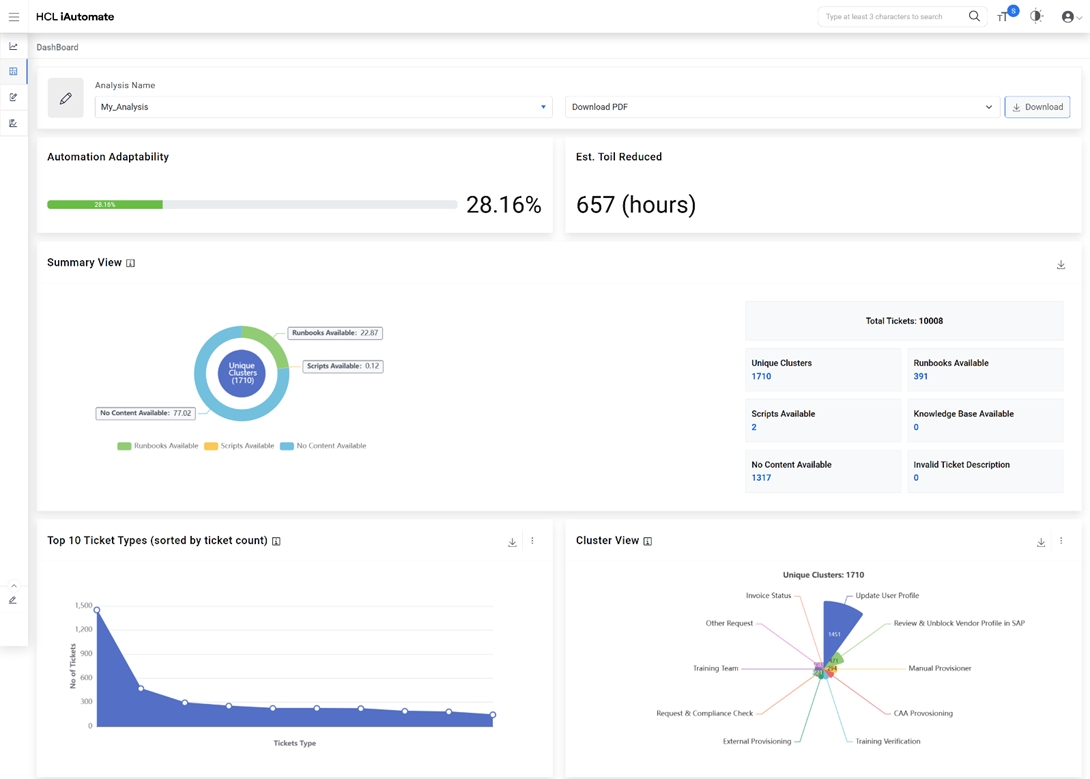
Summary View – Provides a high-level summary analysis.
Ticket Types (Unique Clusters) – Distinct number of ticket categories identified
based on the nature of tickets from the overall ticket dataset uploaded.
Runbooks Available – Ticket categories for which the runbooks are available based
on system driven recommendations.
KB Available – Number of Knowledge Articles, sourced from various web-based
datasets, available for reference by end users.
Scripts Available – Number of scripts available for use, to create automations
which is not available in the out-of-the box runbook repository.
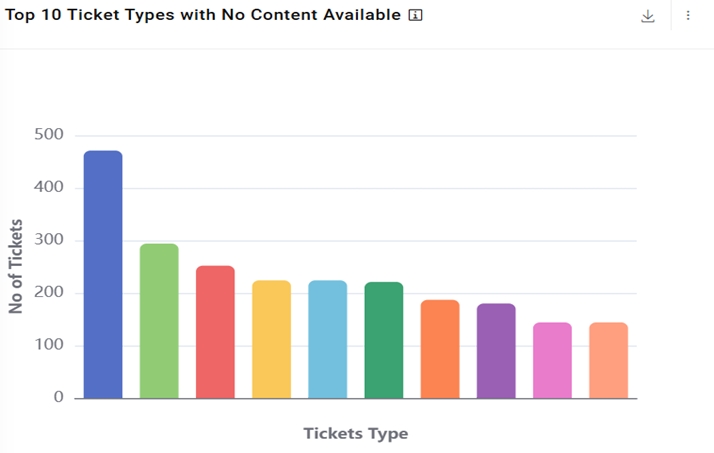
Nothing Available – Number of ticket categories for which no KB articles /
scripts are available.
Invalid Ticket Description – Number of ticket categories which has not enough
information for system to understand for processing.Figure 2. SaaS based Ticket Analysis – Summary ViewFigure 3. SaaS based Ticket Analysis – Full View
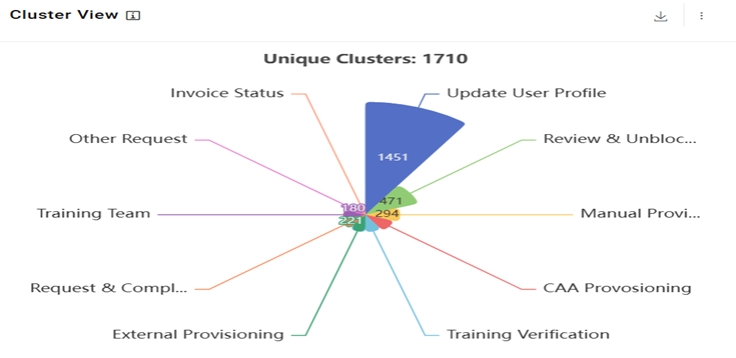
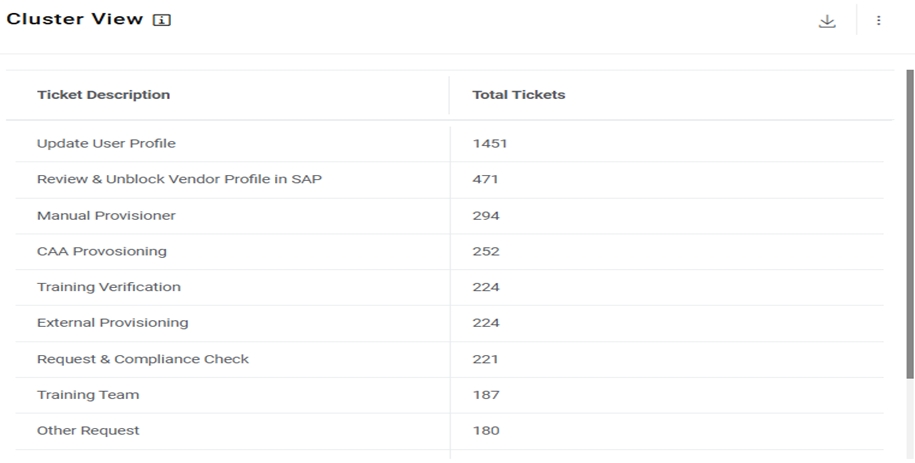
Top 10 Ticket Types (Unique Clusters)– Provides a view of the top 10 unique
ticket categories sorted by count and is indicative of the most voluminous issues in the
environment. Figure 4. SaaS based Ticket Analysis – Chart view of Top 10 Ticket Types (Unique
Clusters)Figure 5. SaaS based Ticket Analysis – Tabular View of Top 10 Ticket Types (Unique
Clusters)
Top 10 Ticket Types (No Automation Possible) – Provides a view of the top 10
unique ticket categories sorted by count for which automations are not available within
iAutomate. Figure 6. SaaS based Ticket Analysis – Top 10 Ticket Types (Unique Clusters) with No
Automation Possible (Chart View)Figure 7. SaaS based Ticket Analysis – Top 10 Ticket Types (Unique Clusters) with No
Automation Possible (Tabular View)
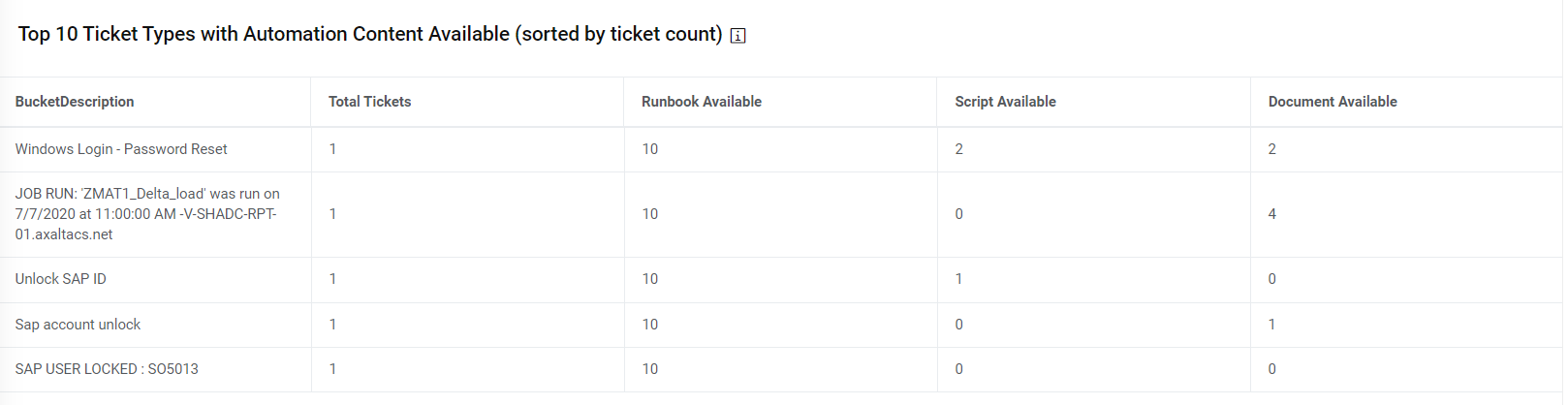
Top 10 Ticket Types (Automation Possible) – Provides a view of the top 10 unique
ticket categories sorted by count for which automations are available within iAutomate.
It also presents a view of available runbooks, scripts and documents / knowledge
articles. Figure 8. SaaS based Ticket Analysis – Top 10 Ticket Types (Unique Clusters) with
Possible Automation
Tiles View Dashboard - This widget highlights the top unique tickets which are
automatable in nature (considering similarity score > 60), the recommended runbook
and the potential effort savings which can be achieved through their automated
remediation.Figure 9. Tiles View Dashboard (Chart View)Figure 10. Tiles View Dashboard (Tabular View)
Users can also download the analysis report with the detailed ticket analysis which
can be used to arrive at the automation percentage.
Click Download PDF to download the pdf report.
Click Invalid Ticket Details to download the CSV file which has no valid
description for processing.Figure 11. SAAS Based Ticket Analysis - Download Report
Note:
In the CSV file, all the ticket variations with
similarity score greater than 0.6 can be considered as potential automation candidates.



.jpg)