
Change Super Admin Authentication Type
You may change Super Admin authentication type to login with Form Based or LDAP or SAML and generate a new password for super admin when user authentication type is Form based.
Select Home from the menu bar. This page is used to update the authentication type for Root/Super Admin users. However, the default Authentication Type is set to be Form Based.

User can change the Authentication Type in following ways:
From Based Authentication Type:
- Select Form Based on dropdown of Authentication Type.
- Enter Root Email (account) for which the user wants to generate new passwords.
- Add License Key, key which is used while KRS configuration for root/Super Admin login.
- Select checkbox Agree to Terms if user agrees to the terms.
- Click on the button Generate New Password to generate a new password for the account.
LDAP Authentication Type:
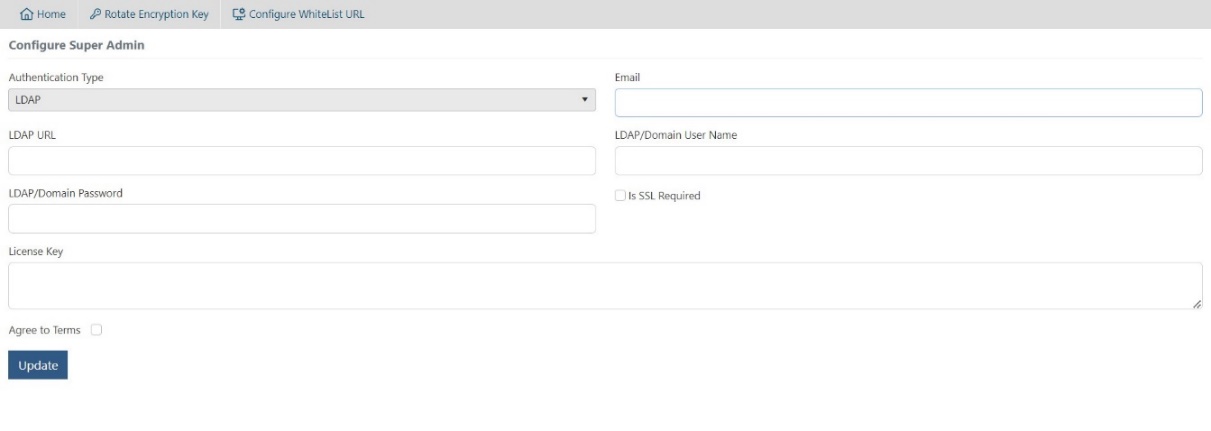
- Select LDAP on dropdown of Authentication Type.
- Enter AD Email (HCL account) to which user must give root/super admin privileges.
- Enter LDAP URL.
- Enter LDAP/Domain Username.
- Check ‘Is SSL Required’, if required.
- Add License Key, key which is used while KRS configuration for root/super admin login.
- Select checkbox Agree to Terms if user agrees to the terms.
SAML Authentication Type:
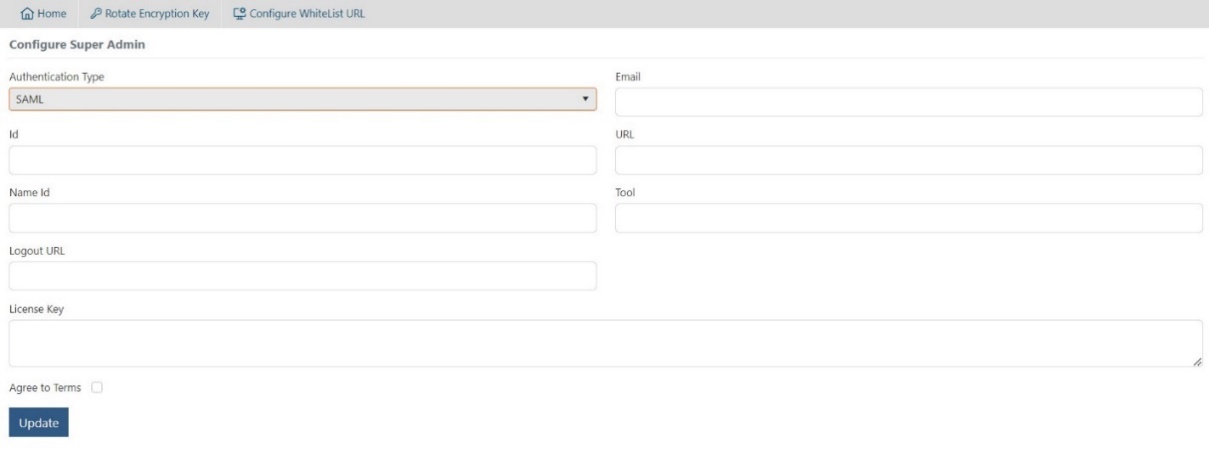
- Select SAML on dropdown of Authentication Type.
- Enter Email.
- Enter ID.
- Enter URL
- Enter Name Id.
- Enter Tool
- Enter Logout URL.
- Add License Key, key which is used while KRS configuration for root/superadmin login.
- Select checkbox Agree to Terms if user agrees to the terms.
- On clicking the Update button, license key will be validated.