
Installation Procedure
- Download the file OpenSSL-Win64.zip from the Path mentioned in the source field of SSL Package Requirements .
- Extract the contents of the zip file in the path C:\OpenSSL-Win64.
- Go to Control Panel System and Security System Advanced System Settings. Click Environment Variables. A new dialog box appears. Click New under System Variables section.
- Set the system environment variable with name OPENSSL_HOME with the path
as:
C:\OpenSSL-Win64 - Set the system environment variable with name OPENSSL_CONF with the path as
(.cnf):
C:\OpenSSL-Win64\ssl\openssl.cnfFigure 1. SSL Package Installation 
- Go to Control Panel System and Security System Advanced System Settings. Click Environment Variables. A new dialog box appears.
- In the system environment variable name as “Path”, add the
following:
%OPENSSL_HOME%\binFigure 2. SSL Package Installation (Cont.) 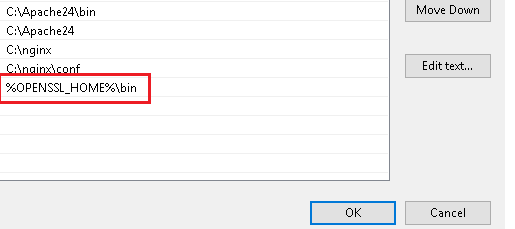
- Restart the Apache2.4 service. Expand the description of the Apache2.4 service. You can
verify the OpenSSL version from the description.
Figure 3. SSL Package Installation (Cont.) 