
Database Details
For this exercise, the authentication type is considered as ‘SQL Server Authentication’ for database.
- On the Database Details view, type the Server Name, and the Database Instance Name.
- Select Authentication type as ‘SQL Server Authentication’.
- In the Username and Password fields, type username and password to access the server.
- In the Database Name field, Database Name is auto filled by default.
- To check the connectivity to a server using the credentials provided, click Check Connection. This displays a message for Connection Success or Connection Failure.
- Successful connection to the database enables the Next button.
Figure 1. Database Details 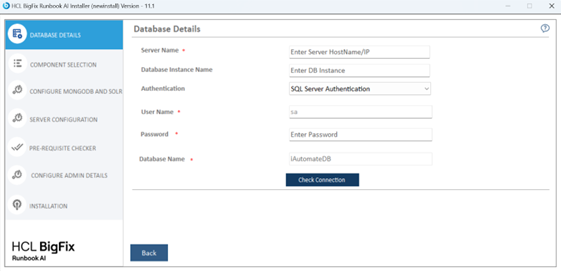
- Click Next to get to the Component Selection view.