
Managing Support
If you’re having trouble while working with BigFix AEX, you can create a support ticket.
This section will guide you through the process of creating new tickets and announcements and how to manage the existing tickets or announcements.
To manage support, follow the below mentioned step:
- On the left navigation bar, click Support.The screen displays the list of all pending support tickets under the Support section and active announcements under the Announcements section in a tabular format.
Figure 1. Manage Support 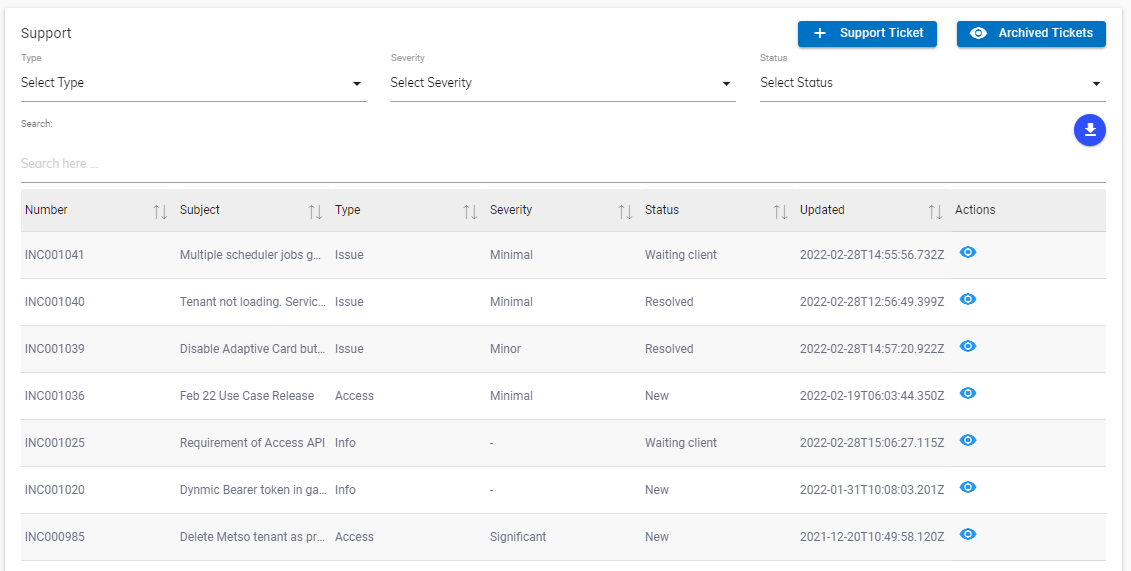
- Listed below are the details of the columns of Support section displayed in Manage Support
- Number: A unique identifier of a ticket created for support in BigFix AEX’s global admin console. It starts with the prefix INC.
- Subject: A brief detail about the ticket.
- Type: Information about the ticket.
- Severity: The severity of the issue on the scale of 1 to 4, 4 being the highest.
- Status: Status: Status of the current action on the support ticket.
- Updated: No. of days since the last update.
- Action: Option to view or edit the tickets.
- Listed below are the details of the columns of the
Announcement section displayed in
Manage Support
.
- Subject: Name of the notification.
- Description: A brief detail about the notification.
- Announced On: Date of broadcasting.
- Action: View or edit the existing announcements.
- Using this screen, a user can create new tickets and announcements and edit or view the existing tickets or announcements.