
Managing Request
This section describes how a provider can create a ticket in the Request console and how the super admin can view and manage the existing tickets.
To manage a request,
- In the left navigation bar, click Requests.
- It navigates you to the Support screen.
Figure 1. Managing Requests 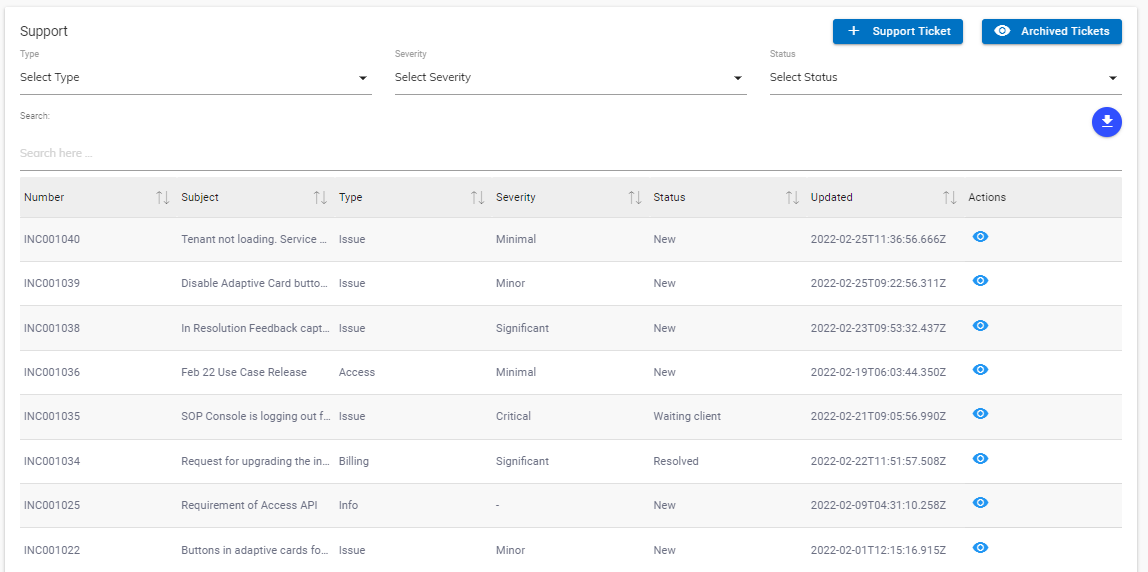
- The screen is divided into two sections:
- Support Ticket- Create new support tickets.
- Announcement - Lists the existing notifications.
- The screen also includes the
 button that lists all the tickets that are closed and the
 button to generate a new ticket.
 - Listed below are the details of the columns of Support section, as displayed in the figure
– Managing Requests.
- Number: A unique identifier of a ticket created for support in BigFix AEX’s global admin console. It starts with the prefix INC.
- Subject: Brief detail about the ticket.
- Type: Information about the ticket created for support.
- Severity: The severity of the issue on the scale of 1 to 4, 4 being the highest.
- Status: Status of the current action on the support ticket.
- Updated: The days from the last update on the ticket.
- Action: Option to view or edit the existing tickets.