User Personas/ Roles
Managing User Permissions and Roles
The application administrator can manage user permissions and roles in foundation by associating the following pre-configured roles available in HCL BigFix Service Management.
Key types of companies in HCL BigFix Service Management
–
- Service Consumer: A company that accesses services within BigFix Service Management, with its end-users belonging to the organization.
- Service Provider / Service Supporter: A company that offers and manages service offerings within BigFix Service Management, while also providing support and assistance to service consumers. A service provider / supporter company needs to be associated with a consumer company in BigFix Service Management.
Key user roles and their actions in HCL BigFix Service Management
-
Service Consumer
- Access the right services and knowledge
- Report an issue
- Request something
- View status / updates
- View broadcasts
- Change language preference
- Use mobile app
- Provide survey response / feedback
- Set user preferences such as time zone and date format, etc.
- Manage profile information
-
Approver
- Approve service requests
- Approve changes
- Review a knowledge article
- Add ad-hoc approvers
- Delegate approvals
-
Fulfilment Viewer
- View the fulfilment work item board
- View fulfilment records (service requests) of self and associated companies
-
Fulfilment User
- View the fulfilment work item board (assigned to self / self-groups)
- Edit a fulfilment item
- Reassign fulfilment items to other support groups which have assignment rules created
- Manage the ticket lifecycle for fulfilment assigned to the individual or their support groups
- Create fulfilment tasks
- Relate work items / CIs to fulfilment items
- Update comments / attachments / notify
- Fulfilment Report / Dashboard (upon configuration)
- Roster - Calendar View
-
Fulfilment Manager
- View the fulfilment work item board
- Edit a fulfilment item
- Reassign fulfilment items to any support group for self-company / associated companies
- Manage the ticket lifecycle for fulfilment assigned to the individual or their support groups
- Create fulfilment tasks
- Relate work items / CIs to fulfilment items
- Update comments/ attachments/ notify
- Fulfilment Report / Dashboard (upon configuration)
- Roster - Calendar View
-
Incident Viewer
- View the incident work item board
- View incident records of self and associated companies
-
Incident User
- View the incident work item board (assigned to self / self-groups)
- Create an incident
- Edit an incident
- Reassign incident to other support groups which have assignment rules created
- Manage the ticket lifecycle for incidents assigned to the individual or their support groups
- Propose an incident as critical
- Create incident tasks
- Relate work items / CIs to incidents
- Update comments / attachments / notify
- Incident Report / Dashboard (upon configuration)
- Roster - Calendar View
-
Incident Manager
- View the incident work item board
- Create an incident
- Edit an incident
- Reassign incidents to any support group for self-company / associated companies
- Manage the ticket lifecycle for incidents assigned to the individual or their support groups
- Propose an incident as critical
- Create incident tasks
- Relate work items / CIs to incidents
- Update comments / attachments / notify
- Create/Update Escalation Plan
- Incident Report / Dashboard (upon configuration)
- Roster - Calendar View
-
Critical Incident Manager
- View the incident work item board
- Create an incident
- Edit an incident
- Reassign incidents to any support group for self-company / associated companies
- Manage the ticket lifecycle for incidents assigned to the individual or their support groups
- Propose an incident as critical
- Accept an incident as critical
- Update incident urgency
- Create incident tasks
- Relate work items / CIs to incidents
- Update comments / attachments / notify
- Incident Report / Dashboard (upon configuration)
- Roster – Calendar View
-
Problem Viewer
- View the problem work item board
- View problem records of self and associated companies
-
Problem User
- View the problem work item board (assigned to self / self-groups)
- Create a problem
- Edit a problem
- Reassign problems to any other support groups
- Manage the ticket lifecycle for problems assigned to the individual or their support groups
- Propose a change from within the problem
- Create problem tasks
- Relate work items / CIs to problems
- Update comments / attachments / notify
- Problem Report / Dashboard (upon configuration)
- Roster - Calendar View
-
Problem Manager
- View the problem work item board
- Create a problem
- Edit a problem
- Reassign problems to any support group for self-company / associated companies
- Manage the ticket lifecycle for problems assigned to the individual or their support groups
- Propose a change from within the problem
- Create problem tasks
- Relate work items / CIs to problems
- Update comments / attachments / notify
- Problem Report / Dashboard (upon configuration)
- Roster - Calendar View
-
Problem Investigator
- View the problem work item board (assigned to self / self-groups)
- Specify root cause for problems where individual is a part of problem investigation team
- Record findings for problems where individual is a part of problem investigation team
- Create problem tasks
- Relate work items / CIs to problems
- Update comments / attachments / notify
- Problem Report / Dashboard (upon configuration)
- Roster - Calendar View
-
Change Viewer
- View the change work item board
- View change records of self and associated companies
-
Change User
- View the change work item board (assigned to self / self-groups)
- Create a change
- Edit a change and submit for review
- Replan / cancel a change
- Reassign changes to other support groups
- Perform change post implementation review
- Create change tasks (other than implementation tasks)
- Relate work items / CIs to changes
- Update comments / attachments / notify
- Change Report
- Change Report / Dashboard (upon configuration)
- Roster - Calendar View
-
Change Manager
- View the change work item board
- Create a change
- Edit a change and submit for review
- Replan / cancel a change
- Reassign changes to other support groups / change management groups
- Perform change post implementation review
- Create change tasks (other than implementation tasks)
- Relate work items / CIs to changes
- Update comments / attachments / notify
- Change Report / Dashboard (upon configuration)
- Roster - Calendar View
-
Implementation User
- View the change work item board (assigned to self / self-groups)
- Create a change
- Edit a change and submit for review
- Replan a change (until under implementation status)
- Cancel a change
- Start and end change implementation
- Reassign changes to other support groups
- Create change tasks (including implementation tasks)
- Relate work items / CIs to changes
- Update comments / attachments / notify
- Change Report / Dashboard (upon configuration)
- Roster - Calendar View
-
Implementation Manager
- View the change work item board
- Create a change
- Edit a change and submit for review
- Replan a change (until under implementation status)
- Cancel a change
- Start and end change implementation
- Reassign changes to other support groups for self-company / associated companies
- Create change tasks (including implementation tasks)
- Relate work items / CIs to changes
- Update comments / attachments / notify
- Change Report / Dashboard (upon configuration)
- Roster - Calendar View
-
Task Viewer
- View the task work item board (assigned to self / self-groups)
- View incident, problem, change and fulfilment task records of assigned to self or self-groups
-
Task Admin
- Can create Task Plan for self-company / associated companies.
-
Interaction Viewer
- View the interaction work item board
- View interaction records of self and associated companies
-
Interaction User
- View the interaction work item board (assigned to self / self-groups)
- Create an interaction
- Edit an interaction
- Reassign interaction to other support groups
- Manage the ticket lifecycle for interactions assigned to the individual or their support groups
- Create incident / request from within an interaction
- Relate existing incidents / requests to interactions
- Update comments / attachments
-
Interaction Manager
- View the interaction work item board
- Create an interaction
- Edit an interaction
- Reassign interaction to other support groups
- Manage the ticket lifecycle for interactions assigned to the individual or their support groups
- Create incident / request from within an interaction
- Relate existing incidents / requests to interactions
- Update comments / attachments
-
Service Desk User
- Can view the overall work item board across all processes
- Access service desk
- Create any work item
- Edit any work item
- Submit a change for review
- Replan / cancel a change
- Reassign tickets to support groups of self-company / associated companies
- Manage the ticket lifecycle for tickets assigned to the individual or their support groups
- Propose an incident as critical
- Update incident urgency
- Propose a change from within a problem
- Create any tasks (other than change implementation tasks)
- Relate work items / CIs to any other work items
- Update comments / attachments / notify
- Incident and Fulfillment Report / Dashboard (upon configuration)
- Roster - Calendar View
-
Knowledge Author
- View and create knowledge articles
- Edit self-authored knowledge articles in Draft state
- Share knowledge articles
- Search for knowledge articles
- Update the expiry date of knowledge articles
- Move an article to outdated status
- Update / change the author of a knowledge article
- Submit an article for review
- Move an article from Outdated to Closed state
-
Knowledge Manager
- Create a knowledge base
- View and create knowledge articles
- Edit self-authored knowledge articles in Draft state
- Share knowledge articles
- Search for knowledge articles
- Update the expiry date of knowledge articles
- Move an article to outdated status
- Update / change the author of a knowledge article
- Submit an article for review
- Instantly publish a knowledge article
- Move an article from Outdated to Closed state
-
Config Viewer
- View the asset/CI board
- View asset/CI records of self and associated companies
- View asset/CI relationships
- CMDB Dashboard
-
Asset Manager
- View the asset/CI board
- View / create / update asset records of self and associated companies
- View / create / update asset relationships
- Manage the entire asset lifecycle from procurement to maintenance and disposal
- Define asset classes
- Scan assets
- Relate assets to other assets / work items
- Update comments / attachments / notify
- Create CI Category
- Create/Update CI resolution Category and Subcategory for self and associated companies
- CMDB Report/Dashboard (upon configuration)
- Roster - Calendar View
-
Config Manager
- View the asset/CI board
- View / create / update asset/CI records of self and associated companies
- View / create / update asset/CI relationships
- Manage the entire CI lifecycle from deployment to decommissioning
- Define asset/CI classes
- Scan asset/CI
- Relate CIs to other CIs / work items
- Update comments / attachments / notify
- CMDB Report/Dashboard (upon configuration)
- Roster - Calendar View
-
Reconciliation User
- Import and validate records for reconciliation
- Normalize records
- Identify duplicate records
- Create golden dataset
- Map with product library
- Configure reconciliation rules
- Configure scheduled jobs for automated reconciliation
- Configure and manage resource units
-
Contract Manager
- Create new contracts
- Access existing contracts
- Manage contract lifecycle
- Link contracts to assets
- Link contracts to service level definitions
- Access asset / config records in Asset/Config Board
-
Meeting Viewer
- View the appointment work item board (assigned to self / self-groups)
- View the appointment calendar view
- View appointment/meeting details
-
Meeting User
- View the appointment work item board (assigned to self / self-groups)
- View the appointment calendar view
- View appointment/meeting details
- View / create / update appointment/meeting details (self / group is owner/coordinator)
- View / create / update decisions and action items (self/group is assignee)
- View / modify meeting attendance (self / group is owner/coordinator)
- View / modify meeting recording links (self / group is owner/coordinator)
- View / modify supplier scorecard (excluding consolidated view)
-
Meeting Manager
- View the appointment work item board
- View the appointment calendar view
- View / create / update appointment/meeting details
- View / create / update decisions and action items
- View / modify meeting attendance
- View / modify meeting recording links
- View / modify supplier scorecard (excluding consolidated view)
-
SIAM Lead
- View the appointment work item board
- View the appointment calendar view
- View / create / update appointment/meeting details
- View / create / update decisions and action items
- View / modify meeting attendance
- View / modify meeting recording links
- View / modify supplier scorecard (including consolidated view)
-
SLA User
- View / create / edit service level definitions of self-company
- View / create / edit work schedules of self-company
- View / create / edit holiday schedules of self-company
- SLA Measurement Report / Dashboard (upon configuration)
- Roster - Calendar View
-
SLA Manager
- View the SLA Board
- View / create / edit service level definitions of self-company / associated companies
- View / create / edit work schedules of self-company / associated companies
- View / create / edit holiday schedules of self-company
- SLA Measurement Report / Dashboard (upon configuration)
- Roster - Calendar View
-
Walk-up User
- View / update walkup records created by users
- Manage the ticket lifecycle for walkup tickets
-
Report User
- View reports / dashboards of self-company / associated companies
- Apply filters to reports / dashboards
- Export reports / dashboards
-
Reports Manager
- View / configure reports / dashboards of self-company / associated companies
- Apply filters to reports / dashboards
- Export reports / dashboards
-
Reports Administrator
- View / configure reports / dashboards of self-company / associated companies
- Add new reports / dashboards
- Apply filters to reports / dashboards
- Export reports / dashboards
-
Template User
- Select and apply / utilize an existing template
-
Template Owner
- Create a new template
-
Template Admin
- View all the existing templates
- Activate / deactivate any existing templates
-
AMS Administrator
- View / create / update assignment rules for all work items
-
User Approval Manager
- Approve / activate user profile requests post self-sign up
-
Catalog Manager
- View service board
- Create / update service offerings for self-company / associated consumer company
- Manage the entire service offering lifecycle for self-company / associated consumer
- Share service offerings with associated consumer companies
- Add related service offerings
- View / add / update service offering attributes
- View / add / update service offering components
- View / add / update service offering entitlements
- View / add / update service offering pricing
- View / add / update service offering ordering information
- View / add / update service offering self-service actions
- View / set service offering preferences
- View / add / update service offering disclaimers
- View / set service offering reminder notifications
- Relate knowledge articles to service offerings
- View Service Desk
- Roster - Calendar View
-
Approval Admin
- Create / edit approval sets for service offerings / CIs
-
Rule Admin
- Access rules section from the application menu
- Create a rule
- Edit an existing rule
- Activate / deactivate a rule
- Create conditions within a rule
-
Roster Manager
- Manage and publish the on-call schedule roster
- View / create / update support schedules
- View / create / update shift schedules
- Add / edit / support users to shifts
-
Notification Admin
- View the notification board
- View / make a default email notification template active / inactive
- View / create / edit / activate custom email notification templates
- View / create / edit / activate notification templates for all supported languages
-
Survey Admin
- Access survey configuration section from the application menu
- View / create / edit survey settings / configuration against self / associated companies
- Choose to apply surveys against company-specific service requests / incidents / both
- Choose to apply surveys against offering-specific service requests / incidents / both
-
Broadcast Manager
- View the brand management section
- Add / edit / activate bulletins
- Add / edit / activate advertisements
- Add / edit / activate external links
- View default user interface colour themes
-
Data Manager
- Add / edit / modify / activate groups, group members, users and user role associations for self-company
- Authorization Admin
- Create and manage authorization rules for a company, i.e. define what users within or outside a company are allowed to access within the system, based on their roles and system attributes.
- Administrator
- Add / edit / modify / activate foundation data of a company (includes organizations, departments, cost centers, locations, groups, group member associations, users, user role associations, and governance forums, excludes company section
- Access integration hub section and register / edit outbound connections to external systems
- Configure a mailbox to drive email-to-ticket / survey-via-email features for a company
- View / create / edit custom attributes across all processes
- Access UI builder and tailor the user interface for a company (includes templates,
interactive screens, system constants, connectors and localization).
- Access data dictionary (list of tables / data sources and list of attributes)
- View / create / update categories in category board (for service offerings, CIs and CI resolutions)
- Access fine-grained access controls / administrative settings against a company (includes settings across approval, change, CMDB, foundation, fulfillment, incident, SLA, walk-up and work item board)
- Access brand management (themes)
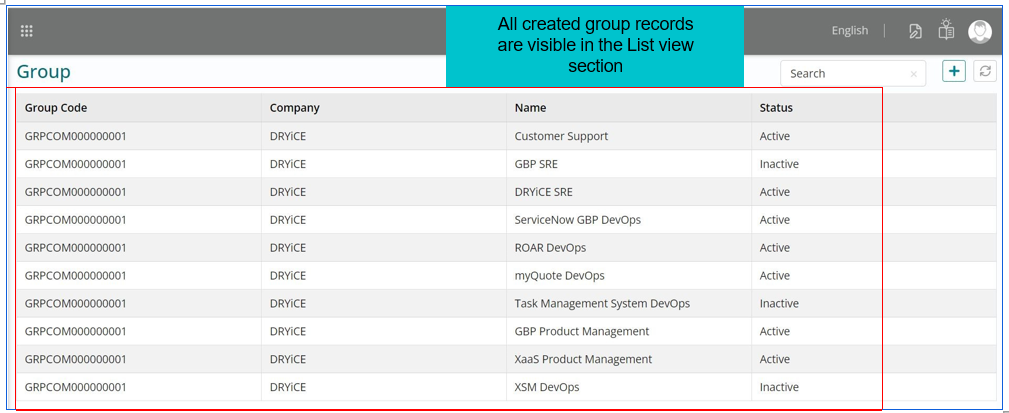
List View - Group
All created group records are visible in the List view section.
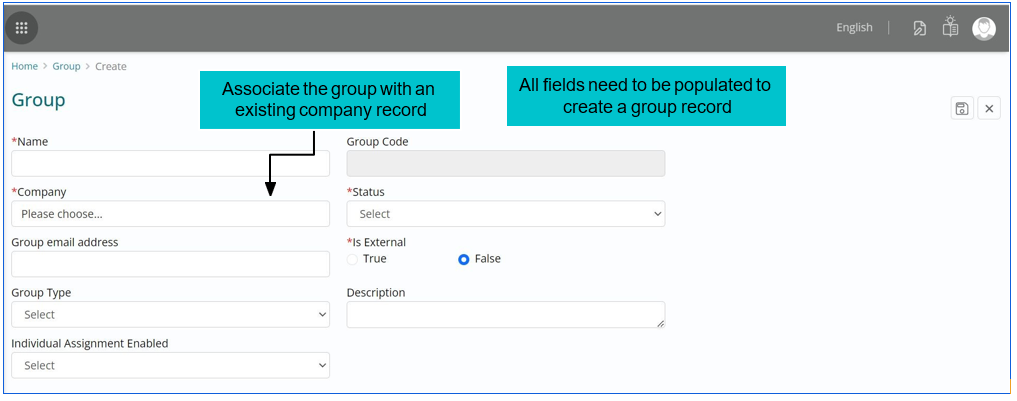
Creating a Record Group
-
Configuration of Groups - The form to ‘Create Group’ includes fields as listed
below:
- Name – A free text field to fill the unique name being given for a group
- Company – A dropdown with the list of companies configured, amongst which selection can be made
- Description – A free text field to detail the description of the group being created
- Status – A dropdown with the values (Active / Inactive) respectively indicating whether a group is operational or not
- A group once created, would get populated in the list view with visibility of the fields Group Code, Company Name (associated company), Name, Status with a search tab.
Editing a Record Group
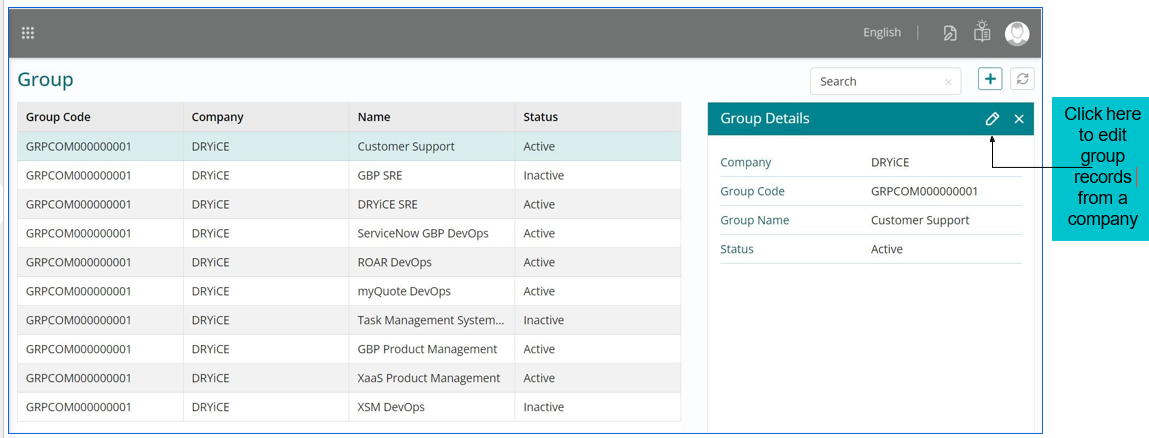
- A group record can be created against a specific company only when the company record already exists.
- A group name needs to be unique in nature, else the record would not get created.
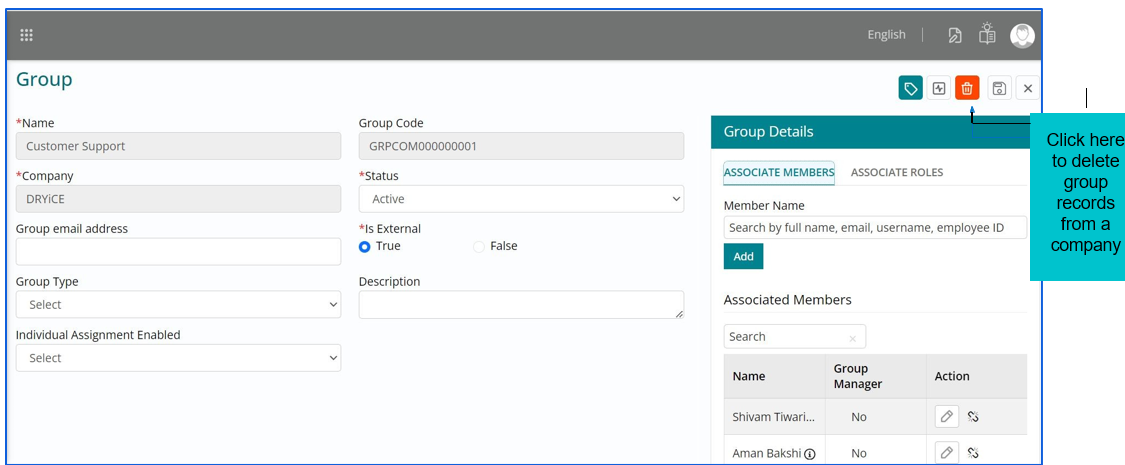
- The edit group page will feature automatically populated, non-editable data pulled from the group record, including fields like Group Code, Name, and the associated Company of the group.
- The other fields are also auto populated from the group record but editable and can be modified accordingly.
- The ‘Save’ button can be used to update the modifications in a Group record.
- The ‘Cancel’ button would navigate the admin out of the Edit Group page.
Deleting a Group Record
Few fields would be greyed out in the Edit page; the remaining can be edited appropriately.
Associating Members & Roles
-
Associating a Group - A group can be associated with group members and roles if the
individual applicable user records exist
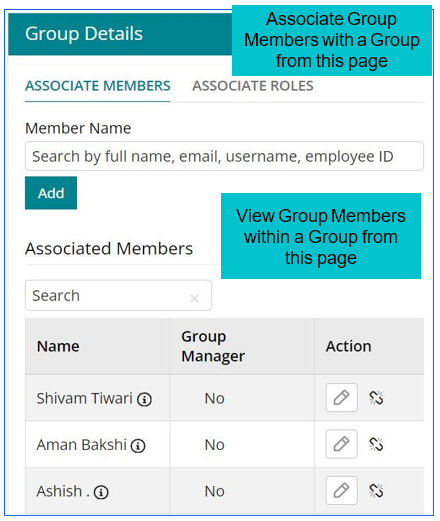
- Navigation to associate members to a group is: Foundation -> Group -> Edit Group -> Associate Members -> Search the member name -> Add
- Navigation to view associated members to a group is: Foundation -> Group -> Edit Group -> Group Details -> Associated Members
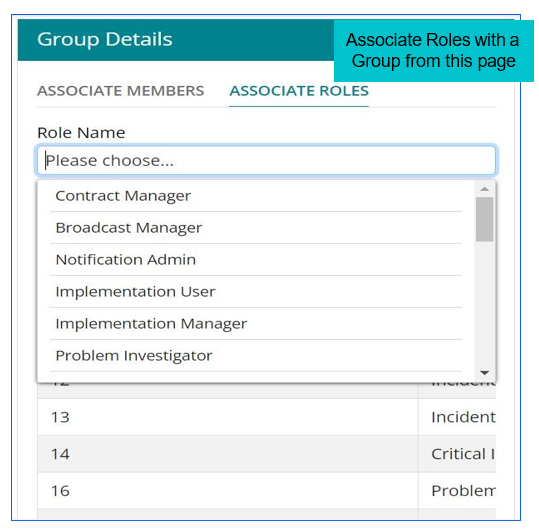
- Navigation to associate roles to a Group is: Foundation -> Group -> Edit Group -> Associate Roles -> Select Role name from the dropdown -> Add
- Navigation to view associated roles to a Group is: Foundation -> Group -> Edit Group -> Group Details -> Associated Roles