
Request Fulfilment
Process Overview
Request Fulfilment process is the primary interface between consumers and service providers, enabling request Management for the entitled Service Requests. Requests submitted by consumers are routed to the appropriate support group for fulfillment. Request and related tasks are further assigned to the Service Providers to be fulfilled.
Key Definitions
- IT Service: An IT Service Provider delivers an IT service to customers, supporting their business processes with information technology. It involves people, processes, and technology, and should be outlined in a Service Level Agreement (SLA).
- Fulfilment: Performing activities to meet a need or requirement, such as- providing a new IT service or competing a service request.
- Request Management: The process responsible for managing the lifecycle of all service offering requests.
- Service Request: A consumer's request to access an IT or Non-IT service. For instance, a Travel expense claim or an Amazon web service request.
- Rejected Request: A request which is not approved by the designated approver for that service request based on certain defined criteria.
- Service Desk: The Service Desk acts as the main contact point between the Service Provider and Consumers, managing Incidents, Service Requests, and related Work Items. It also handles consumer communications and serves as the primary point for information or escalations.
3-Tier Structure
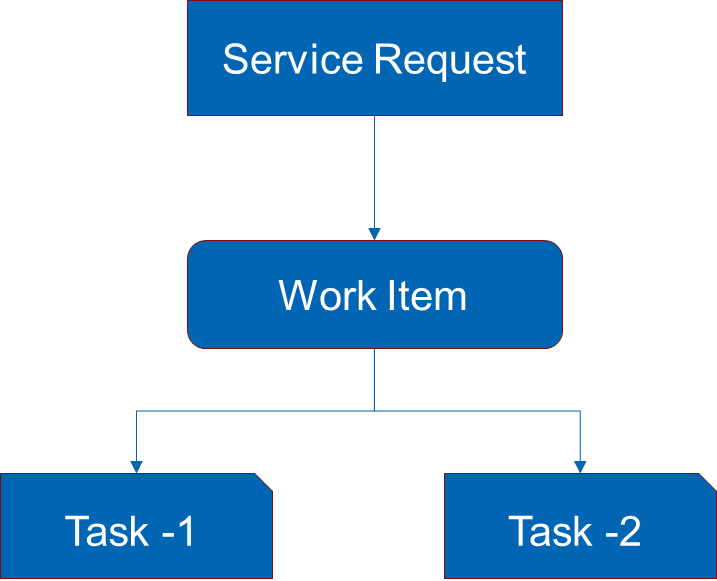
HCL BigFix Service Management has a 3-tier structure for any ticket:
Service Request: User can choose from multiples options in the service catalogue section to create a Service Request.
Work Item: Work Items are created for service providers for fulfilment of service. Service Request (fulfilment) work item is associated with Service Request.
Task: Each Work Item can have one or more tasks allocated to individual service provider groups. Task numbers have prefix TSK. Tasks are optional and can be created manually if needed.
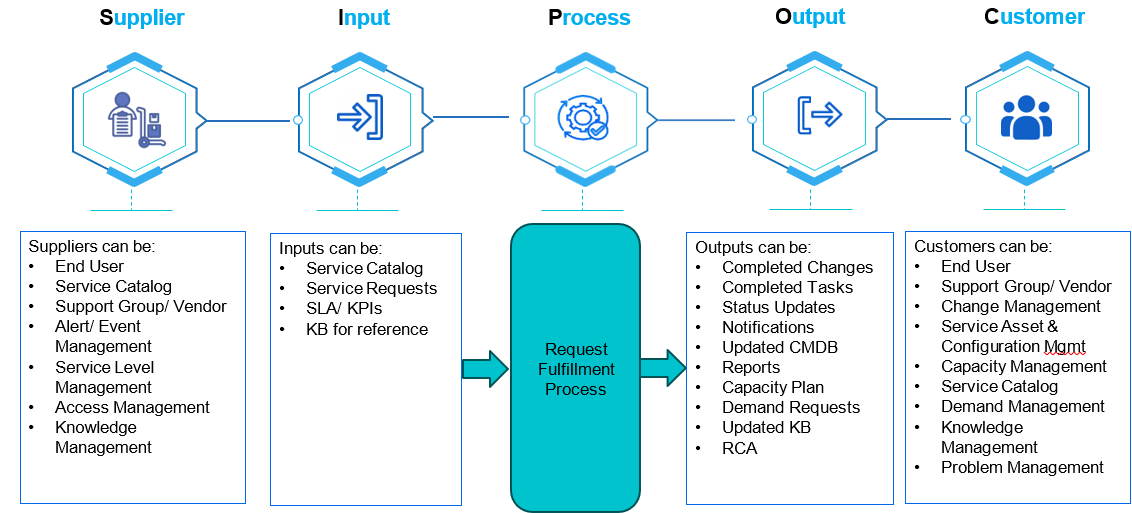
Process Input and Output
Process Roles and Responsibilities
- Offers specifically required throughout the Fulfillment Work Item lifecycle.
- Confirms the request has been fulfilled successfully.
- Carries out tasks as directed by the support team to complete the request.
- Stays informed about relevant Request Management policies and procedures.
- Evaluates the request based on company policies.
- Either approves or rejects the request.
- Gives reasons or comments for the decision.
- Ensures adherence to authorized procedures and work practices associated with the Service Request.
- Performs the assigned tasks for fulfilment of the assigned Fulfilment Work Item.
- Maintains individual knowledge, skill and performance levels necessary to complete the Service Request.
- Ensures completeness and accuracy of the Fulfilment Work Item.
- Communicates (delays and dependencies) concerning Request Management.
- Owner of the Service Request
- Management process.
- Define the KPIs to evaluate the effectiveness and efficiency of the process.
- Review KPIs and actions required following the analysis.
- Assist with, and is ultimately responsible for, the process design.
- Improve the effectiveness and efficiency of the process.
- Review any proposed enhancements to the process.
- Address the issues, highlighted by other Service Request Management process roles, with the running of the process.
Request Management module roles configured in HCL BigFix Service Management
| Roles | Permissions |
| Fulfillment User | To be able to view tickets of his own Fulfiller Groups. |
| Fulfillment Manager | To be able to see Fulfillment Tickets across Fulfiller Groups of his own/associated companies. |
Request Fulfilment Workflow Overview
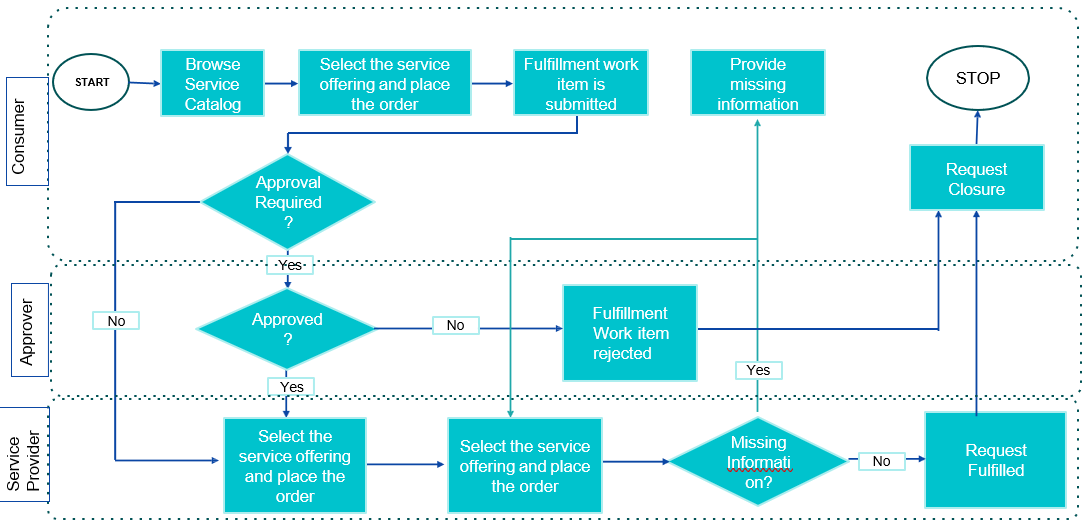
Fulfilment Work Item Status Transition
Lifecycle of a Fulfilment Work Item is managed through five status values:
▪ Pending Approval: When a Fulfilment Work Item has been submitted on the HCL BigFix Service Management tool and is waiting for approvals
▪ Approved: When all approvals are obtained the Fulfilment
status is updated to ‘Approved’
▪ Under Fulfilment: When a Fulfilment Work Item has been picked up by a Fulfiller, and they are working on it, it is moved to ‘In Progress’ status
▪ On Hold: If work on the Fulfilment Work Item must be suspended due to information required from customer, third party vendor, a pending Change etc., the Fulfiller can update the Work Item status to ‘On Hold’
▪ Fulfilled: When a Request placed by the Consumer has been fulfilled buy the Fulfiller, the Work Item status is updated to ‘Fulfilled’.
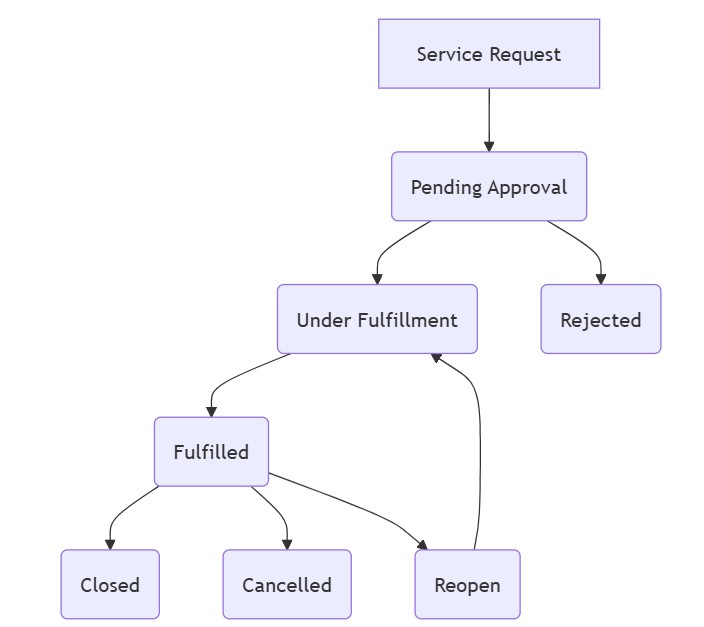
Request Management Task Status Transition
Lifecycle of a Fulfilment task is managed through below status values:
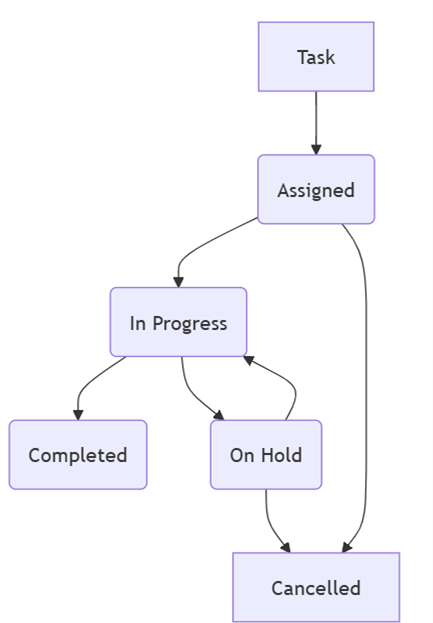
Task: A new Task is created under Fulfillment Work Item.
Assigned: The task is assigned to an individual or team to start working on.
In Progress: When the assignee starts working on the task, the status of the task is moved to ‘In Progress’.
Completed: signifies that a specific action or sub-task associated with the ticket has been successfully finished.
On Hold: If work on the Fulfilment task must be suspended due to information required from customer, third party vendor, a pending Change etc., the assignee can update the task status to ‘On Hold’.
Cancelled: a specific action or sub-task associated with the main request has been terminated or abandoned. This could occur for various reasons.
- Ad-hoc parallel and sequential tasks can also be created for a service request from the ‘Work item board’.
- It is mandatory to close the tasks before providing fix to an incident.
- If a service request is cancelled, all underlying tasks will be cancelled automatically.
- Automatic tasks can be created from Service Board if service order is logged on a service and ad-hoc tasks can be created from Work item board
Product Walkthrough- Request Fulfilment
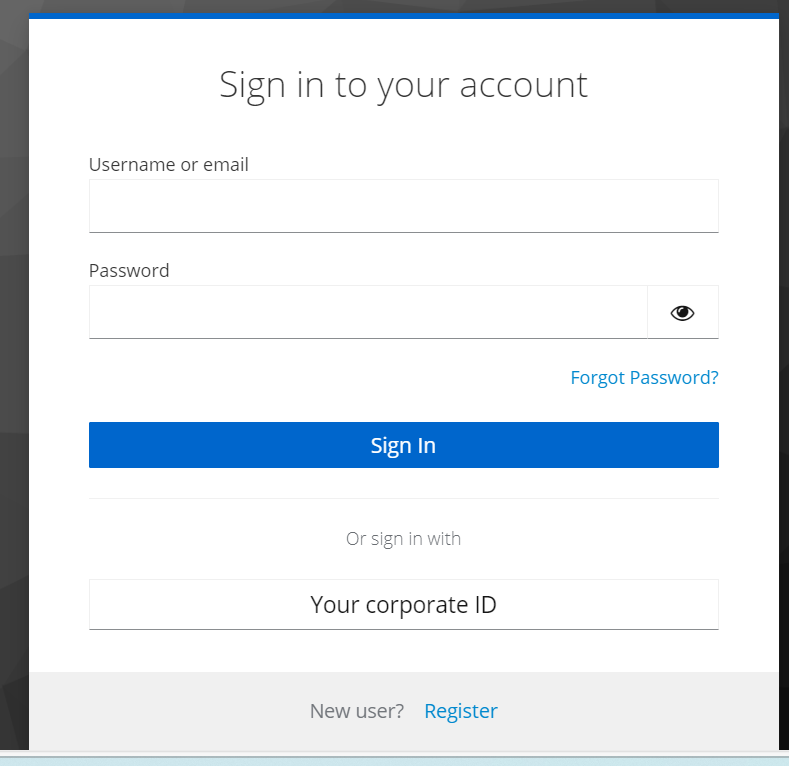
To login, the Support User should:
- Open internet browser (Edge, Chrome) and enter the URL: https://support.dryice.ai
- Provide login credentials to authenticate and login to HCL BigFix Service Management
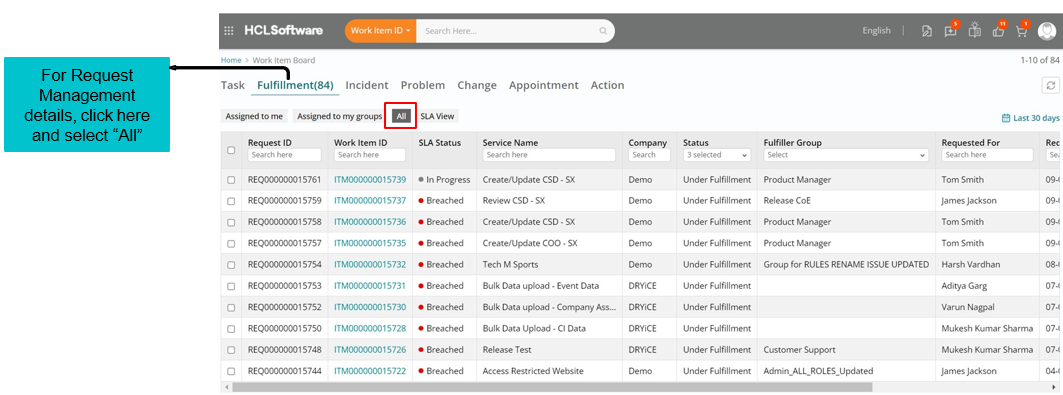
From the Application Menu, click on the Work Item Board. The User will be presented with the current Work Item Board.
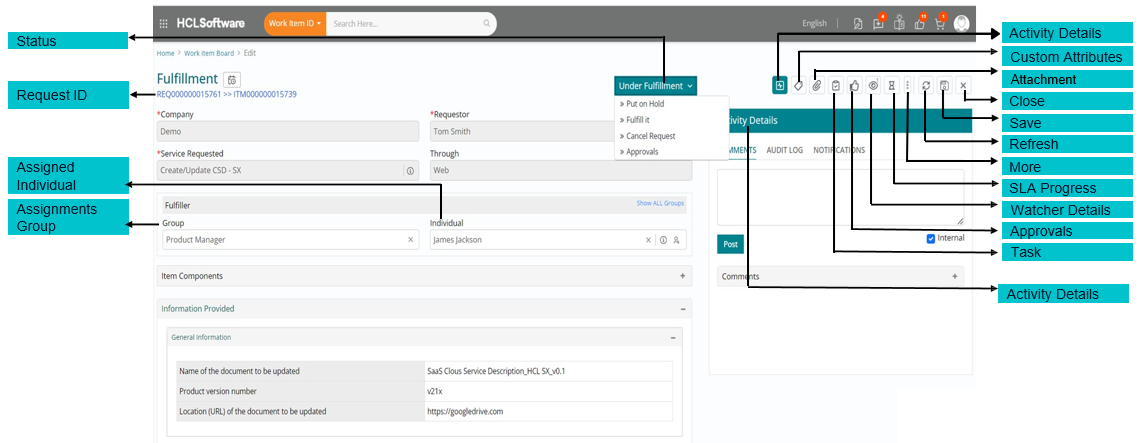
Request ID is the ID of the service request
Assignment Group is the group the request is assigned to
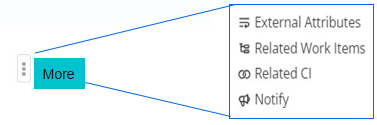
More
Assigned Individual is the Name of the assignee the ticket is assigned to
Activity Details gives an insight to all the activities/ comments posted in respect of work items.
- The status of the Work Item is displayed on top of the Fulfilment form.
- The work item will be placed in the "pending approval" state if there are any approvals still needed. Once all required approvals are obtained, the work item will transition to the "under fulfilment" state and be assigned to a support user for further processing.

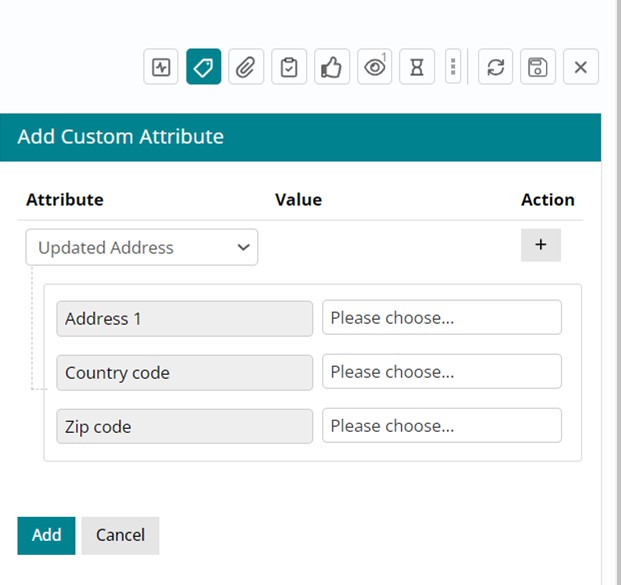
Custom Attributes
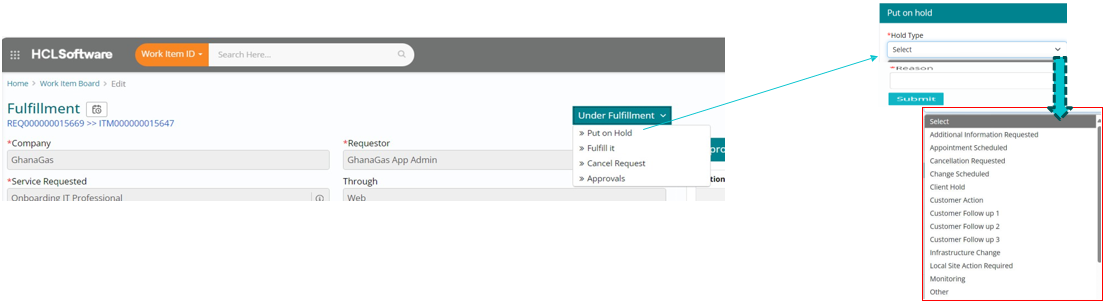
If additional information is required from customer, third party vendor, pending change etc., the fulfiller can update the work Item status
to ‘On Hold’. and select the appropriate “hold type” and “reason”
If the request needs to be placed on Hold for any reason, then the support user can change the status of the ticket to “On Hold”. Once the required information is available with the support user, the request can be moved back to under fulfillment.
Support users may choose to use custom attributes against a fulfillment item as per their requirement.
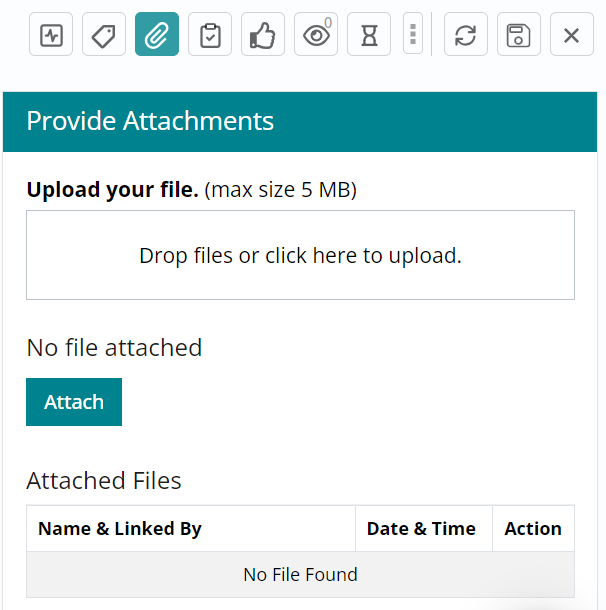
Attachments added against a fulfillment item are visible upon clicking the attachment icon.
Attachment
Attachments added against a fulfillment item are visible upon clicking the attachment icon.
Users can add multiple attachments to a maximum size of 5MB each.
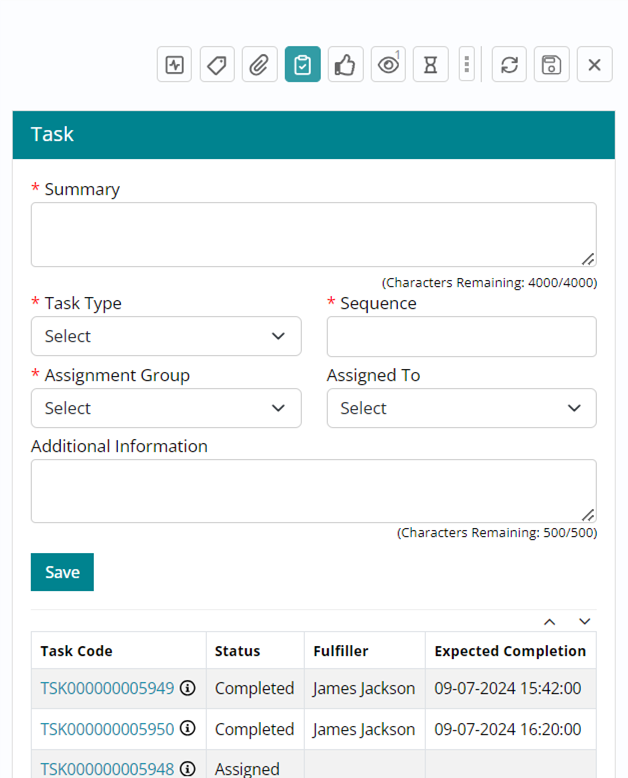
Task
Tasks associated with a fulfillment request can be created and managed. To see the tasks created for a specific request and their current statuses, click on the task icon.
Support users may create additional tasks and view existing tasks (if any present).
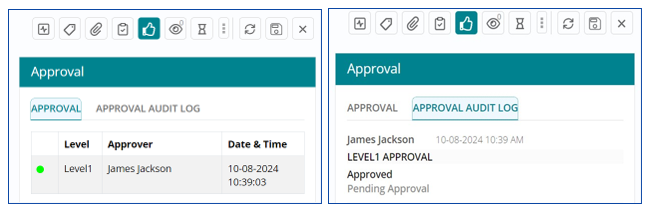
Approval
Support user can click on the “Approval” icon to see the status of the approvals.
If the request needs an approval(s) and has yet not been provided, the status of the work item will be “Pending Approval”. If approved, the approval details will be listed.
The “Approval Audit Log” can be seen to view
detailed information of the approvals.
Watcher Details
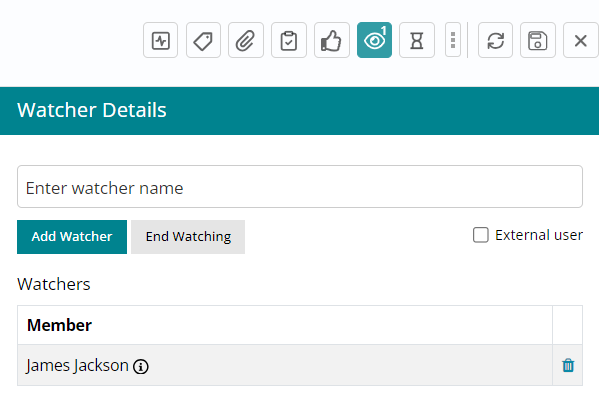
Watcher details can be added by entering the email ID(s) of the person(s) the user wants as a watcher(s).
Automated emails will be sent to the watcher(s) with every action that happens
on the fulfillment request.
The watch option can be put to an end anytime during the request lifecycle.
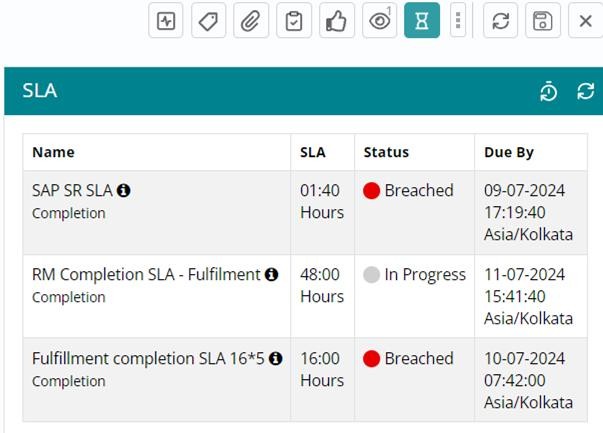
SLA
The SLA configured for the Service request and the status of SLA can be seen here.
More Options
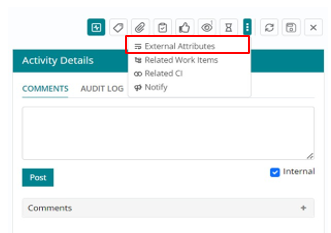
More Options- External Attributes
Through External Attributes, additional information or details about the request that are not part of the standard fields provided by the tool may be added by the user.
More Options - Related Work Items
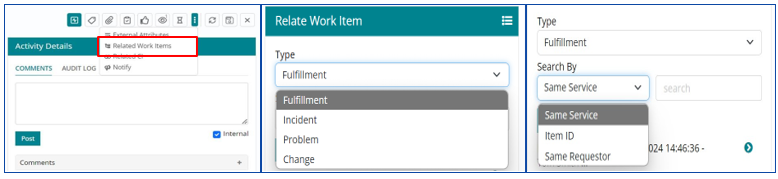
Click on “Related Work Items” and “+” to add.
Select the “type” of related work item- Fulfillment, Incident Problem, change. Select the related work item by searching either Same service, Item ID or Same Requester.
From the list, select the related item to view.
Activity Details
Activity Details- Comments
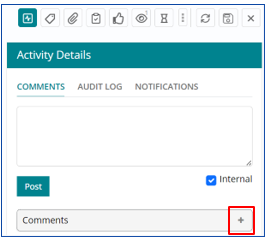
Users can add comments and post.
Choose Internal if the comments need to be visible only for Support group.
Click on the “+” icon to view the list of comments posted on the request.
Activity Details- Audit Log
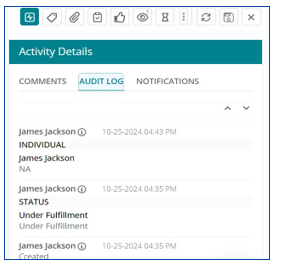
All actions or activities on the request can be viewed as a list once the “Audit Log” is selected.
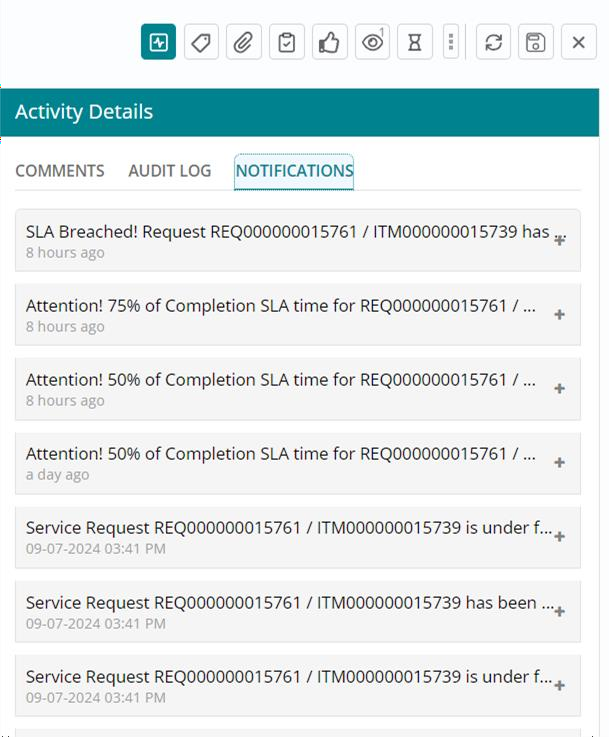
Activity Details- Notifications
The “Notifications” section shows the list of all the notifications sent in respect to service
request to the user and the watchers.
Automatic emails are received by the users and the watchers. The email notification content can also be viewed here.
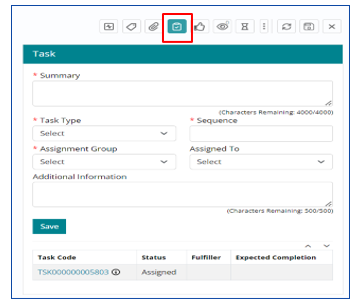
Tasks Creation
Within the request, click on tasks icon to see the list of the tasks created.
To create a new task, fill in the entries in the boxes, and “Save”. The task created will then be added to the list.
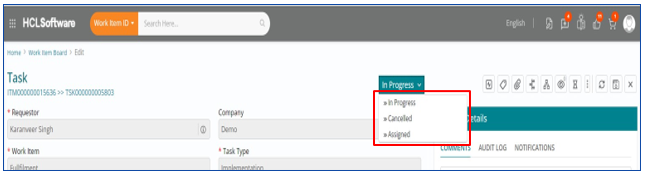
To view/ edit the “Status” of the task- click on the task from the list that appears in the right bottom in “task” menu and select the status of the request.
Tasks – Completion
Once the task is created, the support user should assign it to himself.
The Status of the task then can be changed appropriately.

Request Management Policies
- Task Assignment: Tasks are assigned to individuals or groups responsible for fulfilling the request.
- Only task assignees within the designated assignment or fulfilment group can modify catalog tasks or assign them to others.
- Task assignees can only assign tasks within their own group, not to individuals outside the group.
- Task assignees can only pull tasks from their own assignment or fulfilment group.
- Consumer can cancel the request before the approvals are completed.
- On cancelling a request, it is mandatory to provide the reason for cancellation. The status of the request then changes to “Cancelled”.
- The task assignee can cancel a request even after approval by cancelling the corresponding tasks. The status of the request changes to “Cancelled”.
The fulfiller shall regularly update the Service Request (Fulfillment) Work Item with the information relating to the work item and correct any error in the work item content. The updates will be captured and locked in the activity log section of the work item.
fulfilment work item tasks can be assigned to service providers if the fulfilment requires actions from multiple service providers or groups.
- fulfilment Work Item in ‘Fulfilled’ status can be reopened by the consumer if they are not satisfied with the resolution provided for the Service Request (fulfilment) Work Item associated with their service request. Consumer will have to provide explicit information for re- opening the Service Request (fulfilment) Work Item.
- The reopen policy is not applicable to:
- Rejected requests
- Cancelled requests
- Named service request catalogue item will be auto routed to the predefined group as configured in Service Board against the Service
- Generic service request will be routed to Service Desk who will further reassign the work item to right assignment group.
- Service Desk will be responsible for generic service request queue management, tracking and monitoring the service request lifecycle progress. All persons participating in the service Request Management process will update the Work Item on timely basis for tracking and monitoring to be effective.
- Lead of each fulfilment group should ensure their respective Service Request queue management, timely assignment, update, communication and fulfillment.
- All pending tickets should have valid justifications and communication to Consumer.
Regular review and audits must be conducted to ensure all Fulfillment Work Items are owned, fulfilled within their respective SLAs and there are
no backlogs or pending Work Items without proper justification and communication to the Consumers.
Orphan Work Items
Fulfillment Work Items are classified as orphans when no support user has taken ownership for their fulfillment. They are assigned to a support group but not assigned to an individual. Orphan Work Items form a major reason for aging tickets and backlog. Service Desk should extract regular reports on orphaned Work Items and escalate to Service Desk Lead or Fulfillment team lead.
- Only the consumer can close the request by accepting the fulfilment.
- Assignment or fulfilment groups or task assignee or Service Desk cannot do that.
- A request is brought to closure only after all the associated catalog tasks are closed.
- Cancelled requests are closed directly by the system without waiting for customer confirmation.
- Satisfaction feedback is solicited from the requester upon closure of the request, per the policy.
- When all the associated items for a request are completed and the work item is moved to “fulfilled”, a survey is shared with the consumer.
- Surveys are not generated for:
- Rejected requests
- Cancelled requests
- A consumer can provide 4 or 5 rating and close the request. If the consumer decides to give 3 rating or less, he would be prompted to reopen the request.
- If the consumer does not respond to a feedback survey within 7 days, the request auto closes.