
RAG for the Domino IQ server
Retrieval-augmented generation (RAG) is a technique for enhancing the accuracy and reliability of generative AI models with information fetched from relevant data sources like databases. This technique helps in keeping the response from LLMs more grounded, current and domain-specific.
Starting in Domino 14.5.1, RAG support in the Domino IQ server enables a command defined in dominoiq.nsf to use a Domino database as a RAG source database. The specified fields in the RAG source database are converted into embeddings and stored in a local Vector database. When a configured AI command gets invoked on the Domino IQ server from an application via the LLMReq method in LotusScript or Java, the user prompt is semantically searched against the Vector database. The returned matches are retrieved from the RAG source data documents and sent as additional context in the prompt sent to the LLM inference engine.
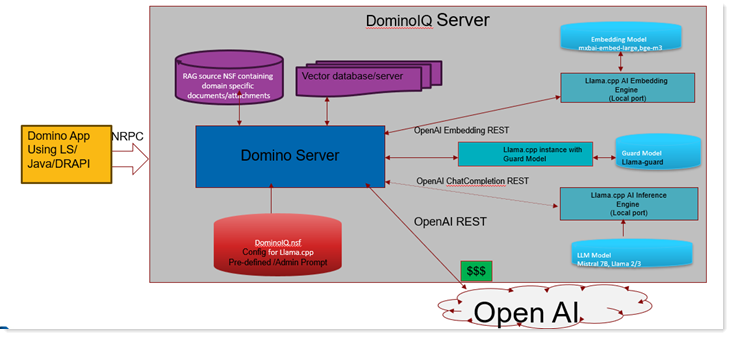
In Domino 14.5.1, RAG support is available only when the Domino IQ server is configured in Local mode.
Starting in release 14.5.1FP1, RAG support is available in both Local and Remote modes. While the LLM and embedding models can be hosted on remote endpoints, the vector database is always hosted locally on the Domino IQ server.
In Local Mode
The DominoIQ task manages the local lifecycle of the RAG stack. It automatically launches:
- LLM Inference Model: A llama-server instance.
- Embedding Model: A llama-server instance.
- Guard Model (Optional): A llama-server instance.
- Vector Database Server: A dedicated local process.
In Remote Mode
The DominoIQ task only launches the Vector Database server locally. The LLM, embedding, and optional guard models are hosted on remote endpoints.
- Compatibility: Remote endpoints must support the OpenAI API standard.
- Configuration: Remote URLs and API keys are specified in the Adding a Domino IQ Configuration for Remote mode.
dominoiq.nsf.Prerequisites
- Make sure that the dominoiq.nsf on the Domino IQ Administration server and all Domino IQ servers in the domain are updated with the dominoiq.ntf shipped with 14.5.1.
- Enable transaction logging on the Domino IQ servers that will be hosting RAG-enabled databases. This helps ensure better data integrity and handling of attachments in DAOS storage.
- Set the following Notes.ini on the Domino IQ servers: FT_SKIP_IGNORE_FIELD=1
Set up RAG
To configure RAG and enable a RAG database for Domino IQ, see the procedures that follow.