
Enabling or disabling the RAG vector database
Enabling a vector database
Before you begin:
The Domino database that will be used with a Domino IQ command for RAG first needs to be replicated to the Domino IQ servers that run the command. The database needs to be full-text indexed enabled and also have a full-text index of attachments with file filters enabled using the Domino Administrator client.
When a database gets enabled as a RAG source database, LLM command request handling honors both the ACL and any applicable Readers field in the documents of the RAG-enabled database by using the Notes DN in the authenticated session.
For instructions on full-text indexing of attachments, see Controlling attachment indexing on servers.
Procedure
- From the Domino Administrator client:
- Connect to the Domino IQ server for which you have enabled Embedding/Vector database, along with specifying the RAG source database.
- In the Files panel, select the RAG source database and right click, select Domino IQ.
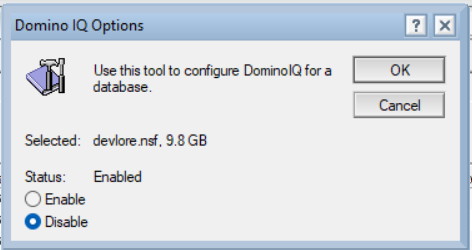
- In the Domino IQ Options dialog click select Enable and press OK.
- From the Remote server console in the Domino Administrator client:
- Use updall to ingest documents in the RAG source database/NSF - a process known as vectorization.
- In the console command box, run
load updall -w
                                <rag-dbname>
. Wait for the console command to finish as this vectorization can take several minutes based on the size and count of documents in the RAG source database.Once the updall process finishes successfully, the LLM command is ready to use for RAG.
Disabling a vector database
- From the Domino Administrator client:
- Remove the RAG source database in the command document, and save the document.
- Restart the Domino IQ server.
- From the Remote server console in the Domino Administrator client:
- Delete the vector database entries for the RAG source database using updall.
- Run
load updall -w -d <RAG-dbname>. Wait for the updall command to finish.
- From the Domino Administrator Client:
- In the Files panel, select the RAG source database and right click, select Domino IQ.
- In the Domino IQ Options dialog box, select Disable and click OK.
Maintaining a RAG-enabled vector database
Use the following commands to maintain the vector index of a RAG-enabled database:
-
- Like a full-text index, a vector index is associated with the database.
Before renaming, moving, or deleting the database, delete the vector
index for the current database by using the following
command:
load updall -w -d <current-dbname> - Once the database is renamed, re-index the new
database:
load updall -w <new-dbname>
- Like a full-text index, a vector index is associated with the database.
Before renaming, moving, or deleting the database, delete the vector
index for the current database by using the following
command:
-
- Every embedding model has its own vocabulary and tokenization. Anytime
an embedding model is changed on the Domino IQ server, you must delete
the existing vector index for every RAG-enabled database by using this
command:
load updall -w -d <dbname> - Once the Domino IQ configuration is changed to use a new embedding model
and the Domino server is restarted, re-index the vector for every
RAG-enabled database using this
command:
load updall -w <dbname>
- Every embedding model has its own vocabulary and tokenization. Anytime
an embedding model is changed on the Domino IQ server, you must delete
the existing vector index for every RAG-enabled database by using this
command:
- For incremental vector indexing when the RAG database has updates after initial
vector indexing, periodically run the following updall
command:
load updall -k <dbname>
Security considerations for RAG
When RAG is enabled, the Domino IQ server stores the vector database under the llm_vector directory of the Domino data directory. The vector database is not encrypted and deployments can protect this storage by using the operating system's file system encryption features.