Assigning code to extension points
After developing your xC extension code, register and associate it with extension points
via the Commerce+ Transaction Server database. You will need to update two database tables:
UEConfig and CmdReg..
About this task
UEConfig and CmdReg.
- Register the Extension Code
- Load information into the
UEConfigtable to define the extension code and its properties. - Assign the Code to Extension Points
- Load information into the
CmdRegtable to associate the registered extension code with specific extension points.The extension point is registered for the store that is identified in the
storeent_idcolumn. If you want to register an extension point for multiple stores, you must include the data for registering the extension for each store on a separate line in the file.
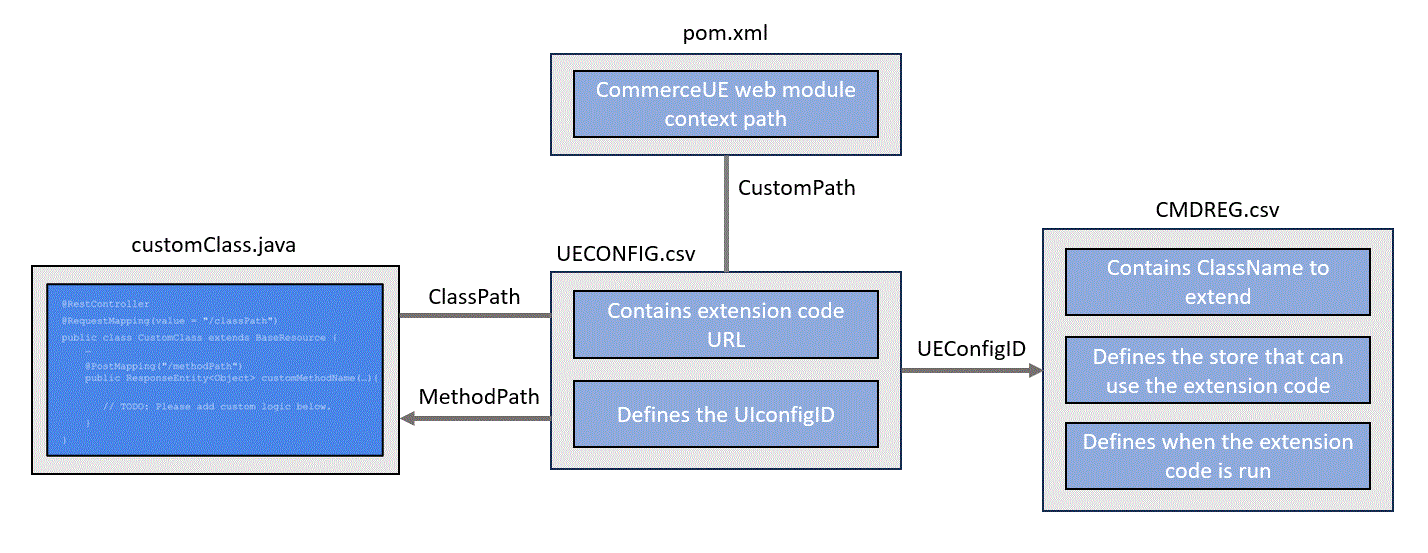
- For more information about using SQL in Commerce+ Transaction Server, see Using SQL.
- For more information about using CSV files, see Using the Data Load utility.
Using SQL
Procedure
- Connect to your database.
Load your data into the UEConfig database table.
-
Modify the following SQL example with your values.
This SQL registers your extension code by associating the path of your custom method to a unique UEConfigId.
INSERT INTO UECONFIG(UECONFIG_ID,URL,HTTPMETHOD,DESCRIPTION,TIMEOUT,RETRIABLE) VALUES (<UEConfigId>,'<Url>','<HttpMethod>','<Description>',<TIMEOUT>,<RETRIABLE>);- UEConfigId
- (Integer) Required: The unique ID of the xC extension code. You use the UEConfigId when you assign the extension code to an extension point in the CmdReg.csv file.
- Url
- (String) Required: The relative URL of the xC extension resource
method from the context root. You are assigning this URL to the UEConfigId that you specified
above. For example, in the URL,
https://hostname:9443/commerceue/order/validate_quantity, enter/order/validate_quantityas the URL value.- commerceue
- The context root of the Customization server.
- extension
- The base URL of the JAX-RS application.
- order
- The path of the resource class.
- validate_quantity
- The extension point.
Maximum number of characters, 512.
- HttpMethod
- (String) The HTTP request method for the extension. Always
set the value to
POST. - Description
- The description of the extension.
Maximum number of characters, 254.
- Properties
- (String) An ampersand (&) separated list of properties in
the form of URL encoded name value pairs. Supported properties include:
- useBridgeClient: Set this property to true if the
extension code makes calls to transaction server REST APIs
(
useBridgeClient=true) - Content-Type: Set this property to application/json or text/plain. The property is used by the Customization server to locate the matching resource method.
Maximum number of characters, 512.
- useBridgeClient: Set this property to true if the
extension code makes calls to transaction server REST APIs
(
- FilterId
- (Integer) The FilterId of a filter to use. The FilterId can be null to indicate that filtering is not required. The FilterId is loaded with a Filter.csv file.
- Retriable
- Indicates whether the extension request is retried when the request
fails. Valid values:
- 0
- False
- 1
- True
- Timeout
- (Integer) The amount of time to wait (in milliseconds) for a request before it is considered failed. If null, a default value is used.
Delete- (String) Indicates whether to delete the record. Specify
1to delete the record.
For example,INSERT INTO UECONFIG(UECONFIG_ID,URL,HTTPMETHOD,DESCRIPTION,REQUESTHANDLER,RESPONSEHANDLER,TIMEOUT,RETRIABLE) VALUES (120570201,'extension/tax/tax_integration_custom','POST','Tax Integration','com.ibm.commerce.order.ue.TaxIntegrationCustomCmdRequestHandler','com.ibm.commerce.order.ue.TaxIntegrationCustomCmdResponseHandler',60000,1);
Load your data into the CmdReg database table.
-
Modify the following SQL example with your values.
This SQL assigns the UEConfigId (which maps to your extension code) to an extension point (command).
INSERT INTO CMDREG(storeent_id, interfacename, description, classname, properties, target) VALUES (Storeent_id, '<InterfaceName>', '<Description>', '<ClassName>', '<Properties>', '<target>');- StoreIdentifier
- (String) Required: The unique identifier of the store where you are
registering the extension point.Note:
- If you want to register the command for a particular store, then specify the unique identifier of the store.
- If you want to register the command for all stores, then specify NullEntity.
- Description
- (String) A description of the command.
Maximum number of characters, 254.
- InterfaceName
- (String) Required: The command interface extension point that
your extension code is extending.
Maximum number of characters, 254.
- ClassName
- (String) The implementation class for your custom xC extension
from the context root.
Maximum number of characters, 254.
- Properties
- (String) The default properties associated with this command. The
properties are in the "
property1=value1&property2=value2" form, where the property is the name of the property, and the value is the value corresponding to the property.Valid properties:- preExecute
- (Boolean) Indicates whether the extension code runs before the command. The value true indicates that the extension code is to run before the command.
- replaceExecute
- (Boolean) Indicates whether the extension code runs instead of the command. The value true indicates that the extension code is to run instead of the command.
- postExecute
- (Boolean) Indicates whether the extension code runs after the command. The value true indicates that the extension code is to run after the command.
- preUEConfigId, replaceUEConfigId, or postUEConfigId
- When the preExecute, replaceExecute, or postExecute parameters are specified, the corresponding UEConfigId must also be given. The UEConfigId is loaded with a UEConfig.csv file. For more information, see UEConfig object input file definitions.
- restTarget
- Indicates whether the extension calls the remote REST service. Set the value to true
(
restTarget=true).
Maximum number of characters, 254.
Delete- (String) Indicates whether to delete the record. Specify
1to delete the record.
For example,INSERT INTO CMDREG(storeent_id, interfacename, description, classname, properties, target) VALUES (0, 'com.ibm.commerce.isv.kit.tax.TaxIntegrationCustomCmd', 'Tax Integration Custom command default implementation', 'com.ibm.commerce.isv.kit.tax.TaxIntegrationCustomCmdImpl', 'replaceUEConfigId=120570201&replaceExecute=true&restTarget=true&retriable=1', 'Local'); -
Verify the data loaded.
SELECT * FROM UECONFIG
SELECT * FROM CMDREG
Using the Data Load utility
Alternatively you can use the Data Load utility to load CSV files into the database.
Procedure
-
Download the following file and extract to the
WCDE_installdir/samples/DataLoad/ directory.
Ensure that you now have a WCDE_installdir/samples/DataLoad/xC directory.
-
Create a UEConfig_sample.csv file in the
WCDE_installdir/samples/DataLoad/xC directory.
Note: You can change the filename to be a unique name.
-
Add the following content to your CSV file.
UEConfig,,,,,,, UECONFIG_ID,URL,HTTPMETHOD,DESCRIPTION,TIMEOUT,RETRIABLE -
In the third row, add your values.
- UEConfigId
- (Integer) Required: The unique ID of the xC extension code. You use the UEConfigId when you assign the extension code to an extension point in the CmdReg.csv file.
- Url
- (String) Required: The relative URL of the xC extension resource
method from the context root. You are assigning this URL to the UEConfigId that you specified
above. For example, in the URL,
https://hostname:9443/commerceue/order/validate_quantity, enter/order/validate_quantityas the URL value.- commerceue
- The context root of the Customization server.
- extension
- The base URL of the JAX-RS application.
- order
- The path of the resource class.
- validate_quantity
- The extension point.
Maximum number of characters, 512.
- HttpMethod
- (String) The HTTP request method for the extension. Always
set the value to
POST. - Description
- The description of the extension.
Maximum number of characters, 254.
- Properties
- (String) An ampersand (&) separated list of properties in
the form of URL encoded name value pairs. Supported properties include:
- useBridgeClient: Set this property to true if the
extension code makes calls to transaction server REST APIs
(
useBridgeClient=true) - Content-Type: Set this property to application/json or text/plain. The property is used by the Customization server to locate the matching resource method.
Maximum number of characters, 512.
- useBridgeClient: Set this property to true if the
extension code makes calls to transaction server REST APIs
(
- FilterId
- (Integer) The FilterId of a filter to use. The FilterId can be null to indicate that filtering is not required. The FilterId is loaded with a Filter.csv file.
- Retriable
- Indicates whether the extension request is retried when the request
fails. Valid values:
- 0
- False
- 1
- True
- Timeout
- (Integer) The amount of time to wait (in milliseconds) for a request before it is considered failed. If null, a default value is used.
Delete- (String) Indicates whether to delete the record. Specify
1to delete the record.
-
Create a CmdReg_sample.csv file in the
WCDE_installdir/samples/DataLoad/xC directory.
Note: You can change the filename to be a unique name.
-
Add the following content to your CSV file.
CmdReg, storeent_id, interfacename, description, classname, properties, target -
In the third row, add your values.
- StoreIdentifier
- (String) Required: The unique identifier of the store where you are
registering the extension point.Note:
- If you want to register the command for a particular store, then specify the unique identifier of the store.
- If you want to register the command for all stores, then specify NullEntity.
- Description
- (String) A description of the command.
Maximum number of characters, 254.
- InterfaceName
- (String) Required: The command interface extension point that
your extension code is extending.
Maximum number of characters, 254.
- ClassName
- (String) The implementation class for your custom xC extension
from the context root.
Maximum number of characters, 254.
- Properties
- (String) The default properties associated with this command. The
properties are in the "
property1=value1&property2=value2" form, where the property is the name of the property, and the value is the value corresponding to the property.Valid properties:- preExecute
- (Boolean) Indicates whether the extension code runs before the command. The value true indicates that the extension code is to run before the command.
- replaceExecute
- (Boolean) Indicates whether the extension code runs instead of the command. The value true indicates that the extension code is to run instead of the command.
- postExecute
- (Boolean) Indicates whether the extension code runs after the command. The value true indicates that the extension code is to run after the command.
- preUEConfigId, replaceUEConfigId, or postUEConfigId
- When the preExecute, replaceExecute, or postExecute parameters are specified, the corresponding UEConfigId must also be given. The UEConfigId is loaded with a UEConfig.csv file. For more information, see UEConfig object input file definitions.
- restTarget
- Indicates whether the extension calls the remote REST service. Set the value to true
(
restTarget=true).
Maximum number of characters, 254.
Delete- (String) Indicates whether to delete the record. Specify
1to delete the record.
-
Modify
WCDE_installdir/samples/DataLoad/xC/wc-dataload-cmdreg.xml
to use your CmdReg input file name.
For example,
<_config:LoadOrder commitCount="100" batchSize="1" dataLoadMode="Replace" > <_config:LoadItem name="CMDREG" businessObjectConfigFile="wc-loader-cmdreg.xml" startKey="100000001" endKey="200000000"> <_config:DataSourceLocation location="<your_CmdReg_input.csv>" /> </_config:LoadItem> </_config:LoadOrder> -
Modify
WCDE_installdir/samples/DataLoad/xC/wc-dataload-ueconfig.xml
to use your UEConfig input file name.
For example,
<_config:LoadOrder commitCount="100" batchSize="1" dataLoadMode="Replace" > <_config:LoadItem name="UEConfig" businessObjectConfigFile="wc-loader-ueconfig.xml" startKey="100000001" endKey="200000000"> <_config:DataSourceLocation location="your_UEconfig_input.csv" /> </_config:LoadItem> </_config:LoadOrder> - Modify WCDE_installdir/samples/DataLoad/xC/wc-dataload-env.xml according to your database information.
- Open a command line utility and go to WCDE_installdir/bin.
-
Load data into the database by running the following command.
dataload.bat WCDE_installdir/samples/DataLoad/xC/wc-dataload-cmdreg.xmldataload.bat WCDE_installdir/samples/DataLoad/xC/wc-dataload-ueconfig.xml