di-parallel-process utility
The di-parallel-process utility indexes preprocessed shards by using a configured input properties file.
Syntax
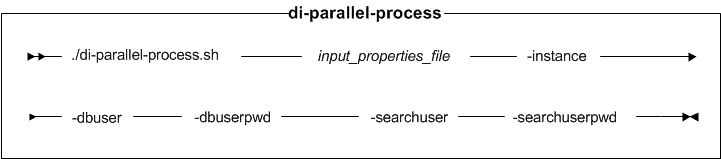
Parameter values
- input_properties_file
- The relative or absolute path for the input properties file of the utility. The default path in Utility server Docker container is /opt/CommerceUtilities/properties/parallelprocess/di-parallel-process.properties.
- dbuser
- Optional: The username that connects to the database.
- dbuserpwd
- Optional: The password for the user that connects to the database.
- searchuser
- Optional: The administrative username for the search application.
- searchuserpwd
- Optional: The administrative user password for the search application.
Logging
Review the wc-dataimport-parallel-processor.log file for logging
information. The path for this file is /opt/CommerceUtilities/logs/.
To provide greater detail in the log, set the log level to FINEST in the
/profile/apps/ts.ear/xml/config/dataimport/parallel-processor-logging.properties
file.
For more information about search logging, see Logging services.
Sample properties file
Before you can run the utility, create an input properties file for indexing by using the output generated by the setup utility.
The sharding input properties file is used by the di-parallel-process utility to process indexing shards. The file contains the following configuration sections:
- System properties, which are shared by other utilities. For example, passwords that are common among utilities.
- Database properties, which are used to establish database connections with the database server.
- Global preprocessing and indexing properties, which are used for preprocessing and indexing by all shards.
- Master search server properties, which specifies the master index cores where all shard data is merged.
- Horizontal Shard properties, which specifies the horizontal shard properties.
- Vertical Shard properties, which specifies the vertical shard properties.
- di-parallel-process.properties
- The sample sharding input properties file for a Linux operating system that uses DB2. Refer to the latest di-parallel-process.properties configuration file in the Utility server Docker container if you are using the Oracle database.
- password.properties
- The sample password properties file, referenced by the sample sharding input properties file. It contains passwords encrypted by the wcs_encrypt utility.
For more information about the properties file and expected values, see Sharding input properties file .
Example
Change to the working directory.- WCDE_installdir\bin
 /opt/WebSphere/CommerceServer90/bin in the
Utility server Docker container.
/opt/WebSphere/CommerceServer90/bin in the
Utility server Docker container.
- di-parallel-process.bat input_properties_file
- di-parallel-process.sh
input_properties_file [-dbuser dbuser]
[-dbuserpwd dbuserpwd] [-searchuser searchuser]
[-searchuserpwd searchuserpwd]