
Step 2: Configure the SP Connection in PingFederate
Configure PingFederate by registering MCM as a Service Provider (SP) and setting the Assertion Consumer Service (ACS) URL. This allows PingFederate to securely send SAML assertions to the MCM server after user authentication.
Before you begin
- You must have administrator access to the PingFederate Admin Console.
- The MCM server must be accessible from the PingFederate server over HTTPS.
About this task
Procedure
- Log in to the PingFederate Admin Console.
- Create or open the SP Connection for MCM.
- Navigate to . Click Create New to create a new SP connection, or click an existing MCM SP connection to edit it.
-
Configure the Assertion Consumer Service URL. Click Add a new row and configure
the following:
Option Description Field Value Binding POST Endpoint URL https://<MCM_SERVER_FQDN>/enrollment/saml/callback Default Check this box -
Replace <MCM_SERVER_FQDN> with the fully qualified
domain name of your MCM server.
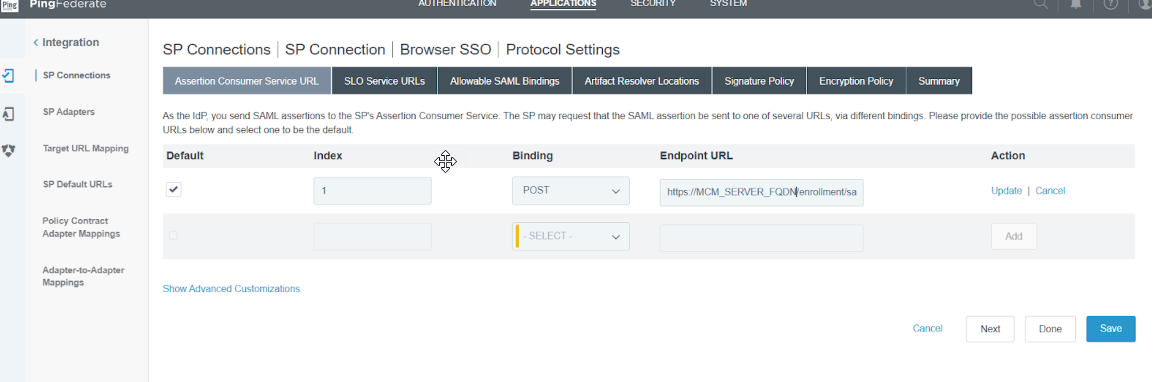
Example: https://mcm.bigfix.com/enrollment/saml/callback
Important: The binding must be set to POST. MCM does not support the Redirect binding for the ACS endpoint. - Click Save to apply the SP connection settings.
Results
Note: If MCM is deployed
behind a load balancer or reverse proxy, use the public-facing FQDN of the proxy —
not the internal MCM host — as the MCM_SERVER_FQDN.