Sites
The Sites page is the central workspace for viewing and managing the BigFix sites in your deployment. Use it to review every public and custom site, check how many devices are subscribed to each site, and create custom sites to host your own content.
A BigFix site is a collection of content, such as Fixlets, tasks, and analyses, that is created by you, by HCL, or by other vendors. Devices subscribe to a site, and the BigFix client on each subscribed device evaluates the content of that site.
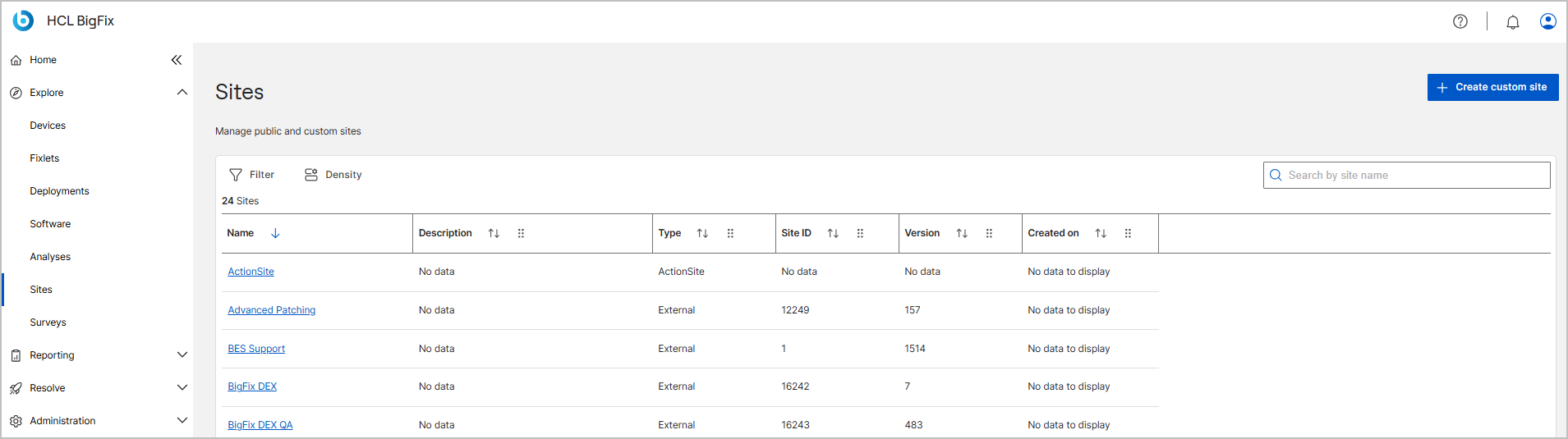
To open the Sites page, go to . The page header shows the page title, the subtitle Manage public and custom sites, and the Create custom site button in the upper-right corner. A counter above the data grid, such as 15 Sites, shows the total number of sites in the list.
Before you begin
Access to this application is controlled by the role that your administrator assigns to you. If your role does not grant the application, it does not appear in the side navigation, and the actions described in this topic are unavailable or dimmed.
- Your role must grant access to this application. Site Management is a default application, so every role has at least view access to it. See Managing Roles.
- Your role defines the sites that you can access and your permission level on each one, such as Owner, Writer, or Reader. See Managing Roles.
- Your operator permissions determine which actions you can complete, such as creating a custom site. For a description of each permission, see Permissions reference.
Site types
The Sites page lists all the site types in your deployment.
| Type | Description |
|---|---|
| ActionSite | The master action site of the deployment. It hosts the content that master operators create. You cannot delete the ActionSite or edit its details. |
| External | A content site that HCL or another vendor publishes and that BigFix gathers from an external source, such as BES Support or Patches for Windows. You cannot edit or delete an external site, but users with the required permission can manage its device subscriptions. |
| Custom | A site that you create in your deployment to organize and host your own content. Users with the required permission can edit the description of a custom site, manage its device subscriptions, add custom content, and delete the site. See Creating a custom site and Managing a custom site. |
| Operator | The site that a non-master operator owns and that hosts the content that the operator creates. |
Toolbar
The toolbar above the data grid controls how the list of sites appears.
| Control | Description |
|---|---|
| Filter (funnel icon) | Displays a subset of sites based on criteria that you define, such as a condition on the site name. The active filter combines with any text that you type in the search box. For more information, see Table filter. |
| Density | Adjusts the row spacing of the data grid. Select Standard (default), Compact, or Comfortable. |
| Search by site name | Filters the list as you type a site name. If you apply a filter, the search combines your text with the filter criteria. |
| Create custom site | Opens the Site details panel to create a custom site. See Creating a custom site. |
Data grid columns
Each row in the data grid represents one site. Each column header includes a sort icon. Select it once to sort ascending, again to sort descending, and again to clear the sort. Use the handle icon on a column header to reorder the columns. The grid contains the following columns.
| Column | Description |
|---|---|
| Name | The name of the site. Select the name to open the site detail page, which shows the Fixlets, analyses, and subscribed devices of the site. |
| Description | The description of the site. For a custom site, this is the text that you entered when you created or last edited the site. |
| Type | The site type, such as ActionSite, External, or Custom. See Site types. |
| Site ID | The unique numeric identifier that BigFix assigns to the site. For example, the BES Support site has Site ID 1. |
| Version | The current version of the site content. The version increases each time BigFix updates or gathers the site content. |
| Subscribed devices | The number of devices that are currently subscribed to the site. Open the site and select the Subscribed devices tab to see the device list. See Subscribed devices tab. |
| Created on | The date and time when the site was created, such as 22 Jul 2026 at 06:18. This value appears for custom sites only. |