
 Exporting contracts
This topic explains how to export selected contracts from interface. You can use this feature to save contract data in the format compatible with contract CSV import.
About this task
Required permission: Manage Contracts
Features:
- The csvReportSeparator value is used as the separator csvReportSeparator.
- The computer group names are used in the export and computer group IDs are not exported
- The metric IDs are used in the export, metric code names are not exported (note that metric ID is the same for a given metric code name, even for custom metrics, see Metric IDs and code names.
- All contracts data is exported including purchases, software titles, contract custom fields, except Metric Measurement value customizations which are not exported and have to be set manually if needed
- Exported contract list is always limited by the current user's computer group visibility
- To ensure compatibility of the exported CSV with another BigFix Inventory instance, make sure the same computer group names, contract custom fields, custom metrics and CSV separator are configured in both instances, and the same BigFix Inventory versions are used
To export contracts, perform the following steps:
Procedure
- Go to All Contracts report appears.
-
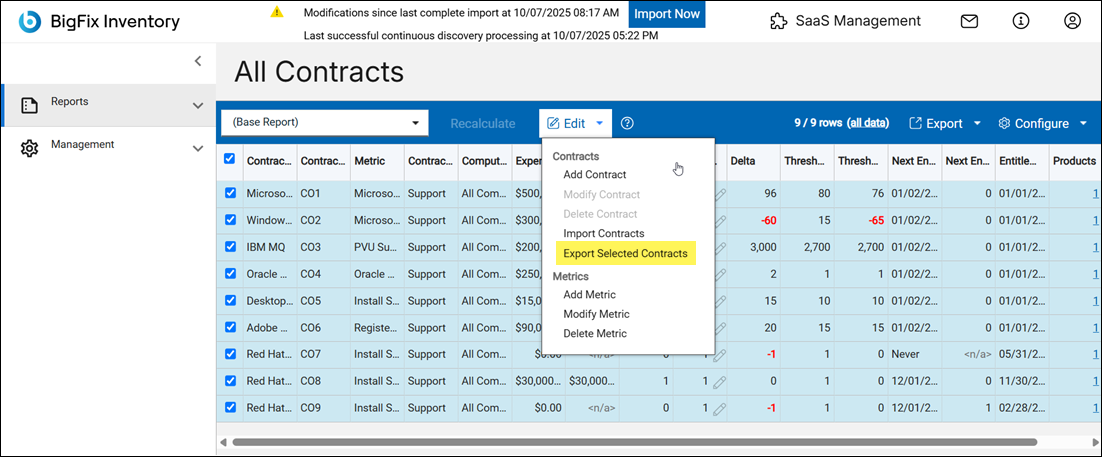
Select the contracts and then click on Edit and choose Export
Selected Contracts.
A CSV file is downloaded.