Automation plan step notification
Send email notifications for each step in an automation plan instead of only after plan completion. Use the Notify tab to choose None, Pre-Notify (before processing), or Post-Notify (after processing).
You now have the flexibility to send email notifications for each step defined in an
automation plan. Previously, users received email notifications only after the
completion of a plan.
Note:
- Ensure that Global Notifications are enabled in system settings to use the Notify feature.
- This feature is supported only on PlanEngine version 9.5.76 or later.
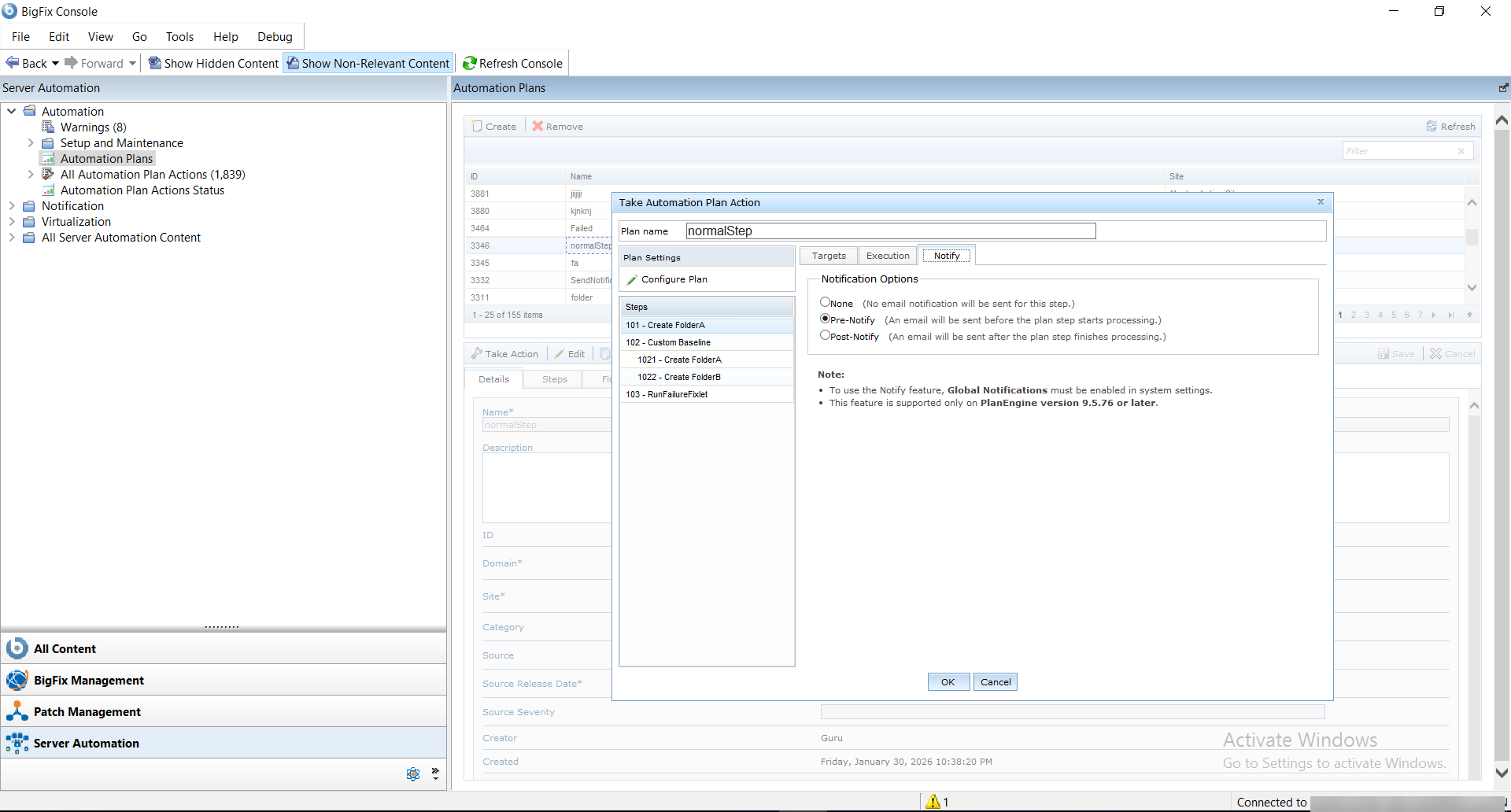
The Notify tab has the following 3 options:
- None: No email notification is sent.
- Pre-Notify: By selecting this option, an email is triggered from the Global Notification email address or any other email address you defined when saving the automation plan, before the processing of the current step.
- Post-Notify: By selecting this option, an email is triggered from the Global Notification email address or any other email address you defined when saving the automation plan, after the processing of the current step.
Note:
By default, the None option is
selected for each step.