
Directory Servers
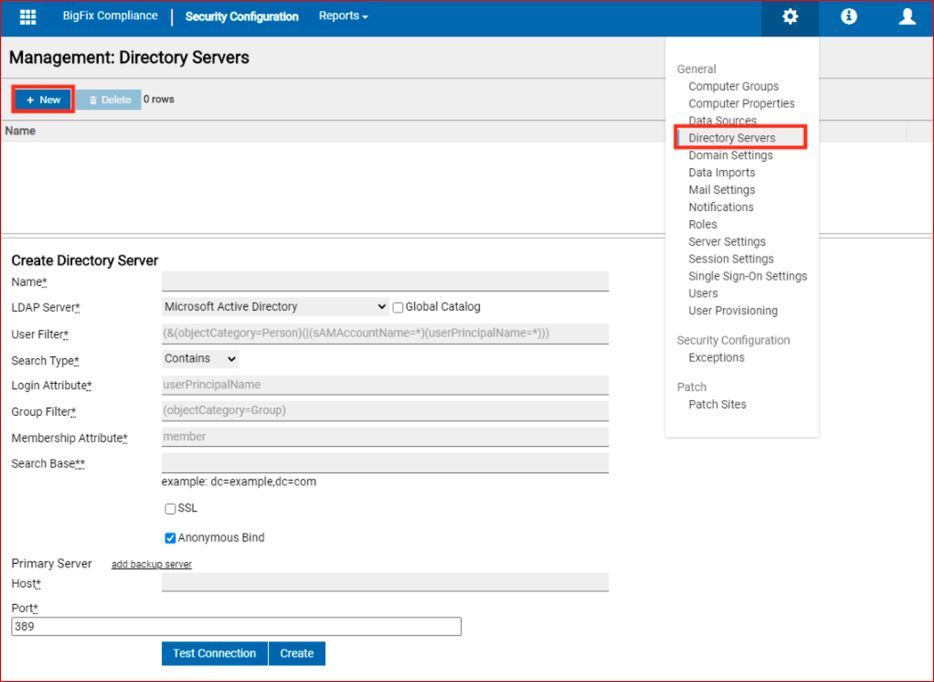
BigFix Compliance Analytics supports authentication with directory servers through Lightweight Directory Access Protocol (LDAP). You can add directory servers to BigFix Compliance Analytics so that the users can log in using credentials based on your existing authentication scheme.
To authenticate BigFix Compliance
Analytics users with directory servers, you must do the following:
- Add a directory server
- Link a user to the directory server (See Users section).
You can also use the User Provisioning feature to automatically create users (with
directory server authentication) without doing it individually from the Users menu.
- (Optional) Add a user provisioning rule (See User Provisioning section).
User Permissions Required for LDAP Authentication
The following permissions or roles must be assigned to the user (bind account) that is added to the LDAP directory server:
- Connect/Bind: The ability to log in to the LDAP server.
- Read Properties (Read-Only): Permission to read user objects and group objects.
- List Contents / Search: Permission to traverse the organizational units
(OUs) within your designated Search Base (for example,
OU=Users,DC=example,DC=com).
To successfully find a user and map that user to groups, the bind account needs read
access only to a small number of properties. The following properties are
required:
objectCategory - Distinguish user objects from group objects during
                            the search.
sAMAccountName- Match the user by the pre-Windows 2000 logon nameuserPrincipalName - Match the user by the User Principal Name, for example username@domain.commember - Resolve the groups that the user belongs to.
Note: These property names apply when you are using an
Active Directory LDAP server. Other directory server types use different
property names. If your directory server does not use these names, select
Other in the LDAP server list
and supply the filter and attribute values for your server.