
Requesting a single folder item
This REST service will return a single folder item based on ID.
Each folder item element contains basic information such as ID, name, description, date
created,
current state and action, and so on.
Note:
- v9.0.0.1: This REST API now collects the date created information. If the job was created before 9.0.0.1, the date created field does not appear.
- v9.0.2.1 iFix1: The returned XML now returns the application ID.
There are different types of folder items:
- <content-scan-job>
- <import-job>
- <report-pack>
- <dashboard>
Report packs in particular contain additional information about the reports that are contained within it.
HTTPS method
GETService format
/services/folderitems/<fiid>Parameters
fiid -folder item
ID
Returns
One of:
- <content-scan-job>
- <import-job>
- <report-pack>
- <dashboard>
Example
/services/folderitems?flatten=1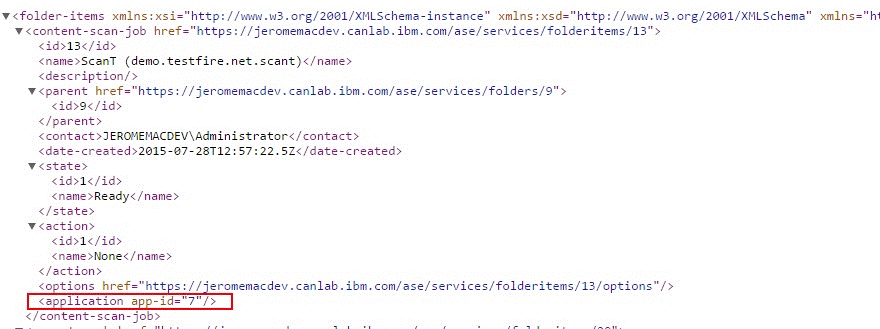
/services/folderitems/{fiid}-JSON Response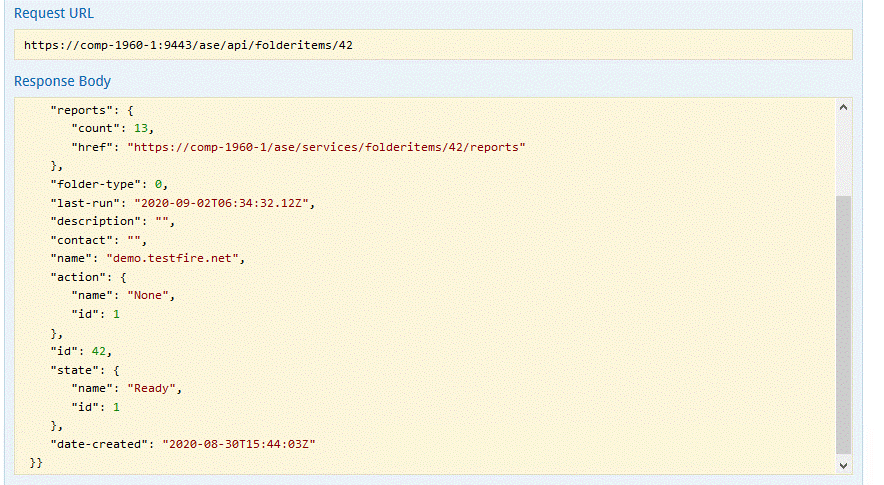
Possible values for Activity Action
| Activity Action - ID | Name |
|---|---|
| 0 | No Action |
| 1 | None |
| 2 | Run |
| 3 | Suspend |
| 4 | Discard results and Stop |
| 5 | Save current results and Stop |
| 6 | Scheduled Run |
| 7 | Auto Run |
Activity state when Activity Action is "None"
| Activity Action - ID | Name |
|---|---|
| 1 | Ready |
| 2 | Starting |
| 3 | Running |
| 6 | Resuming |
| 7 | Canceling |
| 8 | Suspending |
| 9 | Suspended |
| 10 | Post Processing |
| 12 | Ending |
Activity state when Activity Action is other than value “None”
| Activity Action - ID | Name |
|---|---|
| 0 | No Action |
| 1 | None |
| 2 | Waiting to Run |
| 3 | Waiting to Suspend |
| 4 | Waiting to Stop and Discard results |
| 5 | Waiting to Stop and Save current results |
| 6 | Waiting to Run as per Schedule |
| 7 | Waiting to Auto Run |
Note:
It is recommended to use the Activity Action - ID in your automation scripts for reports
as the corresponding Name strings of the IDs are different in native languages.
When the Activity state is Ready, where the Activity Action-ID is 1, it indicates that the reports are available for you to download.
Refer to documented schema for more details.