Installation
Learn about AppScan 360° architecture and how to install the product.
- Set up the AppScan 360°
environment
Before you install AppScan 360°, ensure your environment meets basic requirements for hardware, software, resources, and connectivity.
- Single VM
installation
Get up and running faster with a single VM installation, and when your requirements allow for fewer concurrent scans. Single VM installation steps you through the installation process with a narrow set of choices, and includes both the AppScan 360° platform and AppScan Remediation Advisories.
- Distributed
installation
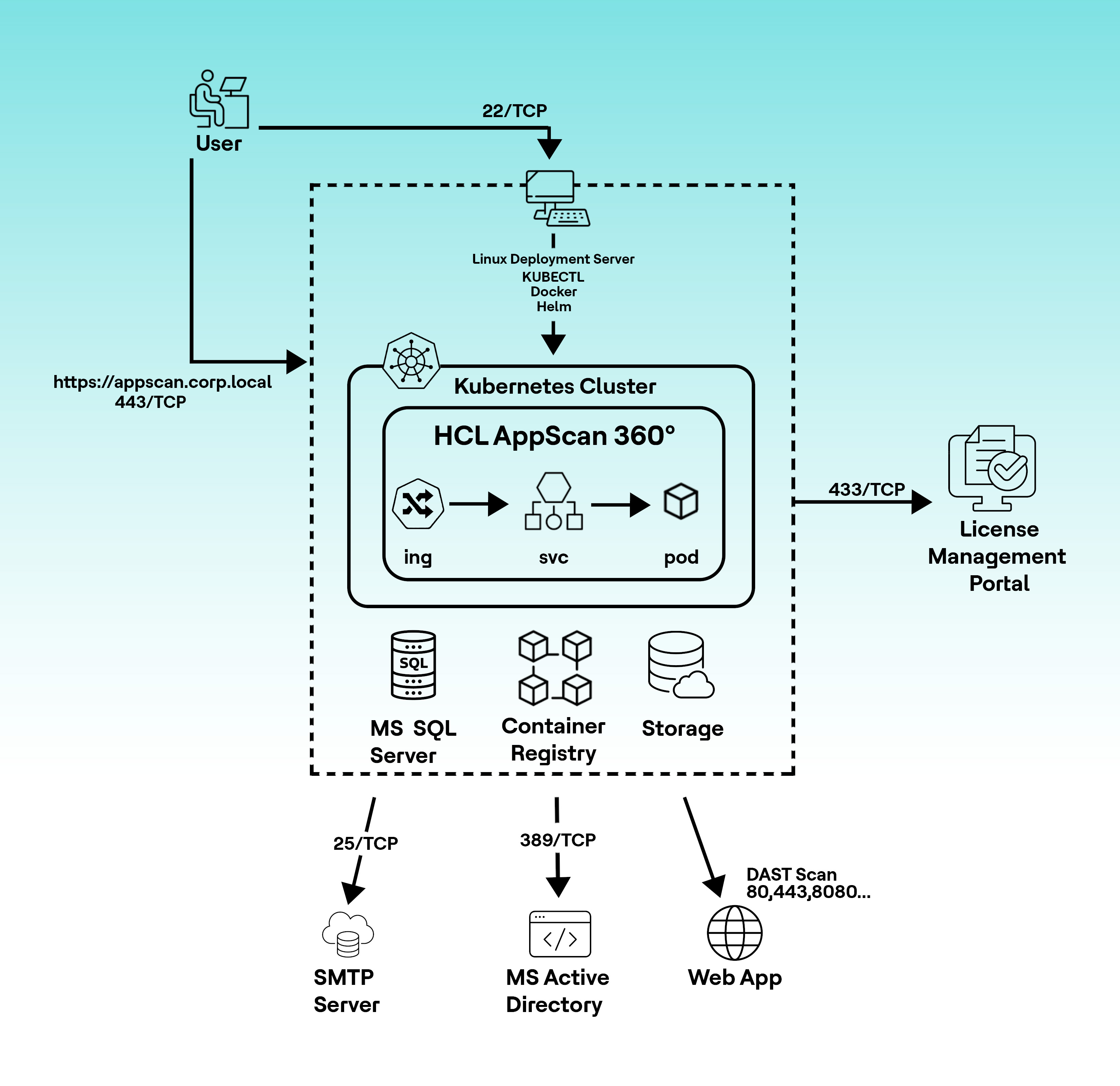
With HCL AppScan 360° distributed install, you get more robust containerized testing and more concurrent scans. Distributed installation requires more setup before installation, but also allows for more control over components.
- Prepare the
configuration file
The configuration file provides specific information to the install process about your environment.
- Install the AppScan 360° platform and AppScan Remediation Advisories together in one procedure.
- Install AppScan 360° using Helm
- Prepare the
configuration file