Advanced capabilities for File Transfer integration
The latest updates to the File Transfer integration give you more control over your data movement.
You can now automatically manage how folders are structured, set directory permissions, and control transfer volumes without needing manual cleanup or extra scripts.
Key Features
- Flexible Folder Structures
- Choose exactly how your files and folders land in the destination
directory:
- Flatten structure
- Copies only the files, completely skipping any
subfolders.
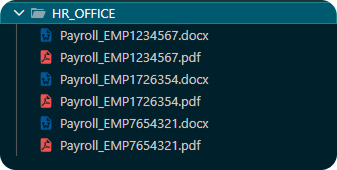
- Recursive copy (contents only)
- Copies all subfolders and files, but leaves the main top-level
folder behind.
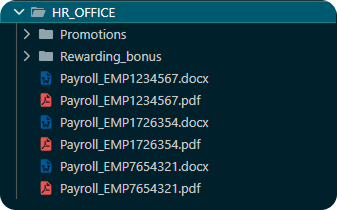
- Recursive copy (include source folder)
- Copies everything, keeping the exact original folder structure
intact.
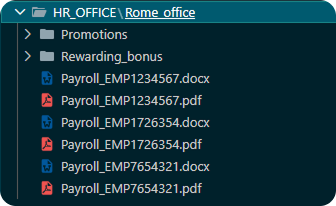
- Destination Directory Permissions (for Unix systems only)
- Set target directory permissions using standard octal notation directly in the configuration.
- Maximum total transfers
- Set the maximum number of files the job can transfer.
Why Use It?
- No More Custom Scripts: You do not need to write extra code to clean up or restructure folders after a transfer.
- Fewer Errors: Automating folder creation and permission settings means fewer manual mistakes and smoother operations.
- Better Consistency: Ensures files always arrive with the correct structure and security settings across your environments.
- Safeguarded Resources: Capping the total number of files to transfer prevents jobs from overwhelming network bandwidth or storage limits.
Transfer smarter and with total control using the enhanced capabilities of the File Transfer integration.
For further information about the integration, browse to Automation Hub.